Using Hog® 2PC Software
46 Hog iPC Handbook
Launching Hog 2PC
The Hog iPC Configuration Panel allows you to set the Hog iPC console to launch the Hog 2PC
application, see
Start-up OS on page 18. The following launch screen will appear when the
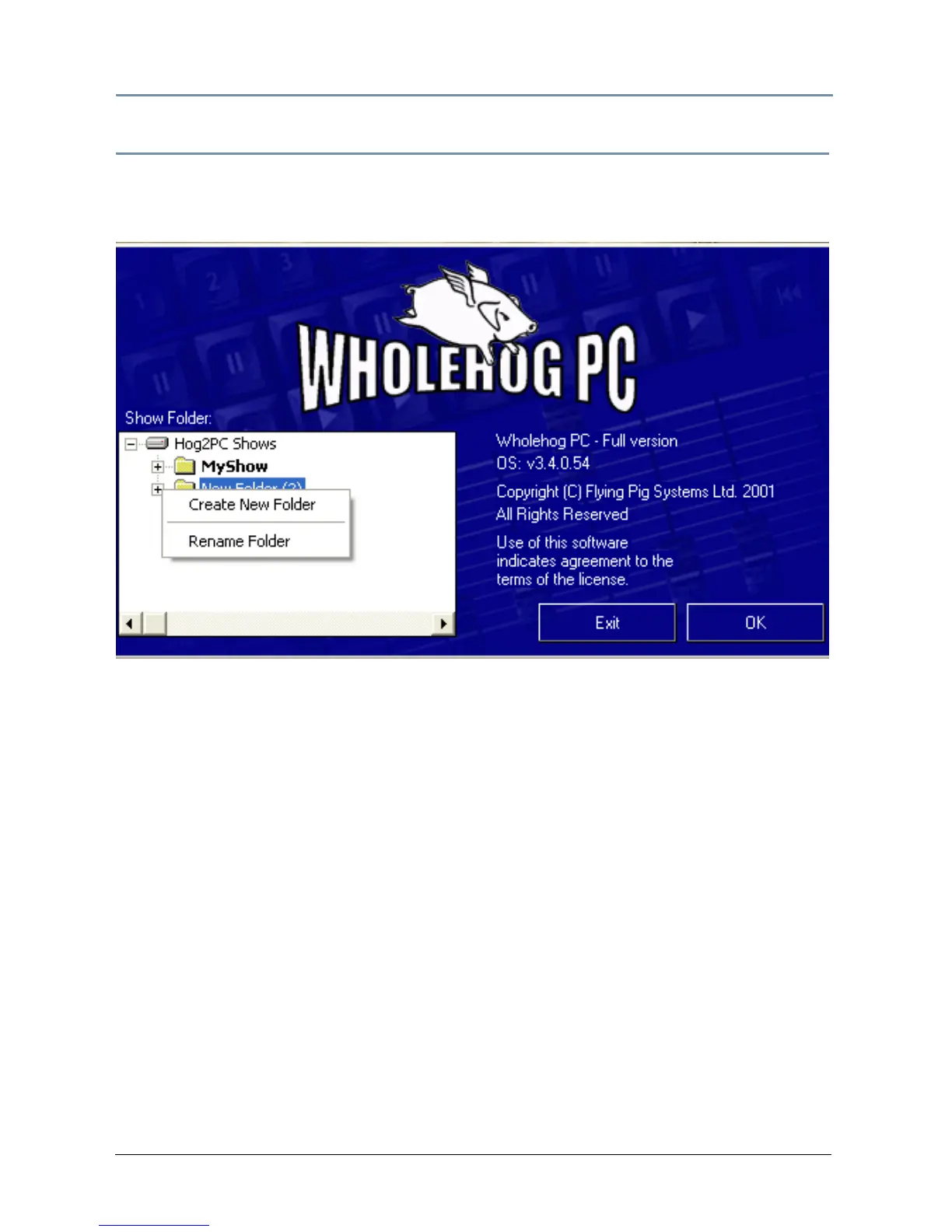
Hog 2PC application opens.
The Hog 2PC launch screen lets you locate existing Hog 2PC show folders or create a new one.
Use the folder viewer on the left to browse to a folder that contains an existing show, or
create a new folder to start a new show. Folders containing an existing show are shown in
bold text.
The software will request that you have a folder before starting a show. Right-click in the
Show Folder window to rename a folder or create a new folder.
When you click the OK button, the Frontpanel and Touchpanel windows will open.
Note: It is possible to bypass the startup dialog and autolaunch a Hog 2PC
show. See the Hog
iPC Configuration Panel Start-up OS on page 18.


 To Next Page