EasyManua.ls Logo

Hill-Rom 100 - User Manual

Hill-Rom 100
48 pages
Print Icon
To Next Page IconTo Next Page
Loading...
USER MANUAL
and Assembly Instructions
Hill-Rom®
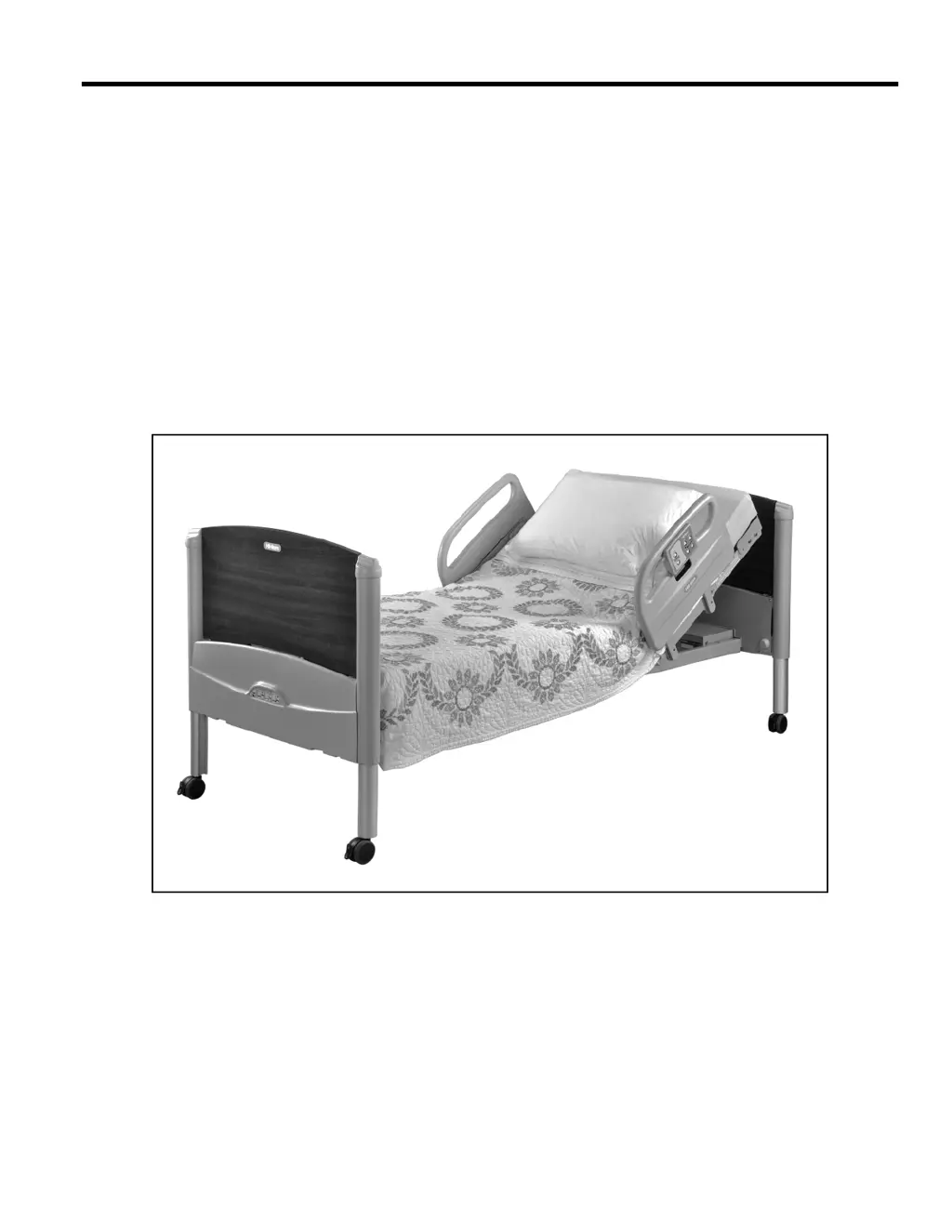
100 Low Bed
Product No. P3930
147730 REV 2

Questions and Answers

  • B
    Bridget MckayAug 1, 2025
    What to do if my Hill-Rom Medical Equipment has no power?
    • T
      thomassusanAug 1, 2025
      If your Hill-Rom Medical Equipment isn't working and has no power, several factors could be at play. First, ensure the bed is properly plugged into the wall socket and that the battery is charged; if not, charge or replace it. Check if a circuit breaker has tripped and reset it if necessary. Also, verify that the control pendant is securely plugged into the bed. Make sure all foot-end lockouts are disengaged. Finally, if none of these steps work, the internal controller fuse might be blown, requiring replacement of the internal controller.
  • B
    bobbyburnettAug 5, 2025
    Why head, knee, or foot section does not raise or lower on Hill-Rom Medical Equipment?
    • H
      heathdeniseAug 5, 2025
      If the head, knee, or foot section of your Hill-Rom Medical Equipment isn't raising or lowering correctly, start by checking if any lockouts are engaged at the foot end of the bed and disengage them. Ensure that all cables are properly plugged into the controller. Inspect the area under the frame for any obstructions, and make sure that bedding or hoses aren't tangled within the bed frame; clear any obstructions or untangle any entangled materials. Lastly, check if the foot gatch is in place and remove it.
  • R
    rothvictoriaAug 10, 2025
    What to do if my Hill-Rom Medical Equipment stops working after a long time?
    • J
      Jose PerezAug 10, 2025
      If your Hill-Rom Medical Equipment stops working after a long time of operation, it could be due to a tripped circuit breaker; in this case, reset the circuit breaker. Another possibility is thermal overload. If this is the case, unplug the bed and allow it to rest for 20 minutes. Then, plug it back in and fully raise and lower it to ensure it's operating correctly and is level.
  • S
    Shelby BryanAug 14, 2025
    Why Hill-Rom Medical Equipment does not operate on battery power?
    • J
      juarezrachelAug 14, 2025
      If your Hill-Rom Medical Equipment doesn't operate on battery power alone, the internal battery may need charging, so charge the internal battery. Alternatively, the battery fuse might be blown, requiring a replacement. If neither of these solutions works, the battery itself may need to be replaced.
  • M
    Michael SimsAug 18, 2025
    How to fix not level bed surface on Hill-Rom Medical Equipment?
    • B
      Brandon VelazquezAug 18, 2025
      If your Hill-Rom Medical Equipment bed surface is not level, it could be due to overloading at one end; reduce the load on the overloaded end. Check for any obstructions under the frame, or bedding or hoses tangled within the bed frame, and clear them. Alternatively, after a long period of inactivity, fully raise and lower the bed to re-establish a level surface.
  • K
    Krystal JohnsonAug 22, 2025
    What to do if siderail binds on Hill-Rom Medical Equipment?
    • T
      twalkerAug 22, 2025
      If the siderail on your Hill-Rom Medical Equipment binds or doesn't lock in the up position, check for any interference from bedding or hoses and remove it. If the siderail is damaged, it will need to be repaired or replaced.
  • M
    Morgan HensleyAug 27, 2025
    What to do if Hill-Rom Medical Equipment bed does not lower completely?
    • N
      nwangAug 27, 2025
      If your Hill-Rom Medical Equipment bed does not lower completely, check for any obstructions under the bed and remove them.

Summary

Introduction, Symbols, and Safety Basics

Document Symbols and Hazard Warnings

Explains text conventions and various hazard warning types like caught, chemical, and electrical shock.

Patient Characteristics and Bed Setup

Specifies patient limits, load capacity, and initial setup instructions.

Mattress and Siderail Safety

Critical safety warnings and precautions for mattress and siderail usage.

Electrical and Battery Safety

Essential safety measures for electrical components and battery system.

Bed Features and Operation

Intended Use and Key Features

Defines the bed's purpose and lists its main features.

Control Pendant and Bed Adjustments

How to use the pendant for bed height, head, and knee section adjustments.

Advanced Bed Functions

Explains Auto Contour, independent section adjustments, and control lockout.

Maintenance, Troubleshooting, and Specifications

Cleaning, Inspection, and Disposal

Procedures for bed maintenance, inspection, and end-of-life disposal.

Troubleshooting Common Issues

Guides on resolving general bed malfunctions and contacting support.

Technical Specifications and Standards

Details product specs, standards, classifications, and environmental conditions.

Assembly Procedure

Tools, Setup, and Parts

Lists required tools, initial setup, and hardware for bed assembly.

Frame and Component Assembly

Detailed steps for assembling the bed frame, towers, sections, and siderails.

Final Assembly and Checks

Procedures for installing finials, bed ends, mattress, and final functional checks.

Hill-Rom 100 Specifications

General IconGeneral
BrandHill-Rom
Model100
CategoryMedical Equipment
LanguageEnglish

Related product manuals