EasyManua.ls Logo

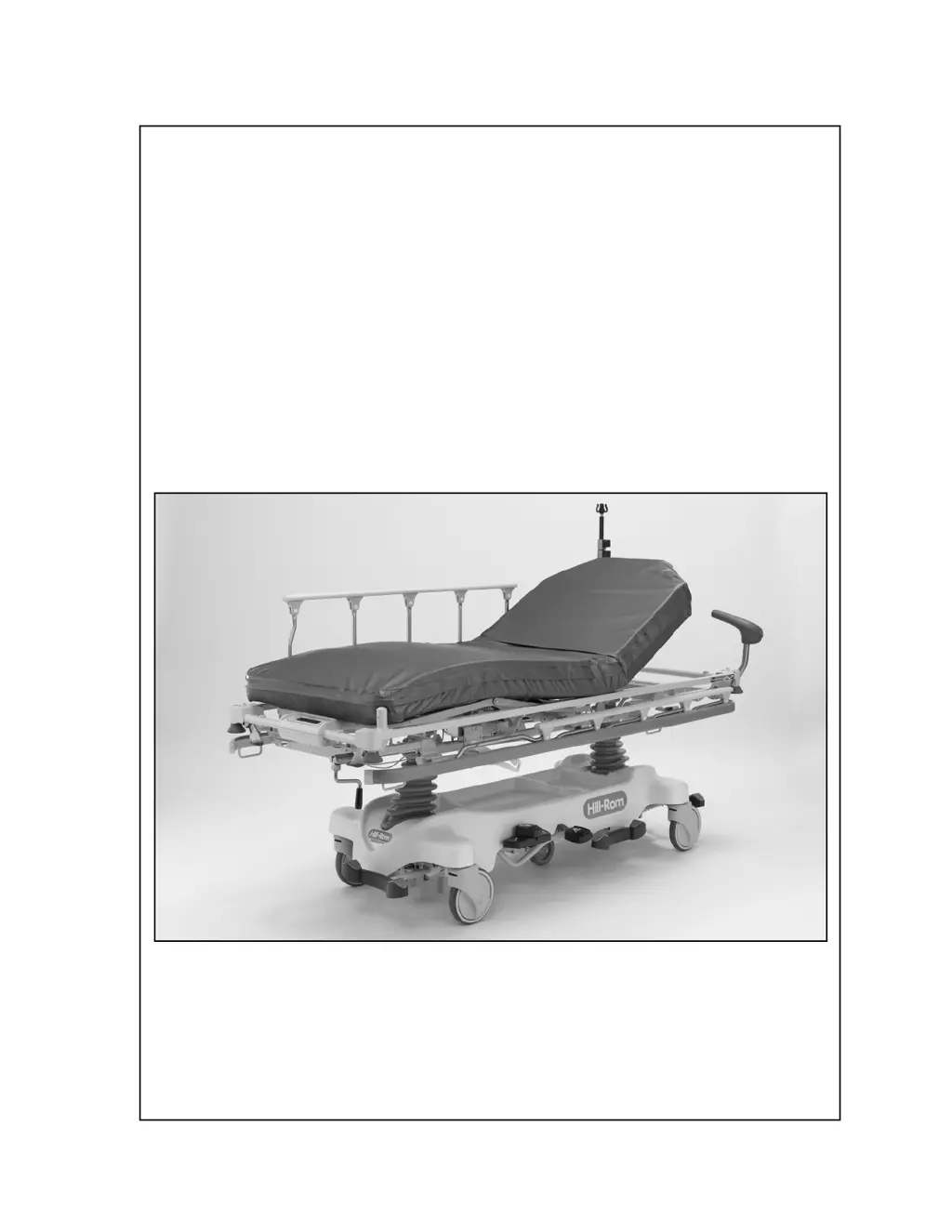
Hill-Rom P8000 - Service Manual

Hill-Rom P8000
444 pages
Print Icon
To Next Page IconTo Next Page
Loading...
SERVICE MANUAL
Hill-Rom®
Transport,
Procedural,
and Specialty
Stretchers
Product No. P8000, P8005, P8010, P8020, P8040, P8050
144386 REV 2

Table of Contents

Questions and Answers

  • L
    Lindsey LopezSep 23, 2025
    Why Procedural Stretcher—Auto Contour™ Feature or BackSaver Fowler® Feature Does Not Raise or Lower Correctly in Hill-Rom P8000?
    • M
      Michael OlsenSep 23, 2025
      If the Procedural Stretcher's Auto Contour™ Feature or BackSaver Fowler® Feature does not raise or lower correctly on your Hill-Rom medical equipment, replace the cables as necessary. Alternatively, adjust the cables or replace the head-end gas cylinder as needed.
  • P
    phillipmartinezAug 25, 2025
    What to do if the Hill-Rom P8000 Medical Equipment stretcher will not lower?
    • N
      nicole26Aug 25, 2025
      If your Hill-Rom medical equipment stretcher will not lower, you can try to adjust the release mechanism. If that doesn't work, you may need to replace the hydraulic cylinder at either the head or foot end of the stretcher.
  • C
    Corey PhamAug 25, 2025
    Why is there reduced braking ability in my Hill-Rom Medical Equipment?
    • R
      Raymond Ortiz IVAug 26, 2025
      To address reduced braking ability in your Hill-Rom medical equipment, ensure the brake/steer link adjustment at both ends of the stretcher is correct. If necessary, adjust the brake/steer link. If the issue persists, adjust the caster brake shoes or replace any defective casters.
  • A
    Amanda BarnettAug 27, 2025
    What to do if the weight shown on the Hill-Rom Medical Equipment scale display is not correct?
    • E
      Erika BerryAug 27, 2025
      If the weight shown on the Hill-Rom medical equipment scale display is not correct, ensure all packing materials and shims have been removed before taking a weight reading. Also, verify that the load beam cables are connected in the correct order before taking another reading.
  • L
    Latoya RamosAug 27, 2025
    What to do if the Hill-Rom P8000 Medical Equipment stretcher will not go into neutral position?
    • K
      Kristin ScottAug 27, 2025
      If your Hill-Rom medical equipment stretcher will not go into neutral position, check the brake/steer link at the head and foot ends of the stretcher for correct orientation, and adjust if necessary. Also, inspect each caster and replace any that are defective. You may also need to tighten the brake/steer link screw.
  • Z
    Zachary ValdezSep 13, 2025
    Why Electric Stretcher—Knee Section Does Not Raise or Lower Electrically in Hill-Rom P8000 Medical Equipment?
    • K
      Kimberly WeeksSep 14, 2025
      If the Electric Stretcher knee section on your Hill-Rom medical equipment does not raise or lower electrically, unplug the stretcher from its power source, put on an antistatic strap, and then connect the plugs firmly into position.
  • W
    William GibsonSep 12, 2025
    What causes OB/GYN Stretcher—Foot Supports Malfunction in Hill-Rom P8000 Medical Equipment?
    • L
      Logan JohnsonSep 12, 2025
      If the OB/GYN Stretcher foot supports on your Hill-Rom medical equipment malfunction, replace any missing hardware. If the problem continues, replace the defective foot support gas spring or the defective foot support Mechlok®1 device.
  • D
    David AndersonSep 12, 2025
    Why Electric Stretcher—Back Section Does Not Raise or Lower Electrically in Hill-Rom P8000 Medical Equipment?
    • T
      Tina LeeSep 12, 2025
      If the Electric Stretcher back section on your Hill-Rom medical equipment does not raise or lower electrically, unplug the stretcher from its power source, put on an antistatic strap, and then connect the plugs firmly into position.
  • P
    Patricia NorrisSep 4, 2025
    Why Procedural, Transport, Trauma, or OB/GYN Stretcher—Back Section Does Not Raise or Lower Correctly in Hill-Rom P8000 Medical Equipment?
    • C
      Claudia PattonSep 4, 2025
      If the Procedural, Transport, Trauma, or OB/GYN Stretcher back section on your Hill-Rom medical equipment does not raise or lower correctly, replace any missing hardware. If the issue continues, replace the defective back section gas spring.
  • M
    Michael EdwardsSep 2, 2025
    Why the Steering Plus™ Steering System Does Not Operate Correctly in Hill-Rom Medical Equipment?
    • S
      Stephen GarnerSep 2, 2025
      If the Steering Plus™ Steering System on your Hill-Rom medical equipment does not operate correctly, examine the fifth wheel pivot arms and pivot bracket for correct assembly. If problems persist, remove the Steering Plus™ Steering System assembly and replace any damaged or inoperative parts, or replace the fifth wheel.

Summary

Chapter 1 Introduction

Purpose

Manual contains operational and maintenance instructions for stretchers.

Audience

Manual intended for facility-authorized persons only.

Reference Documents

Refers to the User Manual for more information.

Chapter 2 Troubleshooting Procedures

Getting Started

Initial steps for troubleshooting procedures.

Initial Actions

Gathering data from operators about stretcher problems.

Scale-Problem and Solution Table

Table listing scale display problems and their corresponding troubleshooting steps.

Function Checks

Brake;Steer

Procedures to check the functionality of the brake and steer system.

Hilow and Trendelenburg;Reverse Trendelenburg

Checks for proper operation of height and tilt adjustments.

Siderail

Checks for proper raise and lower operation of siderails.

Push Handles (Optional)

Checks for proper operation and locking of push handles.

Specific Function Checks-Procedural Stretcher

Knee Section (Optional)-Procedural Stretcher Only

Checks the even rise and lower of the knee section without binding.

Auto Contour Feature (Optional)-ON and Off (serial numbers (S;N) before those that start with K)

Checks the Auto Contour feature's operation for specific serial number ranges.

Auto Contour (S;Ns that start with K and after) and BackSaver Fowler Features (Optional)

Checks Auto Contour/BackSaver Fowler features for later serial numbers.

Specific Function Checks-Electric Stretcher

Patient Controls (located on the siderails)

Checks the operation of patient controls for head and knee articulation.

Nurse Controls (located at the foot end of the stretcher)

Checks the operation of nurse controls for head articulation.

Manual Back Section Articulation

Checks smooth rise and lower of the back section via manual crank.

CPR Release

Checks the CPR release function for lowering the back section.

Chapter 3 Theory of Operation

Electrical System (Electric Stretcher)

Details the electrical components and circuitry of the electric stretcher.

Scale System (Optional for the Procedural, Electric, and Trauma Stretchers)

Explains the scale system, load cells, and user interface.

Display P.C. Board

Explains the functions of the display P.C. board, power supply, and switching regulator.

Display Membrane Switch Panel

Describes the user interface unit employing NCAP technology.

Chapter 4 Removal, Replacement, and Adjustment Procedures

Tool and Supply Requirements

Lists necessary tools and supplies for stretcher service.

4.1 Procedural (P8000), Surgical (P8010), Trauma (P8040), or OB;GYN (P8050) Stretcher-Siderail

Step-by-step instructions for removing and replacing siderails on various stretcher models.

4.3 Electric (P8020) Stretcher-Siderail

Detailed removal procedure for electric stretcher siderails.

4.12 Electric (P8020) Stretcher-Control Board

Procedure for removing and replacing the electric stretcher control board.

Chapter 5 Parts List

Service Parts Ordering

Information on how to identify and order replacement parts.

Recommended Spare Parts

List of recommended spare parts for servicing units.

Caster and Base Shroud

Exploded view and parts list for casters and base shroud.

Base Assembly-Side Pedal

Exploded view and parts list for base assembly side pedals.

Chapter 6 General Procedures

Cleaning and Care

Guidelines for cleaning and caring for the stretcher.

Preventive Maintenance

Importance and recommendation of an effective maintenance program.

Preventive Maintenance Schedule

Schedule outlining preventive maintenance tasks for all stretchers.

Leakage current

Measures leakage current, checks AC power cable/supply unit, replaces if necessary.

Chapter 7 Accessories

Stretcher Accessories

List of available stretcher accessories with product numbers.

7.1 Infusion Support System (ISS) Transfer Pole (P158)

Installation instructions for the ISS transfer pole.

7.2 IV Pole (P2217)

Installation and removal instructions for the IV pole.

7.15 Upright Chest Cassette Holder (P279 AT)

Installation, adjustment, and removal of the upright chest cassette holder.

Hill-Rom P8000 Specifications

General IconGeneral
CategoryMedical Equipment
TypeHospital Bed
ModelP8000
Weight Capacity500 lbs (227 kg)
Height AdjustmentElectric
Frame MaterialSteel
Wheel TypeLocking casters
Overall Width36 inches (91.4 cm)
Caster Diameter5 inches (12.7 cm)
Mattress Typefoam
Side Rail OptionsFull-length or half-length
CPR FunctionYes
Height Range19.5 - 30 inches (49.5 - 76.2 cm)

Related product manuals