EasyManua.ls Logo

Hill-Rom P8040 - Service Manual

Hill-Rom P8040
444 pages
Print Icon
To Next Page IconTo Next Page
Loading...
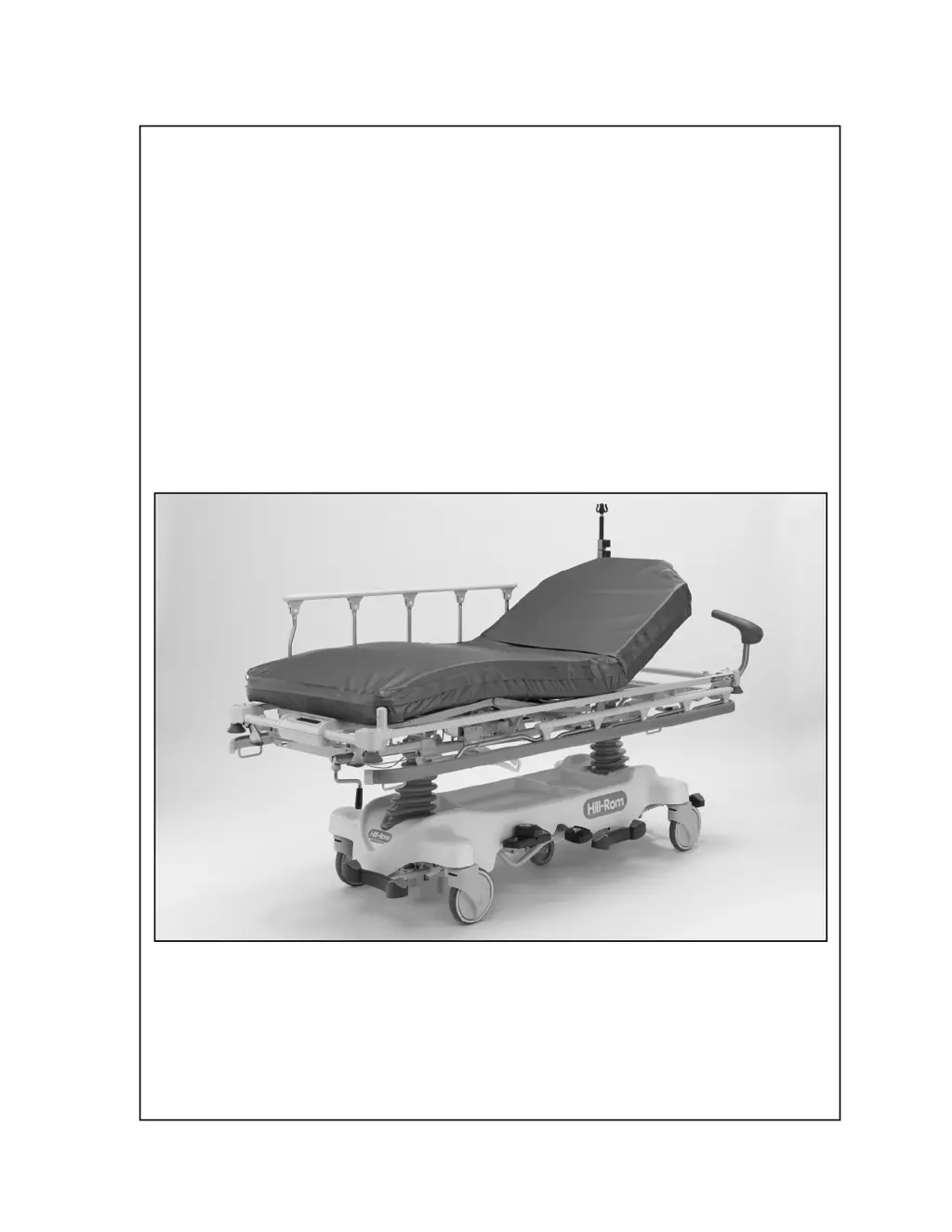
SERVICE MANUAL
Hill-Rom®
Transport,
Procedural,
and Specialty
Stretchers
Product No. P8000, P8005, P8010, P8020, P8040, P8050
144386 REV 2

Table of Contents

Questions and Answers

  • M
    Michael WilliamsSep 23, 2025
    Why Procedural Stretcher—Auto Contour™ Feature or BackSaver Fowler® Feature Does Not Raise or Lower Correctly in Hill-Rom P8040 Medical Equipment?
    • D
      Deborah PalmerSep 23, 2025
      If the Procedural Stretcher's Auto Contour™ Feature or BackSaver Fowler® Feature does not raise or lower correctly on your Hill-Rom medical equipment, replace the cables as necessary. Alternatively, adjust the cables or replace the head-end gas cylinder as needed.
  • K
    Keith IrwinAug 25, 2025
    What to do if the Hill-Rom P8040 Medical Equipment stretcher will not lower?
    • G
      Gabriella FoxAug 25, 2025
      If your Hill-Rom medical equipment stretcher will not lower, you can try to adjust the release mechanism. If that doesn't work, you may need to replace the hydraulic cylinder at either the head or foot end of the stretcher.
  • K
    Kevin RileyAug 25, 2025
    Why is there reduced braking ability in my Hill-Rom P8040 Medical Equipment?
    • M
      Morgan SmithAug 26, 2025
      To address reduced braking ability in your Hill-Rom medical equipment, ensure the brake/steer link adjustment at both ends of the stretcher is correct. If necessary, adjust the brake/steer link. If the issue persists, adjust the caster brake shoes or replace any defective casters.
  • F
    Fernando MercerAug 27, 2025
    What to do if the weight shown on the Hill-Rom P8040 Medical Equipment scale display is not correct?
    • A
      Angela WhiteheadAug 27, 2025
      If the weight shown on the Hill-Rom medical equipment scale display is not correct, ensure all packing materials and shims have been removed before taking a weight reading. Also, verify that the load beam cables are connected in the correct order before taking another reading.
  • M
    Mary SawyerAug 27, 2025
    What to do if the Hill-Rom P8040 stretcher will not go into neutral position?
    • Z
      Zachary FreemanAug 27, 2025
      If your Hill-Rom medical equipment stretcher will not go into neutral position, check the brake/steer link at the head and foot ends of the stretcher for correct orientation, and adjust if necessary. Also, inspect each caster and replace any that are defective. You may also need to tighten the brake/steer link screw.
  • D
    Daniel BowmanSep 13, 2025
    Why Electric Stretcher—Knee Section Does Not Raise or Lower Electrically in Hill-Rom P8040?
    • A
      April EnglishSep 13, 2025
      If the Electric Stretcher knee section on your Hill-Rom medical equipment does not raise or lower electrically, unplug the stretcher from its power source, put on an antistatic strap, and then connect the plugs firmly into position.
  • U
    uvillaSep 12, 2025
    Why Electric Stretcher—Back Section Does Not Raise or Lower Electrically in Hill-Rom Medical Equipment?
    • G
      Gary HernandezSep 12, 2025
      If the Electric Stretcher back section on your Hill-Rom medical equipment does not raise or lower electrically, unplug the stretcher from its power source, put on an antistatic strap, and then connect the plugs firmly into position.
  • T
    Timothy WhiteSep 12, 2025
    What causes OB/GYN Stretcher—Foot Supports Malfunction in Hill-Rom P8040?
    • S
      susangriffinSep 12, 2025
      If the OB/GYN Stretcher foot supports on your Hill-Rom medical equipment malfunction, replace any missing hardware. If the problem continues, replace the defective foot support gas spring or the defective foot support Mechlok®1 device.
  • D
    Drew DanielsSep 4, 2025
    Why Procedural, Transport, Trauma, or OB/GYN Stretcher—Back Section Does Not Raise or Lower Correctly in Hill-Rom Medical Equipment?
    • K
      Kelly HamiltonSep 4, 2025
      If the Procedural, Transport, Trauma, or OB/GYN Stretcher back section on your Hill-Rom medical equipment does not raise or lower correctly, replace any missing hardware. If the issue continues, replace the defective back section gas spring.
  • L
    lopezseanSep 2, 2025
    Why the Steering Plus™ Steering System Does Not Operate Correctly in Hill-Rom Medical Equipment?
    • B
      Benjamin WilliamsSep 2, 2025
      If the Steering Plus™ Steering System on your Hill-Rom medical equipment does not operate correctly, examine the fifth wheel pivot arms and pivot bracket for correct assembly. If problems persist, remove the Steering Plus™ Steering System assembly and replace any damaged or inoperative parts, or replace the fifth wheel.

Summary

Chapter 2: Troubleshooting Procedures

Chapter 4: Removal, Replacement, and Adjustment Procedures

Tool and Supply Requirements

Lists necessary tools and supplies for performing removal, replacement, and adjustment procedures.

Procedural (P8000), Surgical (P8010), Trauma (P8040), or OB;GYN (P8050) Stretcher-Siderail

Procedures for removing and replacing siderails on specific stretcher models.

Electric (P8020) Stretcher-Control Board

Procedures for removing and replacing the control board on electric stretchers.

Chapter 6: General Procedures

Cleaning and Care

General guidelines for cleaning and caring for the stretcher, including safety precautions.

Disinfecting

Procedures for disinfecting the stretcher using EPA-registered disinfectants.

Preventive Maintenance

Importance and recommendation of an effective maintenance program for stretcher longevity.

Chapter 7: Accessories

Hill-Rom P8040 Specifications

General IconGeneral
Weight Capacity500 lbs
TypeHospital Bed
ModelP8040
ManufacturerHill-Rom
FeaturesTrendelenburg

Related product manuals