12
© Copyright 2020, Hill Laboratories
Problem
Power Outage: Due to lightning or some other reason, you facility may lose electrical
power from time to time. When this happens, your table’s power switch will need to
be reset.
To Fix:
Unplug the table from the wall outlet and
wait approximately 30 seconds. Plug the
table back in to the outlet and then press
the power switch in, (see photo), to the
“ON” position
Problem
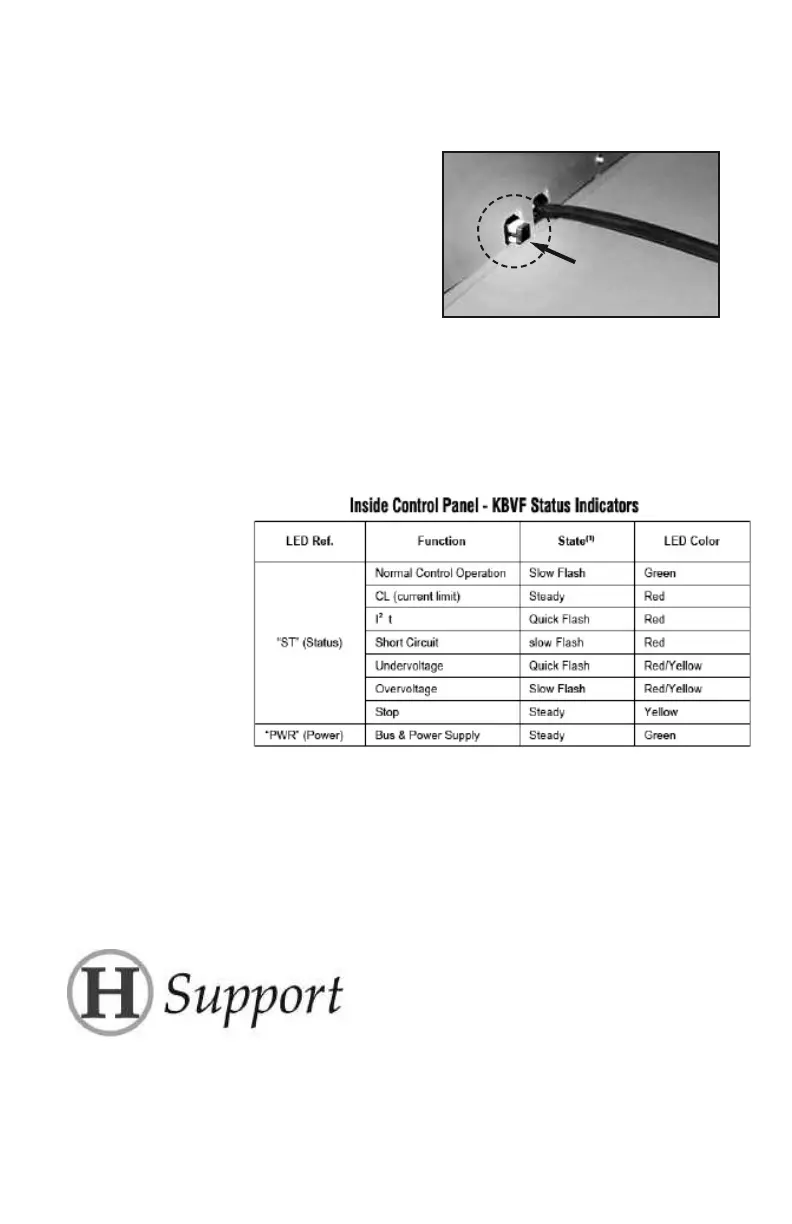
The table is not responding to the Control Box properly.
The problem may be indicated by the LEDs on the internal electronic drive which
controls the flexion motor. The chart below explains the LED indications.
Important: Surge Protection Recommended
Air functions on this table are controlled by a circuit board and low voltage valves (see diagrams on the
following pages). Since electrical spikes, surges and undervoltage can be detrimental to electronic com-
ponents, we recommend protecting your table with an automatic voltage regulator. While a voltage regu-
lator will not guarantee parts against failure, it could save you the cost of parts as well as table downtime.
The APC LE1200 voltage regulator is one example of a device that provides a minimum level of protection.
Additional service needed?
Contact your local dealer or reach us directly:
Phone: 1-877-445-5020 • Fax: 610-647-6297 • Email: Support@HillLabs.com
Technicians are available 9 am - 4 pm E.S.T., Monday - Friday.
Plug in, then push in
to turn
ON
To view the internal
drive showing the
LEDs, adjust the table
height to the lowest
setting and then look
under the thoracic
section into the table
base interior. The elec-
tronic drive is mounted
to the internal frame
scissors.


 To Next Page