EasyManua.ls Logo

Hilti SF 22­A - Page 35

Hilti SF 22­A
Print Icon
To Next Page IconTo Next Page
To Previous Page IconTo Previous Page
Loading...
*362170*
362170 English 31
9.1 Troubleshooting
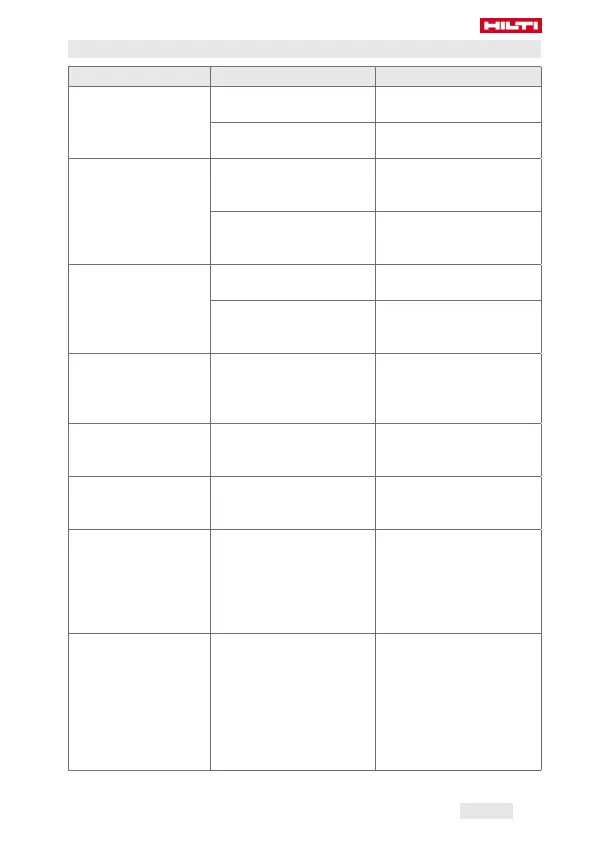
Trouble or fault Possible cause Action to be taken
The power tool
doesn’t run.
The battery is not fully
inserted.
Insert the battery.
page 27
The battery is
discharged.
Charge the battery.
page 27
The power tool
doesn’t work and all
four LEDs blink.
The power tool has been
overloaded briefly.
Release the control
switch and then press
it again.
The overheating cut-out
has been activated.
Allow the power tool
to cool down. Clean
the air vents.
The power tool
doesn’t work and
one LED flashes.
The battery is
discharged.
Charge the battery.
page 27
The battery is too hot or
too cold.
Bring the battery to
the recommended op-
erating temperature.
The on/off button
can’t be pressed, i.e.
the button is locked.
The forward/reverse
selector switch is in the
middle position.
Set the
forward/reverse
switch to the desired
position. page 28
No hammering ac-
tion.
The operating mode is
not set correctly at the
selector ring.
Set the power tool
to “hammer drilling”.
page 29
The battery runs
down more quickly
than usual.
Very low ambient tem-
perature.
Allow the battery to
warm up slowly to
room temperature.
The battery doesn’t
engage with an audi-
ble double click.
The retaining lugs on the
battery are dirty.
Clean the retaining
lugs and push the
battery in until it
engages. Contact
Hilti Service if the
problem persists.
The tool or battery
gets very hot.
The tool is overloaded
(application limits ex-
ceeded).
Pay attention to the
power and perfor-
mance rating of the
product before using
it, i.e check its suitabil-
ity for the job on hand.
See the “Technical
data” section.

Other manuals for Hilti SF 22­A

Related product manuals