EasyManua.ls Logo

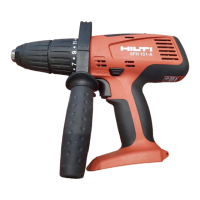
Hilti SF 151-A - User Manual

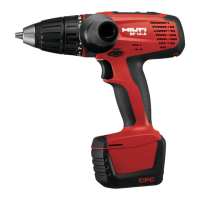
Hilti SF 151-A
16 pages
Print Icon
To Next Page IconTo Next Page
Loading...
SF 151-A /
SFH 151-A
*227959*
227959
Bedienungsanleitung de
Operating instructions en
Mode d’emploi fr
Manual de instrucciones es
Istruzioni d’uso it
Gebruiksaanwijzing nl
Brugsanvisning da
Bruksanvisning sv
Bruksanvisning no
Käyttöohje fi
Manual de instruções pt
Οδηγιες χρησεως
el
Kasutusjuhend et
Lietoßanas pamåcîba lv
Instrukcija lt
Инструкция по зксплуатации ru
00_Cover_SF151_A_P1.qxd 15.9.2005 08:35 Seite 3

Questions and Answers

  • S
    Susan GuerraJul 31, 2025
    Why does my Hilti Power Tool get so hot?
    • K
      Katie NelsonJul 31, 2025
      If your Hilti Power Tool or its battery becomes very warm, immediately switch off the tool, remove the battery. This could be due to an electrical fault or because the tool has been overloaded. Contact Hilti Service for assistance. Ensure you're using the right tool for the job to avoid exceeding application limits.
  • C
    Christina CastilloAug 4, 2025
    How to fix a Hilti Power Tool that won't turn on?
    • G
      Gina BondAug 4, 2025
      If your Hilti Power Tool doesn’t run, it could be due to a discharged or incorrectly fitted battery. Ensure the battery engages with an audible click or charge the battery. If the issue persists, there may be an electrical fault. Remove the battery and contact Hilti.
  • P
    Paul GuzmanAug 8, 2025
    Why does my Hilti Power Tool lose power?
    • T
      Taylor GordonAug 8, 2025
      If the running speed of your Hilti Power Tool suddenly drops considerably, the battery may be discharged. Try changing the battery and recharging the discharged one.
  • F
    Francis Swanson PhDAug 13, 2025
    What to do if the Hilti Power Tool switch is locked?
    • T
      Tiffany HardyAug 13, 2025
      If the on / off switch of your Hilti Power Tool can’t be pressed, it might be locked because the forward / reverse switch is in the middle position (transport lock engaged). Push the forward / reverse switch to the left or right to unlock it.
  • B
    Brandi MooreAug 17, 2025
    Why does my Hilti Power Tool battery die so fast?
    • D
      Diana PerezAug 17, 2025
      If your Hilti Power Tool's battery reaches the end of its capacity more quickly than usual, the battery condition may not be optimal. Try charging the battery in refresh charge mode. Please refer to the operating instructions for the charger.
  • A
    Andrew HoweAug 21, 2025
    How to enable hammer mode on Hilti Power Tool?
    • M
      michellecoxAug 21, 2025
      To enable the hammering action on your Hilti Power Tool, turn the torque and operating mode setting ring to the hammer drilling symbol.
  • P
    Pamela SalasAug 26, 2025
    What to do if Hilti Power Tool battery won't click in?
    • J
      Jessica StaffordAug 26, 2025
      If the battery of your Hilti Power Tool doesn’t engage with an audible double click, the retaining lugs on the battery may be dirty. Clean the retaining lugs and ensure the battery engages securely. If the problem persists, contact Hilti Service.

Summary

General Information and Safety Notices

Safety Notices and Their Meaning

Explains warning and caution symbols and their significance for safe operation of the tool.

Product Description and Specifications

Product Use and Identification Data

Details the intended use of the drill/driver and how to locate identification data on the tool.

Tool Components and Accessories

Covers chuck, switch, grip, lubrication, and included accessories for tool versions.

Technical Data Overview

Provides detailed technical specifications for SF 151-A and SFH 151-A models.

Safety Rules and Precautions

General Safety Guidelines

Covers work area, electrical safety, personal safety, and general power tool use.

Specific Safety Instructions

Details battery handling, service safety, and additional specific safety measures.

Getting Started: Before Use

Battery Management and Charging

Guides on battery care, charging new and used batteries, fitting, and removal.

Tool Preparation and Setup

Covers setting rotation direction and selecting speed ranges for operation.

Operation and Usage

Switching and Speed Control

Explains how to switch the tool on/off and select different speed settings.

Drilling and Hammer Drilling

Instructions for fitting bits, drilling, hammer drilling, and removing bits safely.

Screwdriving Operations

Details on fitting bits, performing screwdriving, and removing bits.

Maintenance, Troubleshooting, and Disposal

Tool Care and Maintenance

Guidelines for cleaning and maintaining insert tools, the tool itself, and batteries.

Troubleshooting Common Issues

Lists common faults, their possible causes, and recommended remedies for the tool.

Product Disposal and Recycling

Information on the proper disposal of electric tools according to regulations.

Warranty and Compliance Information

Product Warranty Terms

Details Hilti's warranty policy for the product, including exclusions and claims.

EC Declaration of Conformity

States compliance with relevant European directives and standards.

Hilti SF 151-A Specifications

General IconGeneral
TypeCordless Drill
Voltage14.4 V
Battery TypeLi-ion
Chuck typeKeyless
Battery voltage14.4 V
Weight with battery1.7 kg
Chuck Size1/2 inch
No load RPM gear 1450 RPM

Related product manuals