EasyManua.ls Logo

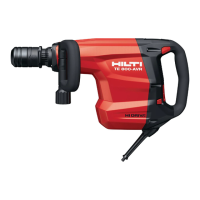
Hilti TE 800-AVR - User Manual

Hilti TE 800-AVR
48 pages
Print Icon
To Next Page IconTo Next Page
Loading...
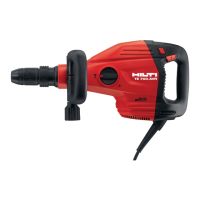
TE 800-AVR
English 1
Français 10
Español 20
Português 30

Other manuals for Hilti TE 800-AVR

Questions and Answers

  • Q
    qturnerJul 27, 2025
    Why won't my Hilti Impact Driver start?
    • S
      Shirley MorrowJul 27, 2025
      If your Hilti Impact Driver doesn't start, it could be due to several reasons. It might be undergoing electronics initialization or the electronic restart safety interlock has been activated, so try switching the power tool off and then on again. Check for an interruption in the electric supply by plugging in another appliance to see if it works. The supply cord or plug could be defective, in which case you should have it checked and replaced by a trained electrical specialist. Alternatively, the control switch might be defective, requiring a check by a specialist and possible carbon brush replacement. If you're using a generator, it may be in sleep mode; apply a load by connecting another power consumer.
  • S
    sullivanbryanAug 4, 2025
    What to do if my Hilti Impact Driver doesn’t start and the service indicator lights red?
    • D
      Dale WrightAug 4, 2025
      If your Hilti Impact Driver doesn’t start and the service indicator is red, it could mean the carbon brushes are worn, so have them checked and replaced by a trained electrical specialist. Alternatively, there may be a fault in the tool, in which case you should have it repaired by Hilti Service.
  • C
    Cody WilsonAug 11, 2025
    Why is there no hammering action on my Hilti Impact Driver?
    • W
      Wendy ThomasAug 11, 2025
      If you're not getting any hammering action from your Hilti Impact Driver, it could be due to a few reasons. The tool might be too cold; try bringing the tip of the drill bit or chisel into contact with the workpiece and let the tool run under no load until it warms up. There could be a fault in the tool, requiring repair by Hilti Service. Also, electronics initialization might be in progress or the electronic restart safety interlock may have been activated after a power interruption, so try switching the tool off and on again. Check for a power interruption by plugging in another appliance. Finally, the supply cord or plug could be defective and need to be checked by a trained electrical specialist.
  • T
    Tracy WatsonAug 19, 2025
    How to increase the power on a Hilti Impact Driver?
    • Q
      qthomasAug 19, 2025
      If your Hilti Impact Driver isn't achieving full power, it could be because power reduction is active. Try pressing the power level selector switch and then switch the power tool off and then on again. The extension cord might be too long or inadequate; use one with an adequate conductor cross section (1.5 mm² for lengths up to 40 m; 2.5 mm² for lengths up to 65 m). It’s also possible the voltage from the electric supply is too low, so try connecting the tool to a different supply.

Summary

Original operating instructions

About these operating instructions

Provides guidance on reading and following the operating instructions for safe use.

Explanation of symbols

Details warning signals and symbols used in the manual and illustrations for hazard identification.

Safety

General power tool safety warnings

Covers essential safety precautions for operating the power tool, including work area and electrical safety.

Personal safety

Details personal protective measures, alertness, and proper use during operation to prevent injury.

Power tool use and care

Guidelines on proper usage, maintenance, and storage of the power tool to ensure safety and longevity.

Service

Emphasizes the importance of professional servicing and using genuine replacement parts for safety.

Additional safety instructions for breakers

Specific safety advice for breaker operation, including work area hazards and protective measures.

Description

Product overview

Illustrates and labels the main components of the TE 800-AVR breaker.

Intended use

Defines the specific applications and conditions for which the breaker is designed.

Active Vibration Reduction (AVR)

Explains the AVR system and its benefit in reducing operator vibration.

Service indicator

Details the function of the service indicator LED for maintenance alerts.

Power level indicator

Explains the power level indicator LED for adjusting chiseling power.

Operation

Preparations at the workplace

Instructions on preparing the work area and ensuring safety before commencing operation.

Fitting the side handle

Step-by-step guide on how to correctly attach and secure the side handle.

Changing the accessory tool

Procedure for safely replacing the chisel or other accessory tools.

Removing the accessory tool

Instructions for safely detaching accessory tools from the breaker, including safety warnings.

Positioning the chisel

Guide on adjusting the chisel angle for optimal working position and performance.

Setting the chiseling power

Explains how to adjust the chiseling power level for precision work.

Types of work

Safety warnings and requirements for operating the tool, emphasizing electrical safety.

Chiseling

Detailed steps for performing chiseling operations, including low-temperature startup and chisel guidance.

Care and maintenance

Care

Instructions for cleaning the tool, including removing dirt and cleaning air vents.

Maintenance

Guidelines for inspecting the tool for damage and ensuring proper function, advising professional repair.

Troubleshooting

The power tool doesnt start

Troubleshoots common issues like electronics initialization, supply interruption, or defective cords/switches.

Power tool start failure with red service indicator

Addresses issues when the tool fails to start and the service indicator lights red due to worn brushes or faults.

No hammering action

Diagnoses lack of hammering action, covering issues like tool being too cold or internal faults.

Power tool starts with red service indicator

Resolves issues where the tool starts but the service indicator lights red, relating to power reduction or cord issues.

Reduced tool power and cord issues

Addresses problems of reduced power output due to extension cords or low voltage.

Chisel release failure

Provides solutions when the chisel cannot be released from the chuck.

Disposal

Manufacturers warranty

Hilti TE 800-AVR Specifications

General IconGeneral
BrandHilti
ModelTE 800-AVR
CategoryPower Tool
LanguageEnglish

Related product manuals