14
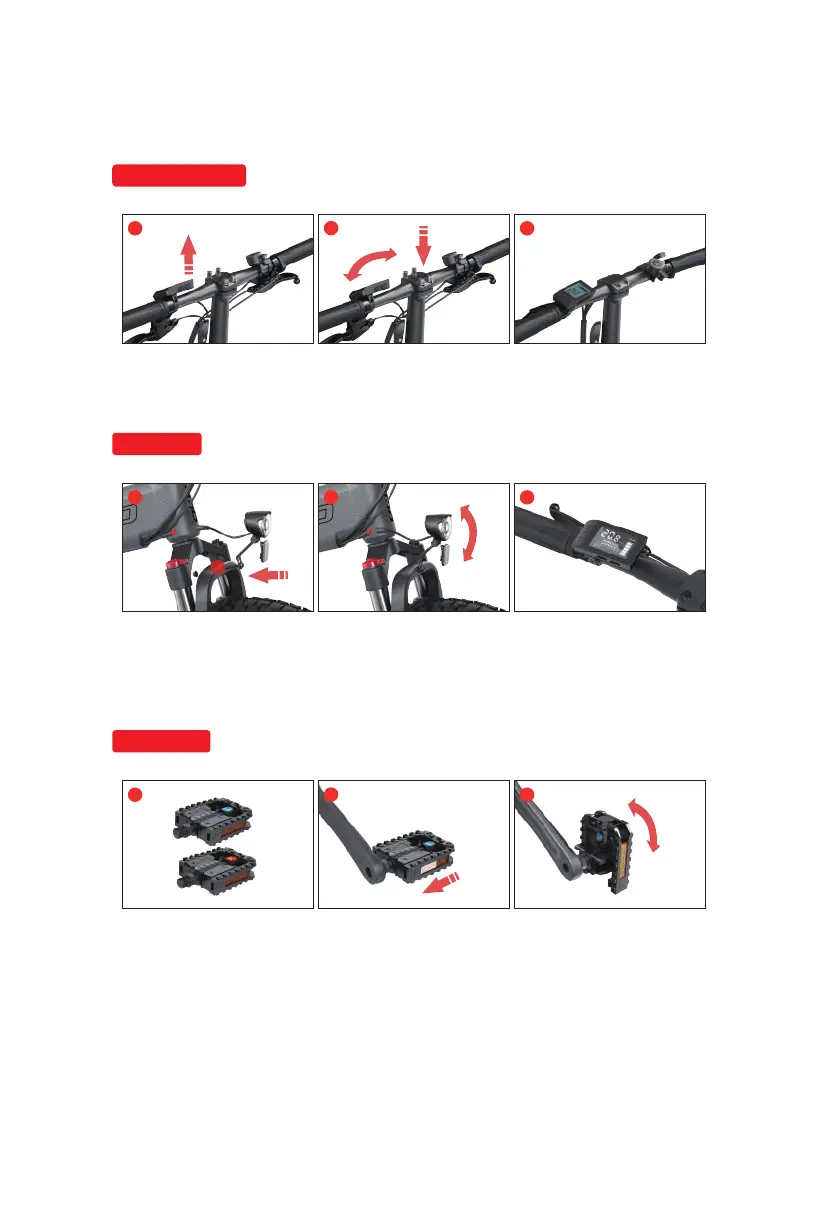
Install handle bars
1. Loosen the screw of
handle bar
2. Adjust the angle of the
handle bar and tighten the
screws.
3. Complete the handlebar
adjustment.
Install lights
1
2
3
1
2
3
1. Remove the headlight
bolts and nuts, fix the
headlight on the front fork
mounting hole and lock it
tightly.
2. Adjust the beam Angle of
the headlight and install the
power cord of the light
3. After the instrument is
turned on, long press "+" to
test whether the front light
can be turned on.
Install pedals
1
2
3
1. Pay attention to the letter
indicating that the left and right
pedals are distinguished. L
represents the left pedal, and R
represents the right pedal.
2. When installing the pedal,
make sure that the end face
of the pedal bolt should be
perpendicular to the crank
installation hole, and the left
pedal should be rotated
counterclockwise (clockwise
for right pedal ) and locked.
3. If you need to fold the
pedals, press the pedals
axially and fold it upwards.


 To Next Page