NOTE
NOTE
NOTE
NOTES
19 20
Basic Features Basic Features
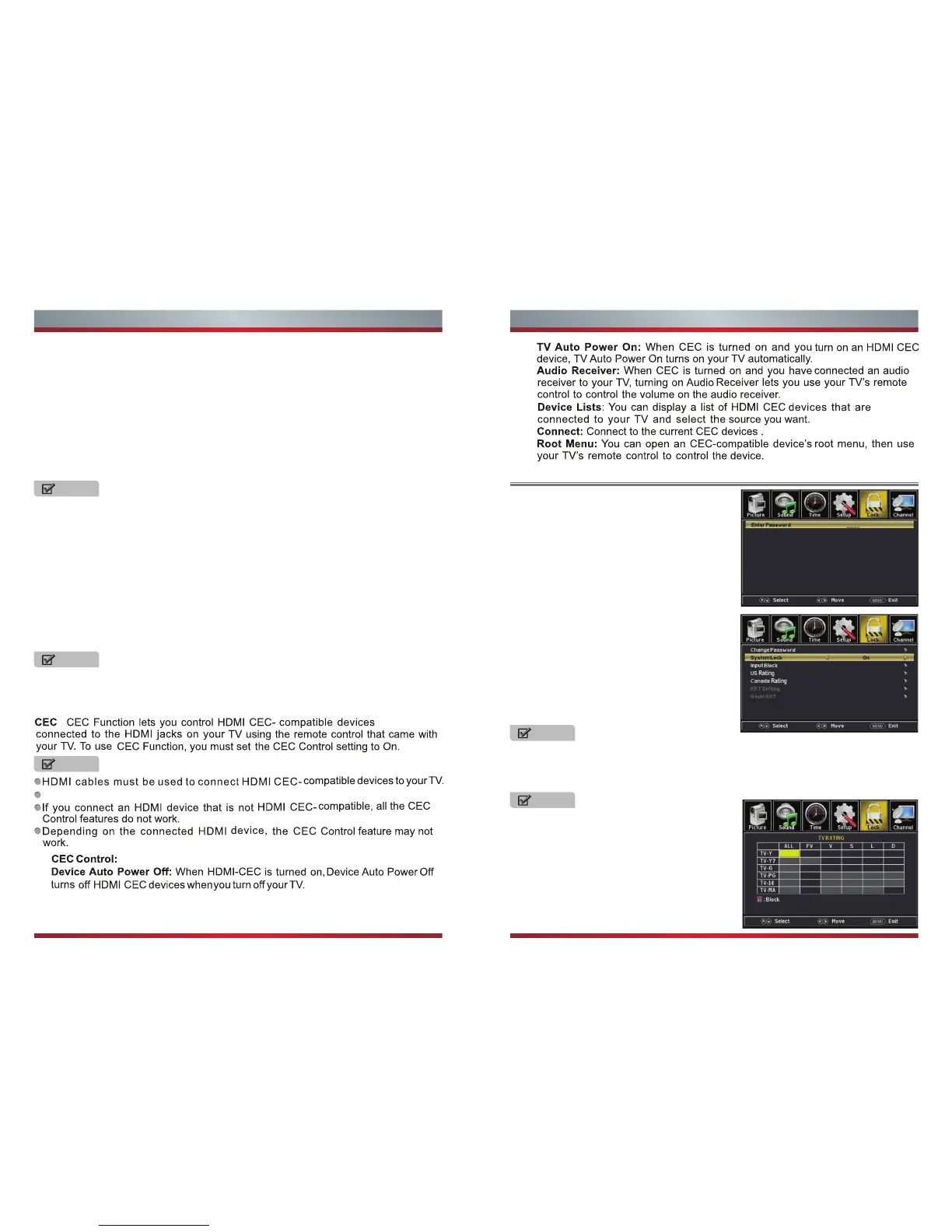
Using the Lock Menu
To use the Lock Menu, enter the default
password (0000) or your 4-digit password that
you created. If you forgot your password, then
call the Hisense Electronics Consumer Care
Center.
Mode - Set the look of digital Closed Captioning.
Font Style - Select from 8 font styles(Default / Font 0 / Font 1 / Font 2 /Font 3 / Font 4
/ Font 5 / Font 6 / Font 7).
Font Size - Adjust the size of the digital Closed Captioning font.
Font Edge Style - Adjust the edge of the digital Closed Captioning box.
Font Edge Color - Adjust the color of the digital Closed Captioning box.
FG Color - Adjust the color of the digital Closed Captioning font.
BG Color - Adjust the digital Closed Captioning background color.
FG Opacity - Adjust the transparency of the digital Closed Captioning font.
BG Opacity - Adjust the digital Closed Captioning background transparency.
Input Labels - Create labels for the devices connected to your TV.
Other Settings - Set the parameter of blue screen and audio only.
Blue screen - Set the background when there is no signal. The background will
show blue screen when it’s on and show noise when off.
Audio Only - Play the audio with the picture turned off. When you turn the Audio
Only on and exit the OSD menu, the panel will be dark; and then press any key to
exit the Audio Only status.
Software Update(USB) - Update the TV software. Select the software in the root
of your USB memory.
System Info - You can find the system information in this menu.
You can not adjust all of the options if the mode is set to 'default.
“US Rating” and “Canada Rating” is available only when “System Lock” is “On”.
NOTE
If you choose the “Reset RRT” function,
all the programs you preset in “RRT
Setting” will be lost.
RRT Setting - Display an advance V-Chip rating table for digital channels.
Reset RRT - Reset the RRT to default.
For the United States, the rating setting
basically include the following options: TV,
MPAA.
TV - The TV rating compose of two aspects:
age-based and content-based.
Restore Default - Change power on options or reset TV to factory default.
Setup Wizard - Set the first time installation.
The HDMI CEC feature of the connected device must be turned on.
Turn the CEC function on or off.
Change Password - Enter a new 4-digital
password then reenter it to confirm.
System Lock - Lock or unlock the buttons on
the TV.
Input Block - Block or unblock the input
sources.
US Rating - Restrict movie and TV programs
by US Ratings.
Canada Rating - Restrict movie and TV
programs by Canadian Ratings.
The item is available only When current stream has downloadable rating data.
Press ok to Lock or Unlock
-



 To Next Page