EasyManua.ls Logo

Hisense 55A7G - Remote Control

Hisense 55A7G
20 pages
Print Icon
To Next Page IconTo Next Page
To Previous Page IconTo Previous Page
Loading...
11
Remote Control
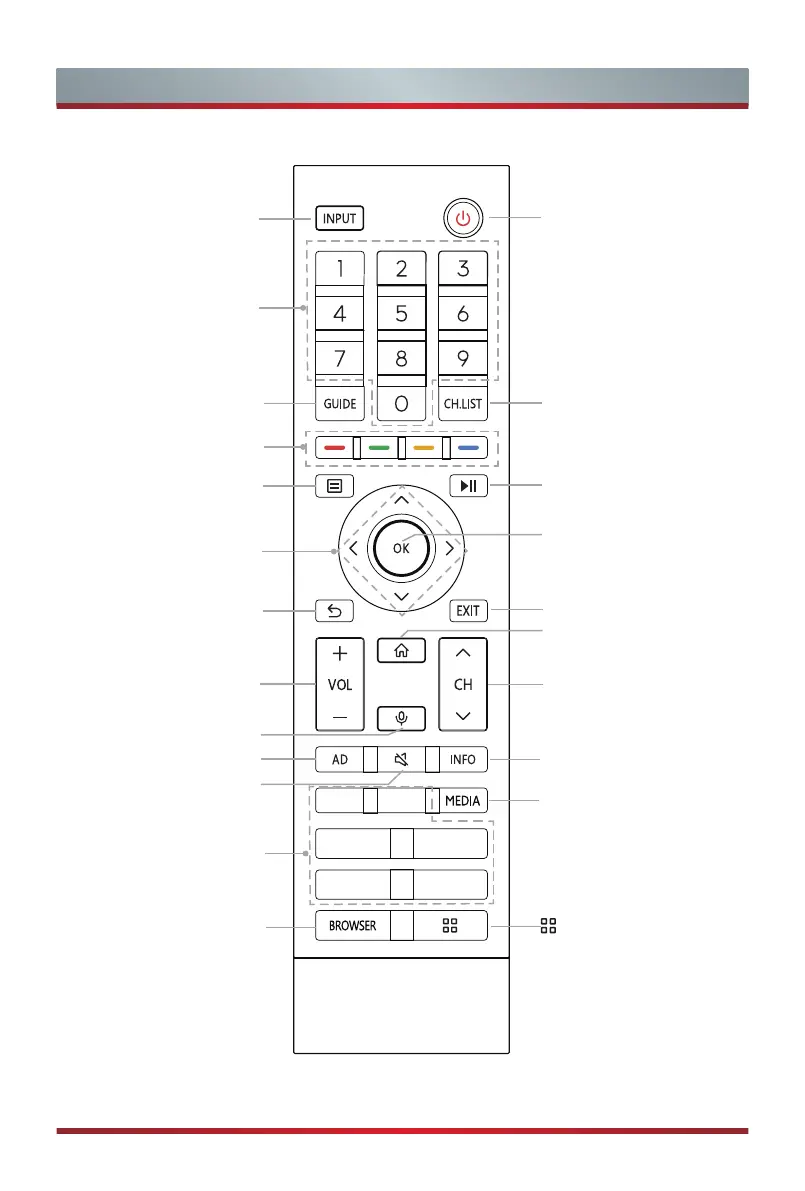
Power on/ Standby
Exit the menu or exit
the application
Channel (up/down)
Display the Home screen
Playpad keys
Display the current
program information
Display the Channel
List on the screen
OK / Display the on-screen
keyboard
Enter the MEDIA
: Fast access to all
applications
Activate the microphone
Under the Menu or App,
return to the previous
place
Navigation buttons
(Up/Down/Left/Right)
Select input sources
Volume (up/down)
Special function buttons
Quick setup
Select a channel or input
numbers
Display the Electronic
Program Guide (DTV mode)
Mute and restore sound
Quick access buttons to
apps
Set the Audio Description
on or o󰀨
BROWSER: Enter into
BROWSER