5
Installing the Stand or Wall Mount Bracket
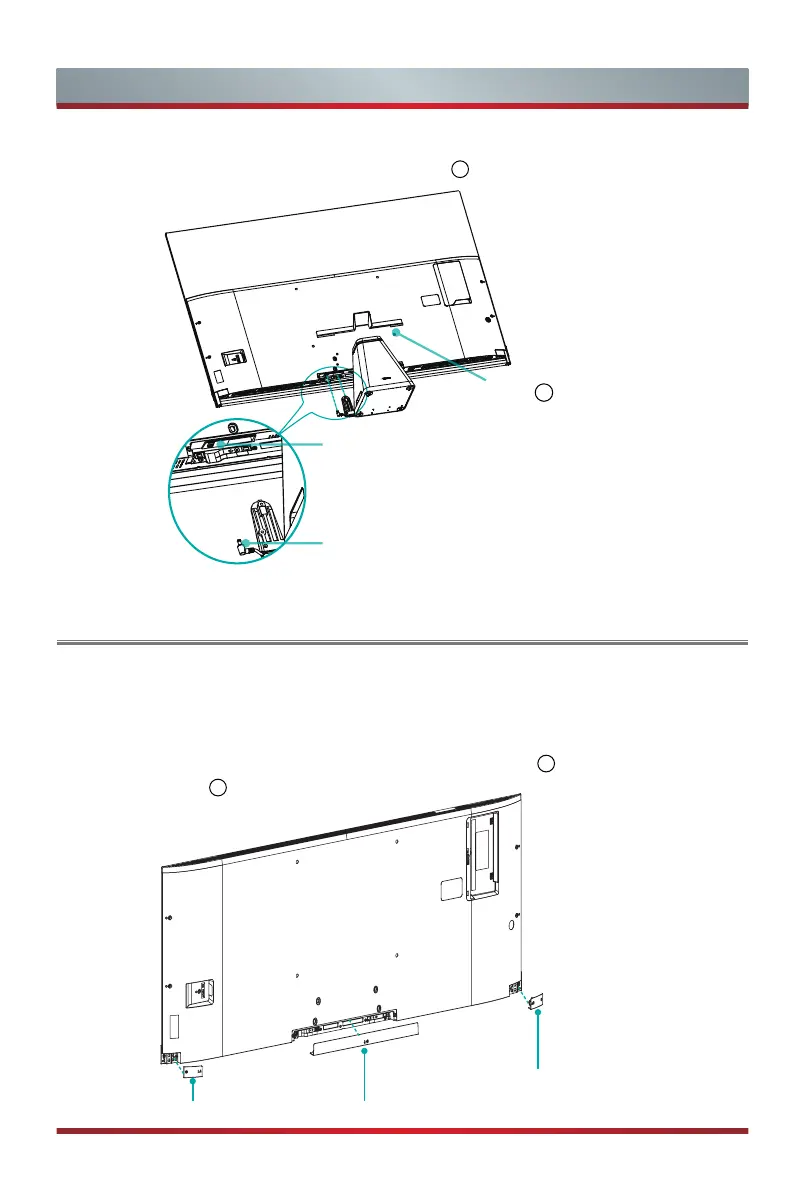
Power cord plug of the
subwoofer connector
Power socket of the TV
Figure 5
Rear Cover
2
5. Connect the power cord plug of the subwoofer to the power socket of the TV, and
then install the cover of the rear stand marked "
2
". (see Figure 5)
Installing
the Wall Mount Bracket
If you want to install the wall mount bracket, you need to prepare as follows:
Carefully place your TV facedown on a soft, flat surface to prevent damage to the TV
or scratching to the screen.
Install the left and the right covers of the front base marked "
1
", install the cover of the
rear base marked "
1
".
Left Cover
①
Right Cover
①
Rear Cover
①



 To Next Page