EasyManua.ls Logo

Hisense 65SX - Remote Control

Hisense 65SX
29 pages
Print Icon
To Next Page IconTo Next Page
To Previous Page IconTo Previous Page
Loading...
13
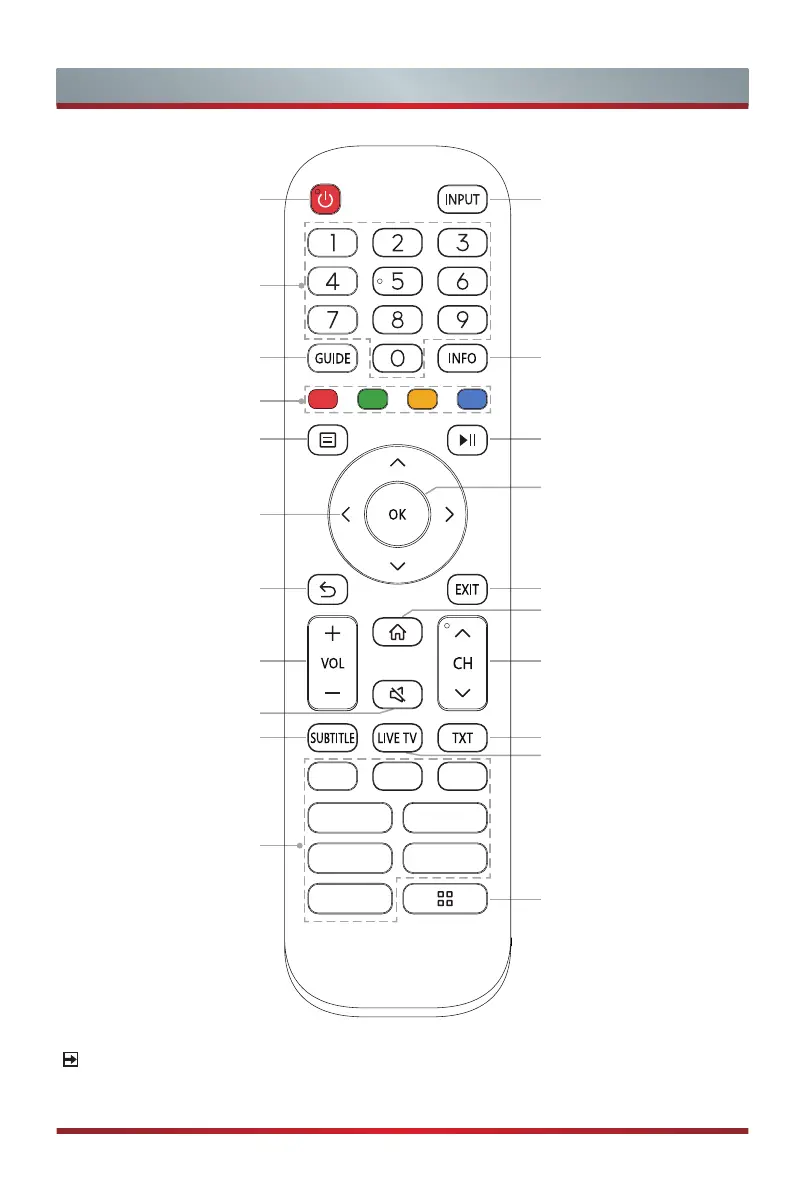
Remote Control
Quick
access buttons
to apps
Mute and restore sound
Exit the menu or exit
the application
Channel (up/down)
Return to the previous
menu
Power Standby button:
Power on/ Standby
Navigation buttons
(Up/Down/Left/Right)
Select a channel or input
numbers
Conrm button / Display
the on-screen keyboard
Special function buttons
Display the Home screen
NOTE
The included remote control will vary depending on model, country. Check information
according to the actual remote control in the accessory bag.
Display the Electronic
Program Guide (DTV
mode)
Display the current
program information
Select input sources
Playpad keys
Volume (up/down)
Display subtitles in the
Live TV
Turn on/off the teletext
function
Enter the Live TV screen
Quick setup
Fast access to all
applications
EN2Q30H
APP APP APP
APP APP
APP APP
APP

Related product manuals