8
EN
Connections
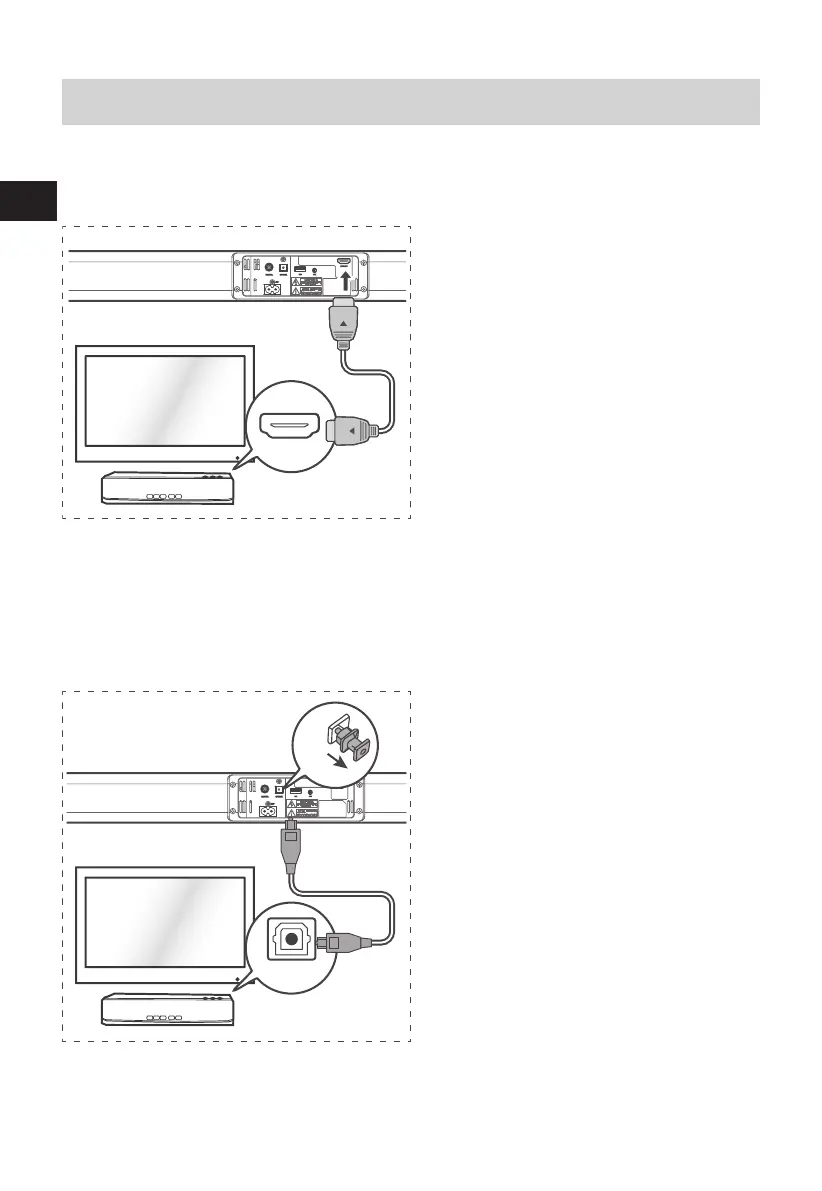
HDMI socket
Use HDMI to connect the Soundbar, AV equipment and TV:
:<
.*3/'8)
ARC (Audio Return Channel)
The ARC (Audio Return Channel) function allows
you to send audio from your ARC- compliant
TV to your sound bar through a single HDMI
connection. To enjoy the ARC function, please
ensure your TV is both HDMI-CEC and ARC
compliant and set up accordingly. When
correctly set up, you can use your TV remote
control to adjust the volume output (VOL +/-
and MUTE) of the sound bar.
- Connect the HDMI cable (not included) from
unit's HDMI (ARC) socket to the HDMI (ARC)
socket on your ARC compliant TV. Then press the
remote control to select HDMI ARC.
Tips:
• Your TV must support the HDMI-CEC and ARC function. HDMI-CEC and ARC must be set to On.
• The setting method of HDMI-CEC and ARC may dier depending on the TV. For details about ARC
function, please refer to your TV owner’s manual.
• Only HDMI 1.4 cables can support the ARC function.
:<
56:/)'2
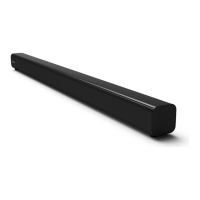
Use the OPTICAL Socket
Remove the protective cap of the OPTICAL
socket, then connect an OPTICAL cable (included)
to the TV’s OPTICAL OUT socket and the OPTICAL
socket on the unit.
Tip: While in OPTICAL or HDMI ARC or
COAXIAL mode, if there’s no sound output from
the unit, you may need to activate PCM Signal
output on your source device (eg. TV, DVD or
Blu-ray player).


 To Next Page