5
EN
Product Diagram
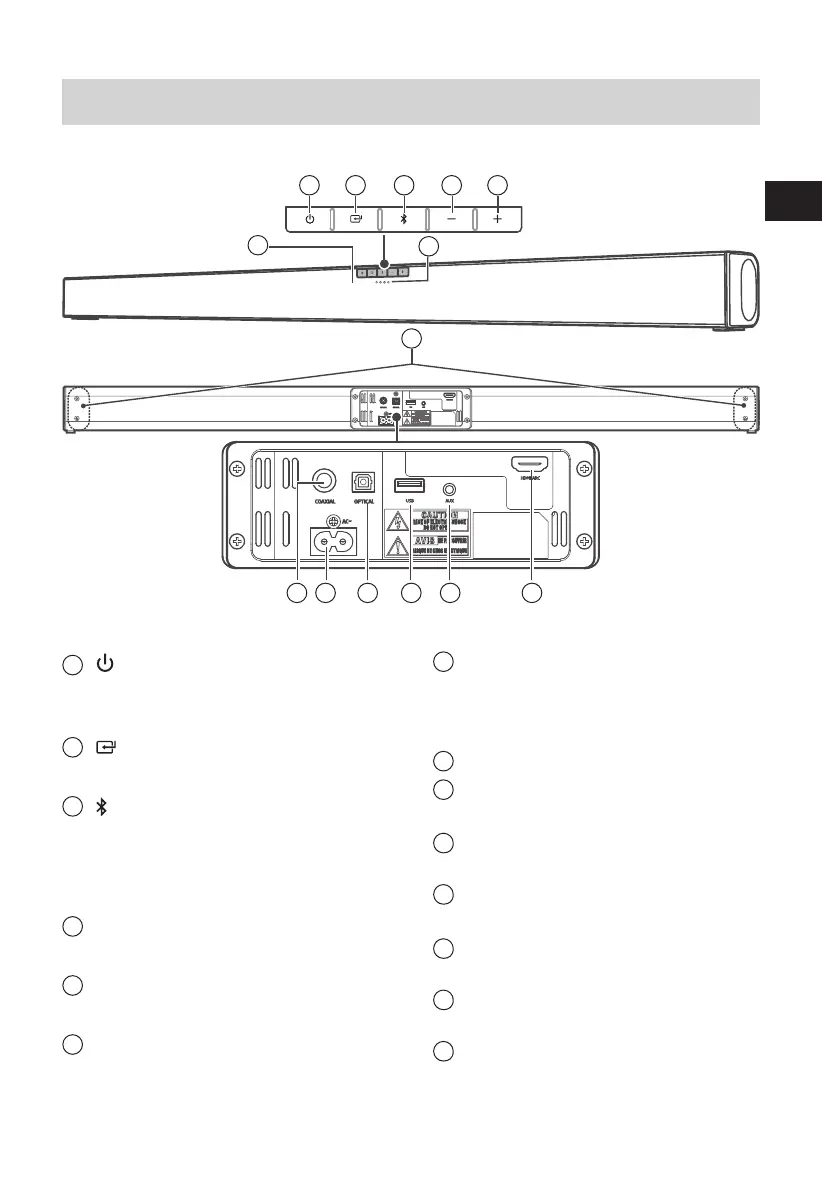
Main Unit
1
(ON/OFF)
Switch the unit between ON and STANDBY
mode.
2
(SOURCE)
Select the play mode.
3
(Bluetooth)
Select the Bluetooth mode.
Press and hold to activate the pairing
function in Bluetooth mode or disconnect
the existing paired Bluetooth device.
4
- (volume)
Decrease the volume level.
5
+ (volume)
Increase the volume level.
6
Remote Control Sensor
7
LED Indicators
• Red/Green: In STANDBY/AUX mode.
• Orange/ash: In Optical/Coaxial mode.
• Blue: In Bluetooth mode.
• White/ash: In HDMI ARC/USB mode.
8
Wall bracket screws
9
COAXIAL Socket
Digital audio connection.
10
AC~ Socket
Connect power cord.
11
OPTICAL Socket
Digital audio connection.
12
USB Socket
Insert the USB device.
13
AUX Socket
Connect to an external audio device.
14
HMDI ARC Socket
Connect to a TV via HDMI cable.
Rear View
Front View
6
7
8
9 10 11 12 13 14


 To Next Page