12
EN
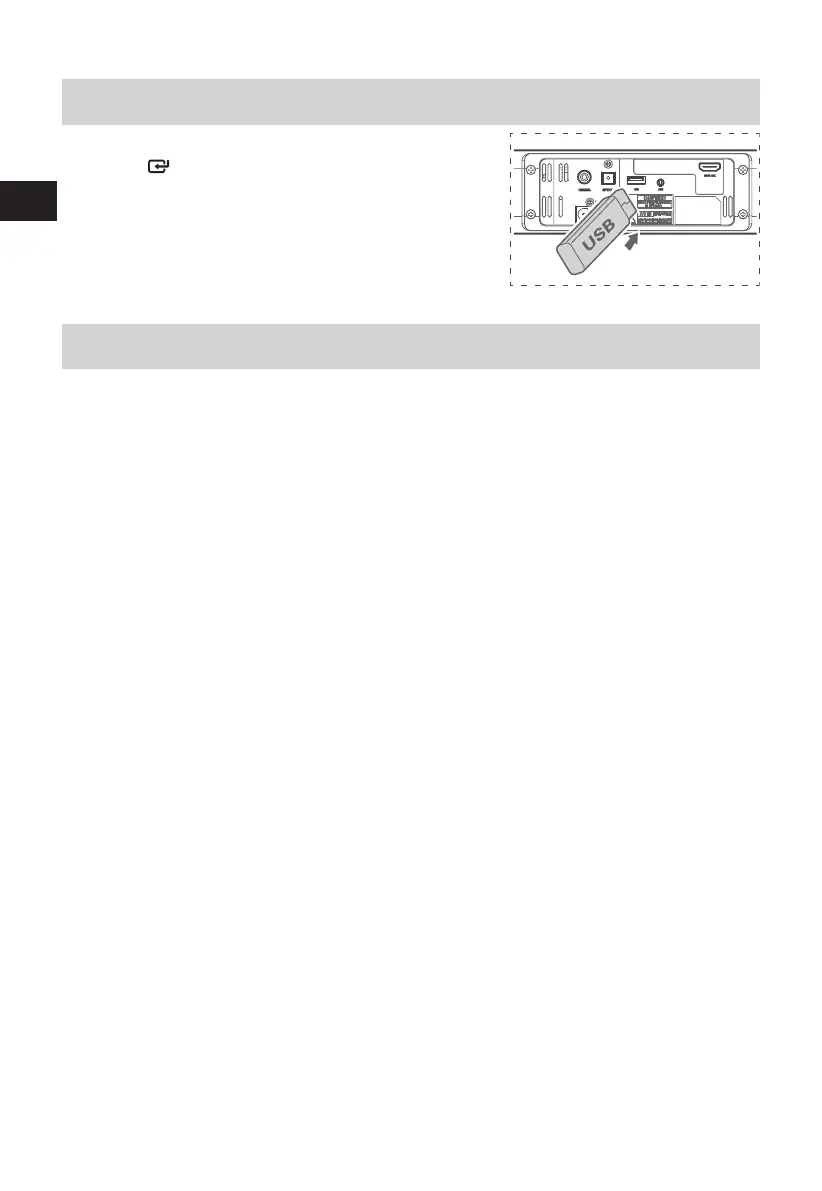
USB Operation
1 Insert the USB device.
2 Press the button on the unit or the USB button on the
remote control to select USB mode.
3 Play starts automatically. If play does not start automatically,
press
BF
/PAIR button.
- To skip to the previous/next track, press the
H
/
G
buttons
on the remote control.
Troubleshooting
To keep the warranty valid, never try to repair the system yourself. If you encounter problems when using
this unit, review the following before requesting service.
No power
• Ensure that the AC cord is properly connected.
• Ensure that there is power at the AC outlet.
• Press standby button on the remote control or soundbar to turn the soundbar on.
No sound
• Increase the volume. Press Volume Up on the remote control or on the right side of the soundbar.
• Press MUTE on the remote control to ensure the soundbar is not muted.
• Press source buttons to select a dierent input source.
• When using either of the Digital input, if there is no audio:
- Try setting the TV output to PCM or
- Connect directly to your Blu-ray/other source, some TVs do not pass through digital audio.
• Your TV may be set to variable audio output. Conrm that the audio output setting is set to FIXED or
STANDARD, not VARIABLE. Consult your TV’s user manual for more detailed information.
• If using Bluetooth, ensure that the volume on your source device is turned up and that the device is
not muted.
Remote control does not work
• Before you press any playback control button, rst select the correct source.
• Reduce the distance between the remote control and the unit.
• Insert the battery with its polarities (+/-) aligned as indicated.
• Replace the battery.
• Aim the remote control directly at the sensor on the front of the unit.
I hear buzzing or humming
• Ensure all cables and wires are securely connected.
• Connect a dierent source device (TV, Blu-ray player, etc) to see if the buzzing persists. If it does not,
the problem may be with the original device.
• Connect your device to a dierent input on the soundbar.
I can’t nd the Bluetooth name of this unit on my Bluetooth device
• Ensure the Bluetooth function is activated on your Bluetooth device.
• Re-pair the unit with your Bluetooth device.


 To Next Page