Settings
1.
Open the door and press .
2.
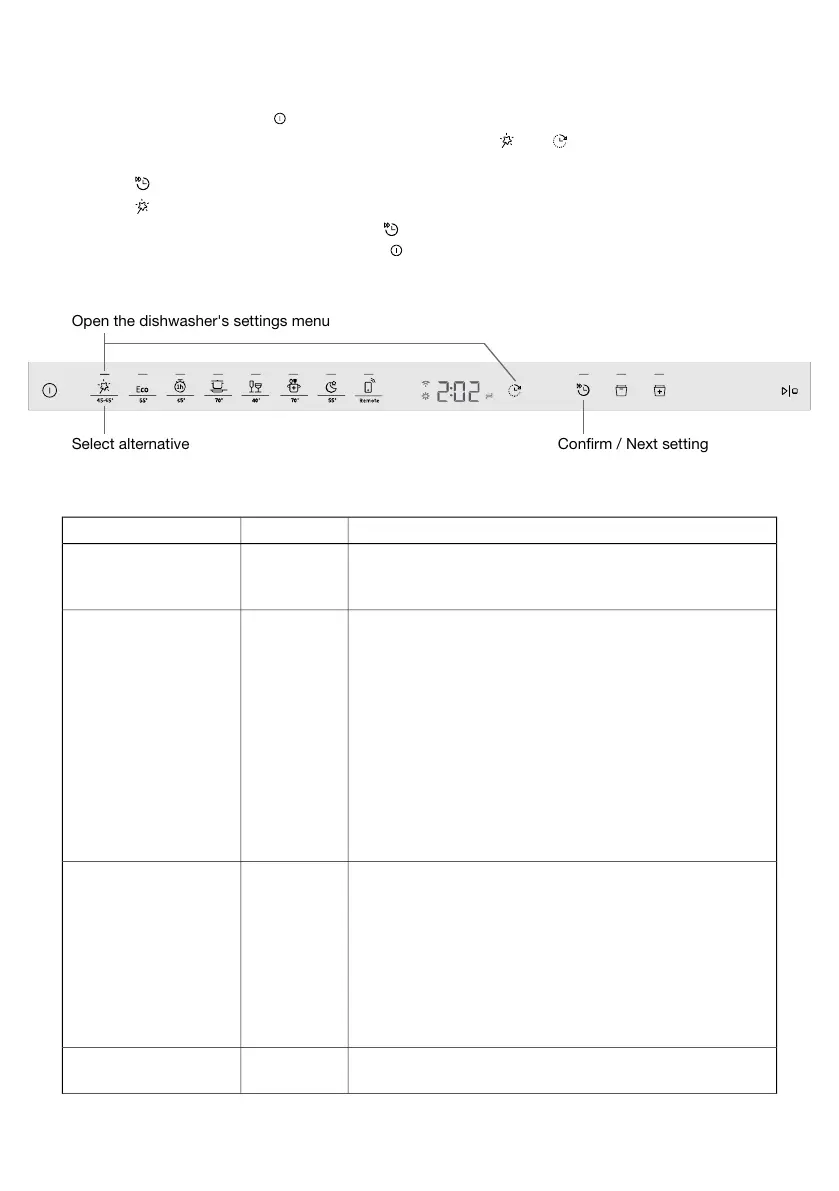
To open the dishwasher's settings menu, press and hold and until SEt is shown on the
display.
3.
Press to step through the settings menu.
4.
Press to step through the alternatives.
5.
Confirm the selected setting by pressing .
6.
To exit the menu, step through it or press .
Confirm / Next settingSelect alternative
Open the dishwasher's settings menu
AlternativesSettings
A beep confirms that the control panel has been pressed.2:00 - 2:03Sounds
A beep indicates when a dishwashing program has ended.(2:00 Off)
Error messages are always indicated by a loud buzzer.
Setting for rinse aid dosage. The rinse aid dispenser can
be adjusted between 3:00 (Off) and 3:05 (High dosage).
3:00 - 3:05
(3:00 Off)
Rinse aid
Increase the rinse aid dosage:
• If the dishes have water marks.
Decrease the rinse aid dosage:
• If the dishes have a sticky white/blue film.
• If the dishes are streaked.
• Build-up of foam. If you have very soft water, the rinse
aid can be diluted 50:50 with water.
Pre-selected at factory: 3:04
Adjusting the water softener. Select a setting depending
on the hardness of the water supply. It is important that
this setting is correct!
4:00 - 4:09
(4:00 Off)
Water hardness
See Water hardness in the chapter Before washing for the
first time.
For a water supply with a hardness below 6°dH (10°fH /
7°eH / 1.0 mmol/l), select 4:00. The water softener is deac-
tivated and no salt needs to be added.
Pre-selected at factory: 4:04
Activate this setting when using an all-in-one detergent that
contains rinse aid.
5:00 (Off)
5:01 (On)
TAB
21



 To Next Page