6
Connection Description
6
·
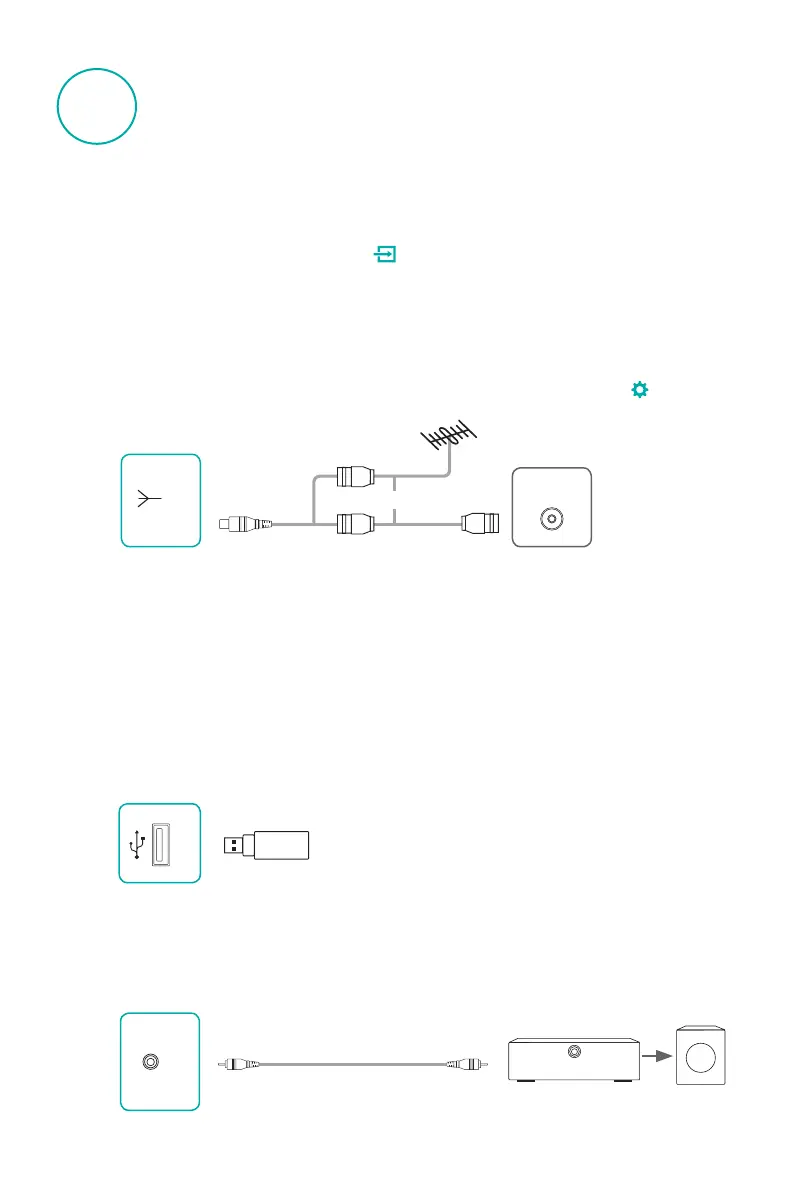
Connecting a USB Device
USB: This machine has the USB standard interface, which can be connected to
standard equipment with USB1.1, USB2.0 , including hard disk, U-disk and so on.
When multifunction USB external device is a combination device, it is recommended
that you use USB 3 jack.
The total current should be no more than 1900 mA when all the USB jacks are
connected with external devices. Hisense warranty does not cover the TV damages
and issues caused by the current overload.(Only USB 3 jack supports USB 3.0 devices)
or
USB
ANT 75Ω
COAXIAL
·
Connecting an Ex-Speaker
COAXIAL: Use a coaxial cable to connect the TV's COAXIAL jack to the Audio
Amplier, then connect the Audio Amplier to the external speaker.
COAXIAL
·
Selecting signal input
To enjoy the show from a cable set-top boxes and other external devices, select mode
with this device is connected, press the
button to enter the Source menu, select the
local port corresponding to the signal source in the Source menu.
·
Connecting an Antenna or Cable
Wired / Antenna input: It can be connected to cable networks or antenna.
•
Need to switch Analog TV, Digital TV-DTMB signal, please press the
button
to
enter the setup menu, select Tuner to switch.
Speaker audio amplifier to be connected.
Audio amplifier
Speaker



 To Next Page