2
Accessories List
1
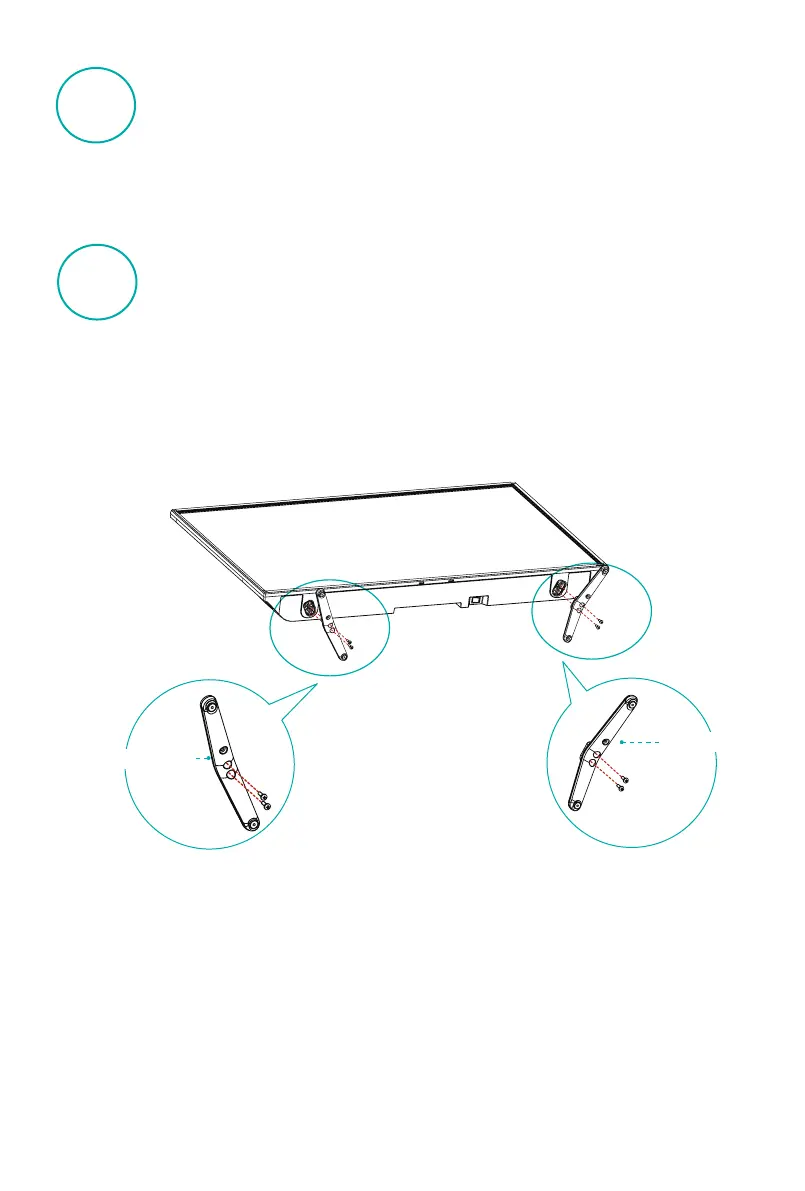
Installing the Stand
2
•
Carefully place your TV face-up on a soft, flat surface to prevent damage to the TV
or scratching to the screen.
•
Install the base stand with the provided screws in the accessory bag in case of
causing damage to TV.
•
Appearance prevail in kind.
1
2
BASE STAND
BASE STAND
M4×12(40")
M4×20(50")
M4×12(40")
M4×20(50")
User Manual
Warranty Card
Remote Control
Power line
AAA Battery
Screw
Insert the base stand into the bottom
slots of the TV, use the two screws to
the base stand and TV together.
Insert the base stand into the bottom
slots of the TV, use the two screws to
the base stand and TV together.





 To Next Page