3
Remote Control
3
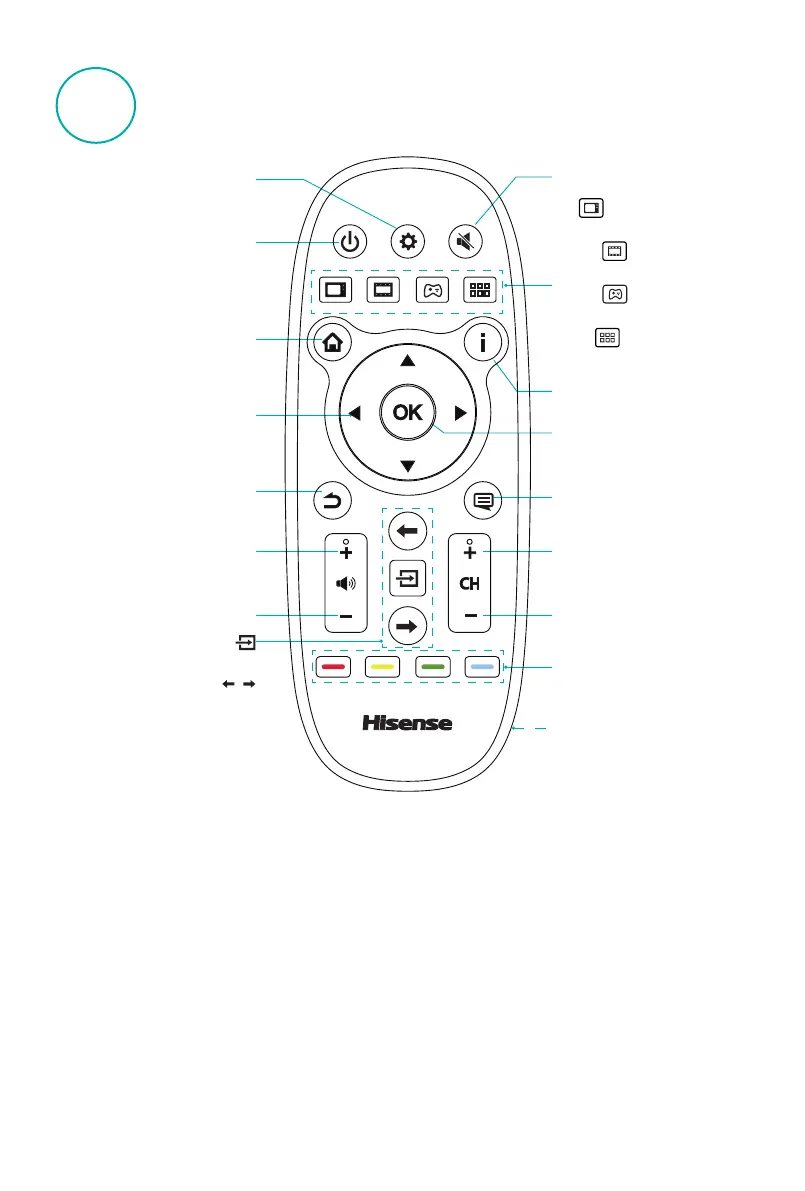
Channel increasing button
Channel down button
TV
Media
Game Apps
Menu
Information
TV
Enter Live TV
Media
Enter VOD
Game
Enter Game
Apps
Enter Apps
▲/
▲
/
▲
/
▲
Up/down/left/right button
Special function buttons
Source button
Select input sources
Switch sources
Standby button
Enter standby/exit standby
Setting button
Start/stop quick setup menu
Home button
Enter the television's Home
page
Return button
Exit the current menu
Volume increasing button
Volume down button
Mute button
Start/Exit the mute state
OK button
Conrm the selection
Battery cover hand-clasping
·
Change the battery
1.Open the battery cover,
battery cover separated from
the body in a remote control
, in the battery cover hand-
clasping place.
2. Install two AAA size (1.5V)
batteries. Match the "+" and
"-" signs on the batteries
to the signs on the battery
compartment.
3. Close the battery cover until
the body is fully consistent
with the remote control.
·
The effective range of remote control
1. Remote control distance: In front
of the remote distance 8 meters
effective range.
2. The remote control angle: taking
the television infrared light
receiver window as an apex, 6
meters away, its controlled angle
(left to right) is within 30 degrees,
while the vertical angle (up to
down) is within 15 degrees.
·
Attention
1. If the remote control doesn't work
normally, unstable, or cannot
control the TV, please update
Battery.
2. If you do not use the remote
control for a long time, remove
the batteries.(Used batteries
pollute the environment, properly
handle.)
3.To achieve the best remote
reception, the black square on
the back of the remote control
transmitter window aligned
television remote control receiver
window position for remote
operations.





 To Next Page