8
·
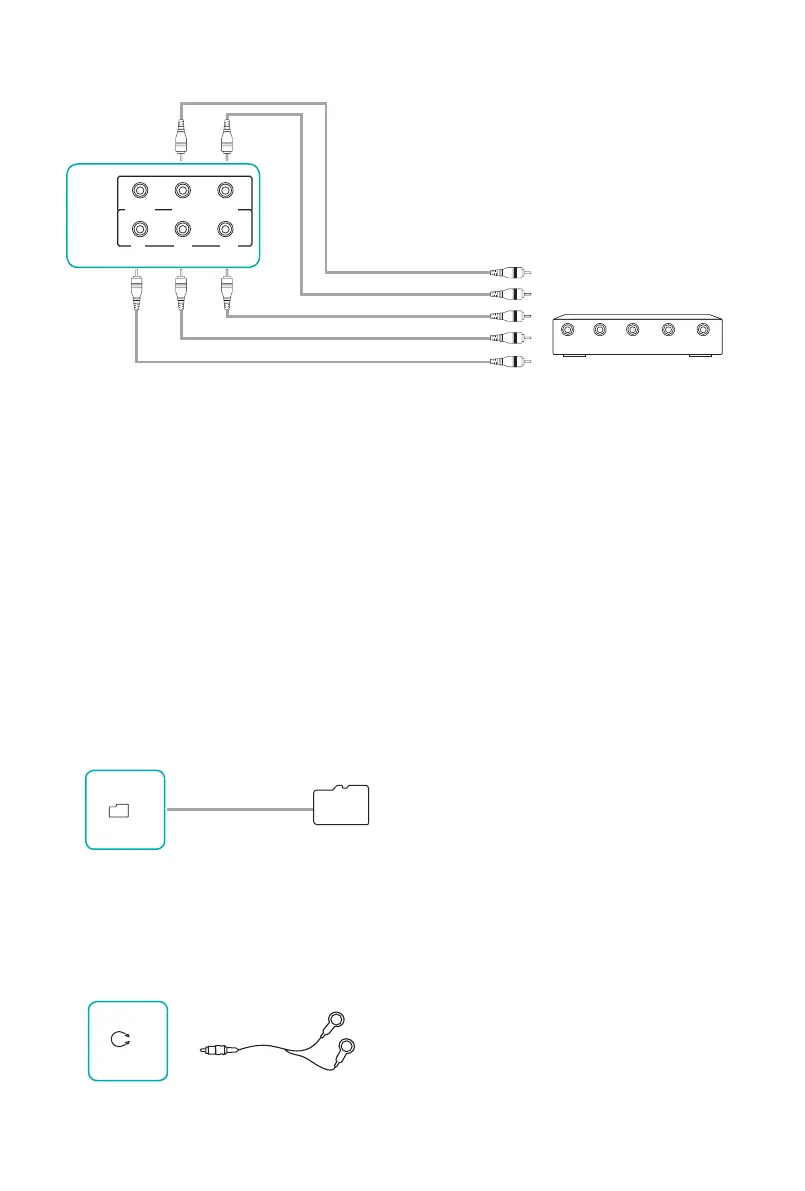
Connect the TV's COMPONENT jack to component video output jack (Y, PB, PR)
of the external A/V devices (VCD, DVD, VCR or Camcorder).
·
Connect the TV's AUDIO jack to audio output jacks (Audio Left/Right) of the
external A/V devices.
·
Component output jacks in VCD/DVD may be marked with Y, B-Y, R-Y or Y,
C
B
、C
R
.
【NOTES】
·
For video format supported by component input, refer to the specications.
·
Please make sure that the audio connects, otherwise the sound will be abnormal.
(Green)
R
L
P
R
P
B
Y
P
R
P
B
Y
With the Component Cable
·
Connecting a TF card
Connect to the TF jack in the TV with TF card (According to illustration: keep
the unlled corner up and toward the jack).
TF card
TF
AV IN
P
B
COMP
L
AUDIO
Y
VIDEO
P
R
P
R
Video Camara/VCR/Set-top box/
Satellite Receiver/DVD/VCD
(White)
Audio L
(Red)
(Red)
(Blue)
Audio R
·
Connecting a Headphone
While the headphone is connected, the sound from the built-in speakers will be
disabled.
Headphones can be connected to the HEADPHONE jack on the TV.
HEADPHONE



 To Next Page