USER MANUAL Basic Features
|
16
Search channel can be divided into in DTV signal and in ATV
signal.
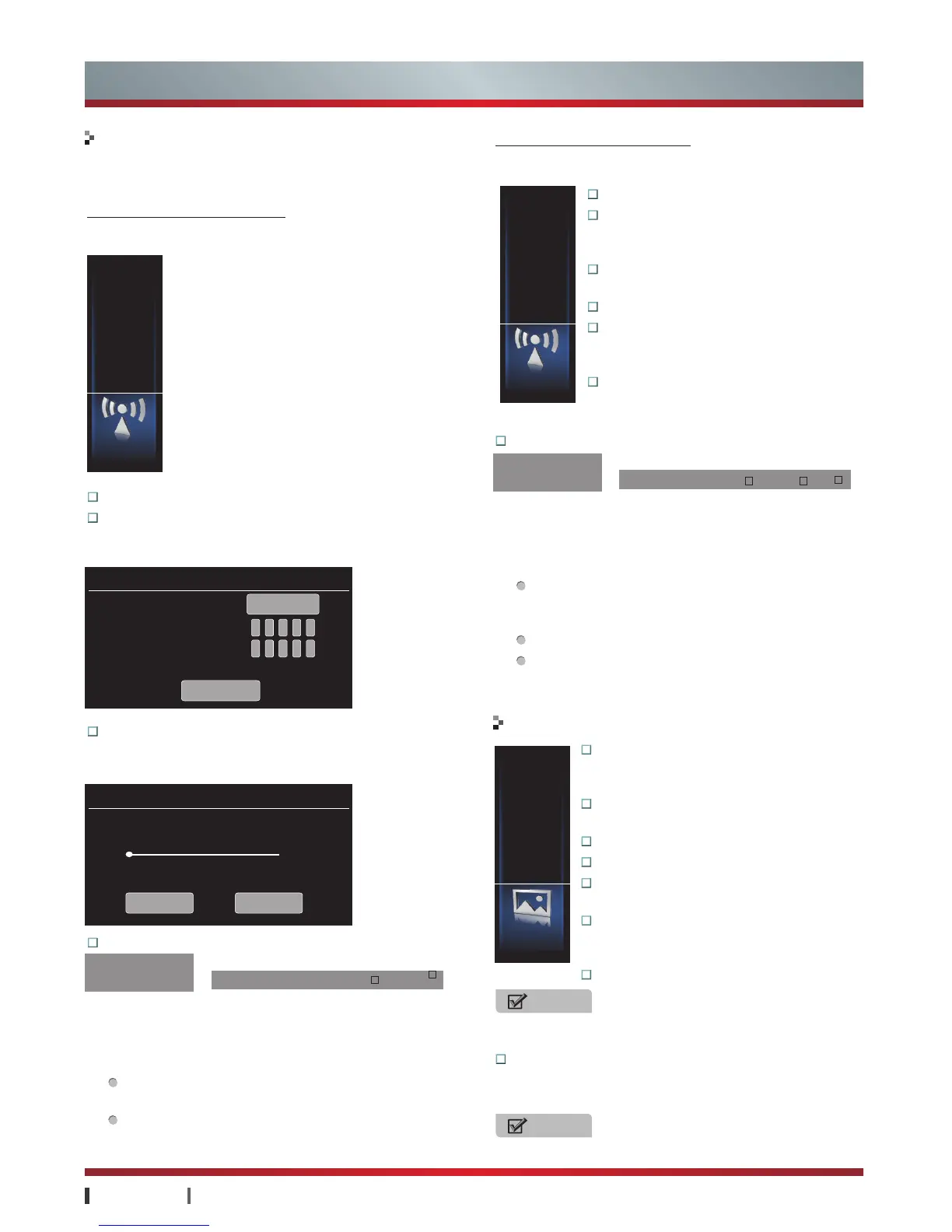
Search channel in DTV signal
-Search for digital television
signal before the Input Source is set up as "DTV". (For more
information, see "Remote Control" -> "Input Source button")
Channel:
Select the channel number.
Manual:
You can press
Numeric button
to manually set
the frequency, then press
Start to Search
to scan for
channels that have signals.
Auto Install:
Press
YES
to scan for Channels that have
signals automatically and store the channels information in
the channel list.
Program Edit:
Basic Features
Channel
Picture
Program Edit
Channel Setting
Channel
Manual Tuning
Auto Install
Manual Tune
Frequency
0
RF Level
Quality
Channel Number
554MHz
Start to Search
Auto Install
It will cover original channels, are you
sure to search? ?
0Channel
Frequency
50.0MHz
Yes No
50%
Search channel in ATV signal
-Search for analog television
signal before the Input Source is set up as "ATV". (For more
information, see "Remote Control" -> "Input Source button")
Channel:
Select the channel number.
Video System:
Set the video pattern
for local channels, including PAL, NTSC,
SECAM and AUTO
Audio System:
Set the audio pattern for
local channels, including BG, DK, M, I.
Fine-Tune:
Adjust the current frequency band.
Auto Install:
Automatically scan for
Channels that have signals and store the
channels information in the channel list.
Manual Tuning:
Manually scan for
channels in current frequency. Press
▲
/
▲
/
OK button
to search the channel.
1
Functions:
Edit your TV programmes. You can add a
channel into favorite list, skip a channel in DTV mode.
2
Operations:
Press
Menu
to enter channel setting, then
select program edit.
Fav.:
Set the selected channel as one of the favorite
programmes.
Skip:
Skip the selected channel. To recover the skipped
channel, select the icon and press
OK
to confirm.
NOTE
Adjust the Tint for NTSC signal reception in ATV/AV mode.
3DNR:
It can optimize the picture signal from time and
space; reduce the outside noise interference and return
the pure initial signal.
NOTE
If the TV has no signal, this option is unadjustable.
1
Functions:
Edit your TV programmes. You can move the
location of a channel, rename a channel, skip a channel in
ATV mode.
2
Operations:
Press
Menu
button to enter menu.
Move:
Move the location of the selected channel.
Press ▲ /
▼
to select the location to be inserted, and
then press
OK
to confirm.
Rename:
Change the name of the selected channel.
Skip:
Skip the selected channel. To recover the skipped
channel, select the icon and press
OK
to confirm.
Program Edit:
001 TV Program
002 TV Program Move Rename Skip
Program Edit
001 TV Program
002 TV Program Skip Favorite
Program Edit
Video System
Fine-Tune
Manual Tuning
Audio System
Channel
Auto Install
▲
Channel Setting
Picture
Setting
Picture Mode
Contrast
Sharpness
Brightness
Color
Color Temp
▲
Picture Mode:
The picture modes including
Standard, Stadium, Game, Cinema, Concert,
Studio and User.
Brightness:
Adjust the brightness of the
picture.
Contrast:
Adjust the contrast of the picture.
Color:
Adjust the level of color in the picture.
Sharpness:
Adjust the sharpness level for
clearer picture or smoother picture.
Color Temperature:
Adjusts the color
components independently to achieve a
warm or cool feeling.
Tint:
Adjust flesh tones so they appear natural.



 To Next Page
 Loading...