13
|
Connections USER MANUAL
Connections
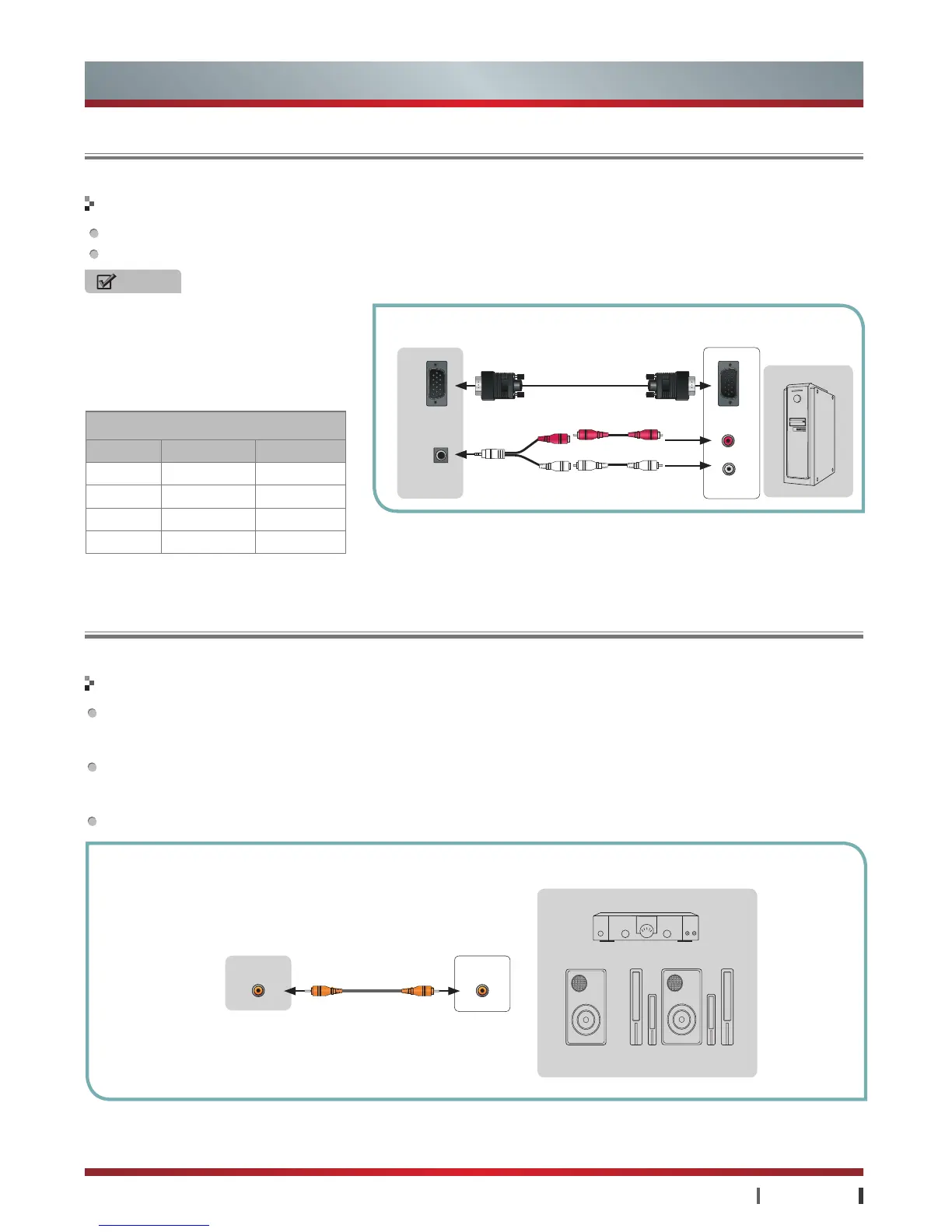
The TV set has D-sub15 pin RGB computer standard jack, connect the TV VGA jack to the PC.
Connect the TV's AUDIO IN jack to audio output jacks (Audio Left/Right) of PC.
Making Connections
NOTES
·
The VGA audio signal are conneted to
PC with Audio Adapter provided. Please
make sure that the audio connects,
otherwise the sound will be abnormal.
·
For video format supported by VGA input,
refer to the table.
TV JACKS
Audio L
EXTERNAL
DEVICES
Connecting a PC
Use a coaxial cable to connect the TV's COAXIAL jack to the Audio Amplifier's coaxial jack, or use the AV Out Adapter to
connect the TV's AV OUT jack to the Audio Amplifier's coaxial jack, then connect the Audio Amplifier to the external speaker.
(COAXIAL output digital signal, AV OUT output analog signal.)
When connect an external speaker, the TV sound send to other external speakers through the audio cable (recommend you
for the Hisense Strip audio products), There's no sound from the built-in speaker. So make sure that the external speakers is
switched on.
Before connecting external speaker, please turn down the volume of the TV and the external speaker.
Making Connections
Connecting an Ex-Speaker
White
Red
VGA
VGA
AUDIO IN
VGA Input
Format Resolution Frequency
VGA 640×480 60Hz
SVGA 800×600 60Hz
XGA 1024×768 60Hz
SXGA 1280×1024 60Hz
Audio LAudio L
Audio RAudio R
COAXIAL COAXIAL
TV JACKS
Powerless
Bass Speaker
EXTERNAL DEVICES
Speaker
Audio Amplifier
Audio R



 To Next Page
 Loading...