- 28 -
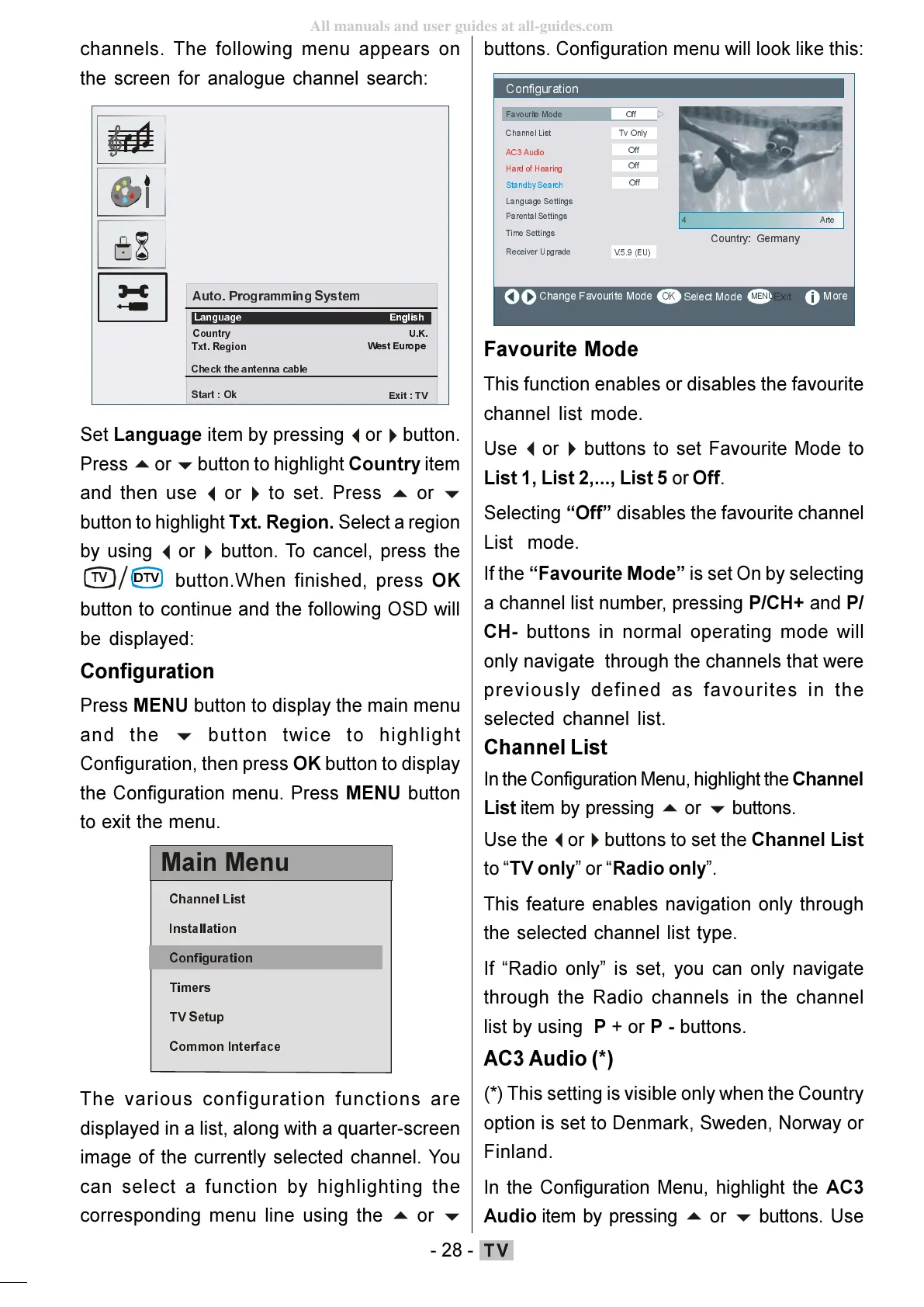
channels. The following menu appears on
the screen for analogue channel search:
$ XWR3URJUDPPLQJ6\VWHP
&RXQWU\
8.
&K HFNWKHDQWHQQDFDEOH
6WDUW2N
([LW79
/DQJXDJH
(QJOLVK
7[W5HJLRQ
Set Language item by pressing
button to highlight Country item
and then use
button to highlight Txt. Region. Select a region
by using
button. To cancel, press the
79
button.When finished, press OK
button to continue and the following OSD will
be displayed:
Configuration
Press MENU button to display the main menu
and the
button twice to highlight
Configuration, then press OK button to display
the Configuration menu. Press MENU button
to exit the menu.
0DLQ0HQX
&KDQQHO/LVW
,QVWDOODWLRQ
7LPHUV
796HWXS
&RPPRQ,QWHUIDFH
The various configuration functions are
displayed in a list, along with a quarter-screen
image of the currently selected channel. You
can select a function by highlighting the
corresponding menu line using the
buttons. Configuration menu will look like this:
&RQILJXUDWLRQ
)DYRXULWH 0RGH
&KDQQHO/LVW
/DQJXDJH6HWWLQJV
7LPH6HWWLQJV
5HFHLYHU8SJUDGH
0RUH
7Y2QO\
9 (8
2II
3DUHQWDO6HWWLQJV
$&$XGLR
2II
+DUGRI+HDULQJ
2II
6WDQGE\6HDUFK
2II
Favourite Mode
This function enables or disables the favourite
channel list mode.
Use
buttons to set Favourite Mode to
List 1, List 2,..., List 5 or Off.
Selecting Off disables the favourite channel
List mode.
If the Favourite Mode is set On by selecting
a channel list number, pressing P/CH+ and P/
CH- buttons in normal operating mode will
only navigate through the channels that were
previously defined as favourites in the
selected channel list.
Channel List
In the Configuration Menu, highlight the Channel
List item by pressing
buttons to set the Channel List
to TV only or Radio only.
This feature enables navigation only through
the selected channel list type.
If Radio only is set, you can only navigate
through the Radio channels in the channel
list by using P + or P - buttons.
AC3 Audio (*)
(*) This setting is visible only when the Country
option is set to Denmark, Sweden, Norway or
Finland.
In the Configuration Menu, highlight the AC3
Audio item by pressing
buttons. Use
ENG-01-TV-22784W-1165UK-MB29-PEUIDTV-(1SCRT-AV-YPBPR-HP-SPDIF-STRLOUT-PCIN)-10060401-5013xxxx.p6511.10.2008, 17:3728
All manuals and user guides at all-guides.com







 To Next Page