33
Random playback (VCD)
1
Press PLAY MODE during playback or stop
mode.
2
Press / to select “Mode”, then press
ENTER to select “Random”.
3
Press PLAY ( ).
The Random Playback will start.
If you set “Random” during playback mode,
Random playback will begin after the track
that is currently being played has ended.
To resume normal playback, select Mode
“Off” in step 2.
•
•
Note:
In case of Video CD with PBC, you cannot set
Program playback.
The program is cancelled when you eject the disc or
turn the power off.
In case of Video CD with PBC, you cannot set
Random function during playback.
•
•
•
Customizing The Function Settings
You can change the default settings to
customize performance to your preference.
Setting procedure
1
Press SETUP in stop
mode.
The following on-screen
display appears.
Parental : Off
Set Password
Output : Interlace
DivX(R) VOD
DRC : Off
QSound : On
E.B.L. : Off
TV Screen : 4:3
Display : On
Picture Mode : Auto
JPEG Interval : 5 Seconds
Screen Saver : On
Menu : English
Subtitle : English
Audio : English
OSD : English
2
Press or to select
the desired section, then
press or ENTER.
Parental : Off
Set Password
Output : Interlace
DivX(R) VOD
DRC : Off
QSound : On
Menu : English
Subtitle : English
Audio : English
TV Screen : 16:9
Display : On
Picture Mode : Auto
JPEG Interval : Off
3
First option will be
highlighted.
Press
or to select the
desired option.
Parental : Off
Set Password
Output : Interlace
DivX(R) VOD
DRC : Off
QSound : On
Menu : English
Subtitle : English
Audio : English
TV Screen : 16:9
Display : On
Picture Mode : Auto
JPEG Interval : Off
4
Then press or ENTER.
The selectable settings
will appear.
TV Screen 4:3
Display : On
Picture Mode : Aut
JPEG Interval : Off
TV Screen 4:3
4:3
16:9
5
Change the selection using or , by referring
to the corresponding pages 34 ~ 36.
Press ENTER to save the setting.
Repeat steps 3 - 5 to change other option.
To select another section, go back to step 2
by pressing or RETURN repeatedly.
•
•
6
To clear SETUP screen, press SETUP or press
RETURN repeatedly.
Setting details
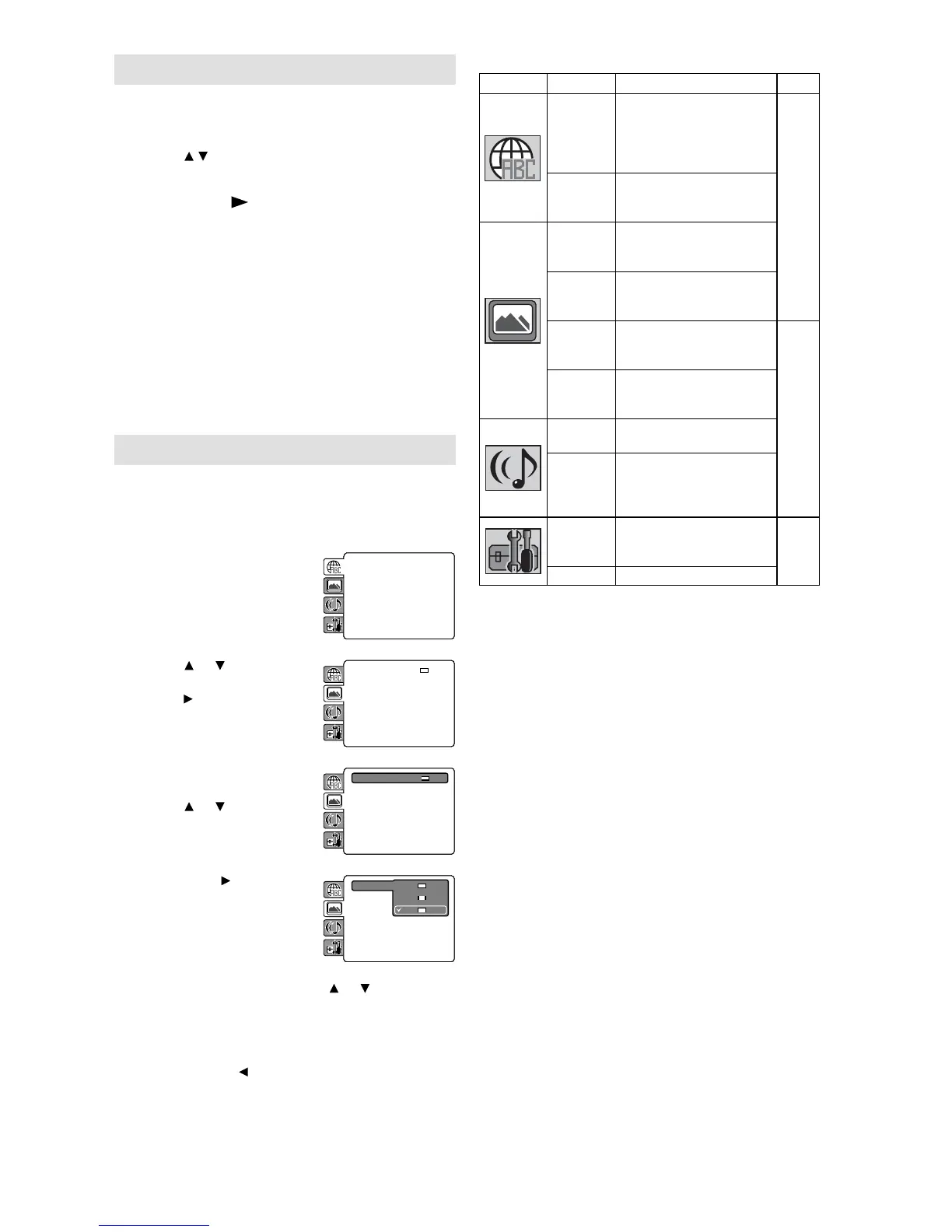
Section Option Details
Page
Menu
Subtitle
Audio
To select the language of
“Menu”, “Subtitle” and
“Audio” if more than one
languages are available
on the disc.
34
OSD To select a preferred
language for on screen
display.
TV
Screen
To select a picture size
according to the aspect
ratio of your TV.
Display To turn On or Off the
operational status
display on the screen.
Picture
Mode
To select a preferred
picture mode from
“Video”, “Film” or “Auto”.
35
JPEG
Interval
To select a preferred
setting for the slide show
playback.
Night
Mode
To select On or Off for
Night Mode.
Digital
Out
To select a digital
output sound format
corresponding to your
system connection.
Parental To select a preferred
parental level for the
parental setting.
36
Password To change the password.



 To Next Page