41
Connection to other equipment
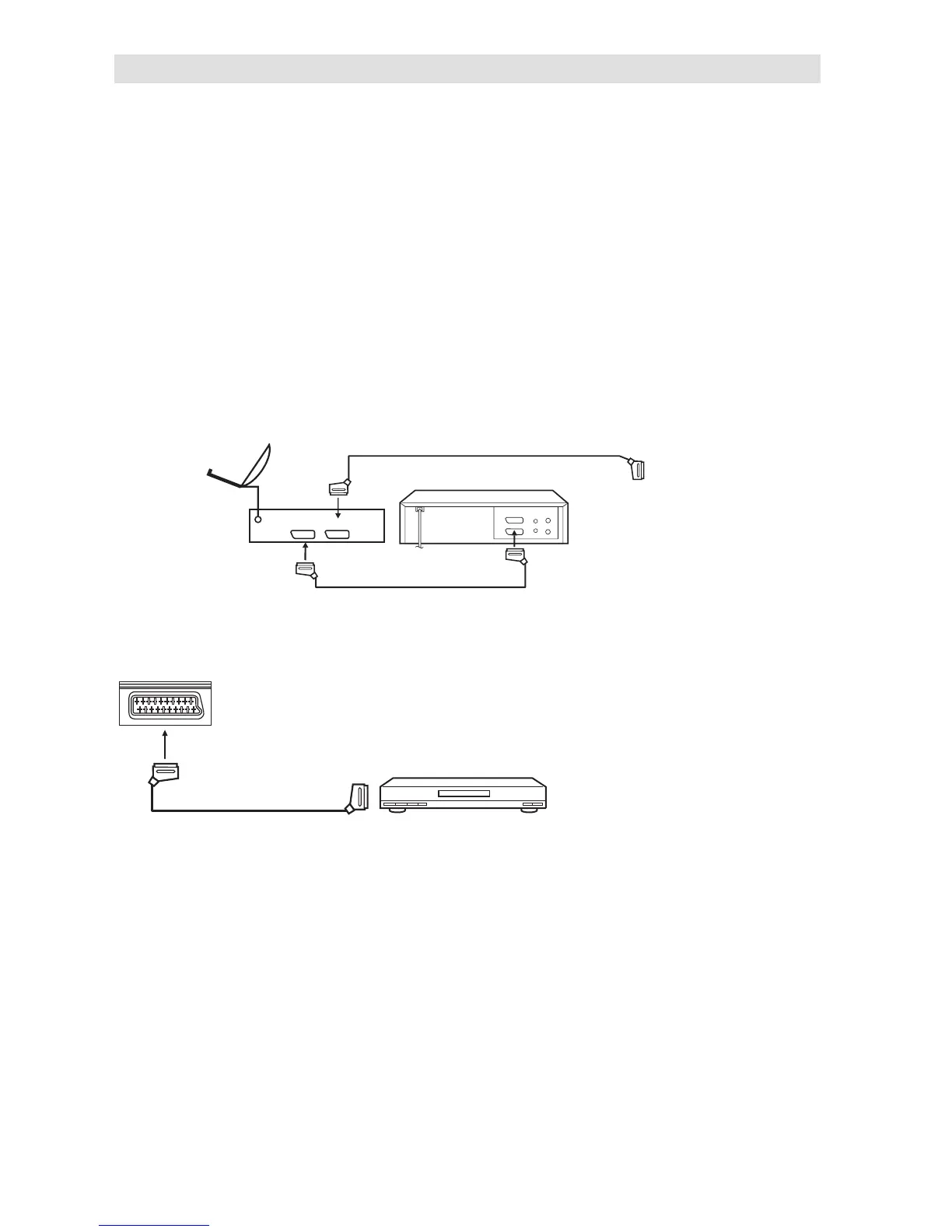
2. Connecting a DVD player
DVD Player
(SCART cable, not supplied)
TV (Back side view)
VCR
TV
(All illustrated SCART cables and
antenna cables are not supplied)
TV
Satellite antenna
Satellite
receiver
Video recorder
1. Connecting to other equipment
Attention: Preparation:
• Disconnect all equipment from the AC-supply, to prevent any possible damage.
• Make the necessary connections.
• Make sure all connections are safe & secure before reconnecting your equipment the AC-supply.
Pls connect your satellite-receiver or DVD player via SCART (unless equipped with HDMI or DVI).
Make sure your SCART cable’s cross-section is at least 1 cm or more. SCART cables with less
thickness may cause visible noise.
Pls make the following settings inside your receiver’s / DVD-player’s setup-menu:
Video signal: RGB
TV-Format: 16:9
If you miss to make these settings properly, picture quality will be inferior and parts of the picture
might be missing. This is not a fault of this TV-set.
In case you need help to make this adjustment with your satellite-receiver / DVD-player, pls consult
the related instructions or contact the supplier or maker of those apparatus for support.
Pls use the satellite’s remote-control handset to select Teletext or desired TV-station. Generally it is
not possible to store satellite TV-stations into a standard TV.
If the TV does not automatically switch to AV-1, please select INPUT AV1 manually, as seen on page
11.



 To Next Page