English - 8 -
Remote Control
1
2
3
4
5
6
7
8
9
10
11
12
13
14
15
16
17
18
19
20
21
22
23
24
25
26
Inserting the Batteries into the Remote
Remove the screw that secures the battery compart-
Lift the cover gently. Insert two 1.5V - size AAA bat-
teries. Make sure the (+) and (-) signs match (observe
correct polarity). Do not mix old and new batteries.
Replace only with same or equivalent type. Place the
cover back on. Then screw the cover back on again.
To pair remote with the TV
accessories will be performed before the initial setup
starts. You will need to pair your remote control with
your TV at this point.
Press and hold the Source button on the remote for
about 5 seconds, the LED on the remote will light up.
Then release the Source button, the LED will start
to blink. That means the remote is in pairing mode.
name of your remote and press OK when it appears
on the TV screen.
When the pairing process was successful, the LED
the remote will enter to sleep mode after 30 seconds.
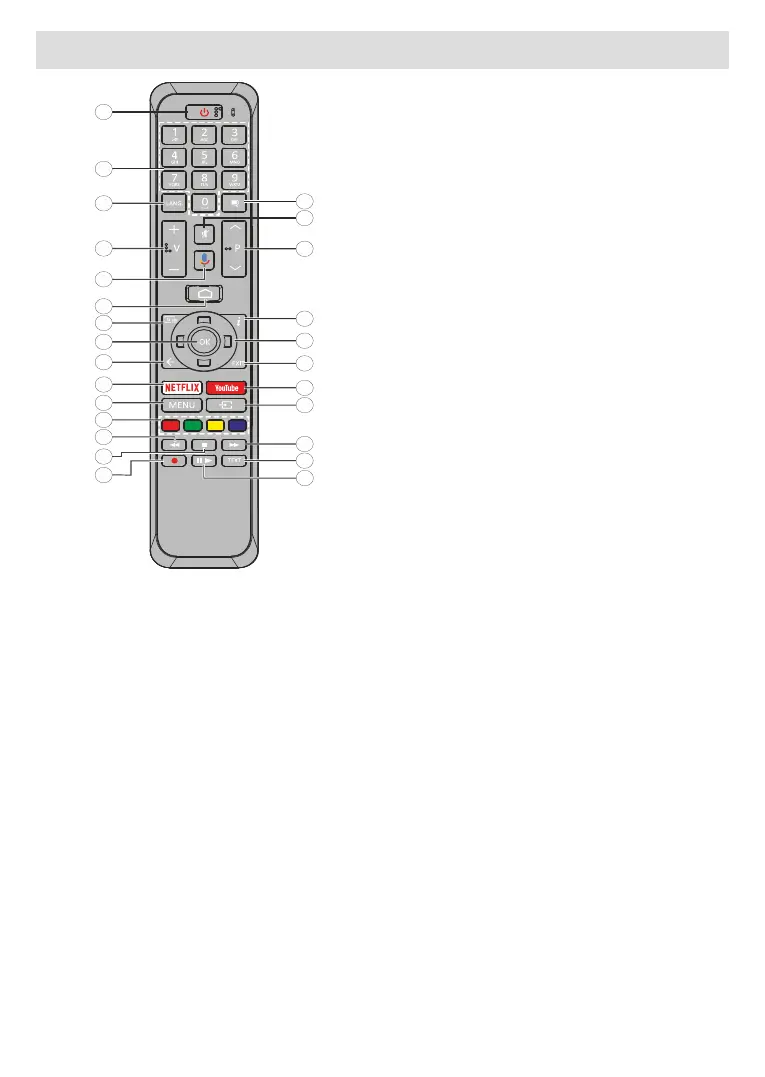
1. Standby: Quick Standby / Standby / On
2. Numeric buttons: Switches the channel in Live TV
mode, enters a number or a letter in the text box on
the screen
3. Language: Switches among sound modes (analogue
TV), displays and changes audio language (digital TV,
where available)
4. Volume +/-
5. Microphone: Activates the microphone on the remote
6. Home: Opens the Home Screen
7. Guide: Displays the electronic programme guide in
Live TV mode
8. OK: Confirms selections, enters sub-menus, views
channel list (in Live TV mode)
9. Back/Return: Returns to previous menu screen, goes
one step back, closes open windows, closes teletext (in
Live TV-Teletext mode)
10.
11. Menu: Displays Live TV Settings menu in Live TV mode
12. Coloured Buttons: Follow the on-screen instructions for
coloured button functions
13. Rewind: Moves frames backwards in media such as
movies
14. Stop: Stops the media being played
15. No function
16. Pause: Pauses the media being played
Play: Starts to play selected media
17. Text: Opens and closes teletext (where available in
Live TV mode)
18. Fast forward: Moves frames forward in media such
as movies
19. Source: Shows all available broadcast and content
sources in Live TV mode
20. YouTube: Launches the YouTube application
21. Exit: Closes and exits from displayed Live TV Settings
menus, closes the Home Screen
22. Directional buttons: Navigates menus, setting options,
moves the focus or cursor etc. and displays the subpages
in Live TV-Teletext mode when pressed Right or Left.
Follow the on-screen instructions
23. Info: Displays information about on-screen content
24. Programme +/-: Increases/Decreases channel number
in Live TV mode
25. Mute:
26. Subtitles:
Standby Button
Press and hold the Standby button on the remote
control. dialogue will appear on the screen.
Highlight OK and press the OK button. The TV will
to switch the TV into quick standby mode or to switch
on the TV when in quick standby or standby mode.



 To Next Page