Need help?
Do you have a question about the Hitachi 50HK5100 and is the answer not in the manual?
Insert AAA batteries into the remote control for operation.
Connect the antenna to the TV's aerial input socket.
Connect the TV's power cord to a mains socket.
Turn on the TV using the remote or side button.
Connect HDMI devices to the TV's HDMI input port.
Guide through initial TV setup including language and country.
Warnings on electrical shock, ventilation, liquid exposure, and heat.
Explains symbols for safety, electrical safety, and laser warnings.
Precautions for securely mounting the TV on a wall.
Tips for reducing energy consumption and eco-friendly disposal.
Details Ultra HD, HDR/HLG capabilities, and audio features.
Lists items included in the TV package, like remote and batteries.
Explains notifications for standby mode and auto power-off.
How to use the TV's single physical control button.
Detailed steps for using the TV's physical control button.
Explains the functions of each button on the remote control.
Overview of the main menu and its primary sections.
Details sections like Home, TV, Settings, Apps, and Sources.
Covers remote battery, power, antenna, and license information.
Guidelines for disposing of electronics and batteries in the EU.
Disposal advice for business users and outside the EU.
Technical details on TV broadcasting, channels, and voltage.
Frequency ranges and power output for wireless LAN.
Regulations for wireless LAN use in different countries.
Detailed functions of all buttons on the remote control.
How to assign a custom function to the 'My Button 1'.
Lists various connectors (VGA, HDMI, USB, LAN, etc.) and their usage.
Recommends using a high-speed shielded HDMI cable for 4K content.
Instructions for switching the TV on, off, and into standby mode.
Step-by-step process for initial TV setup and configuration.
Managing input sources, including HDMI settings for 4K/HDR.
Connecting USB devices and playing media files.
Accessing and viewing media files through the Media Browser.
Features for streaming content and controlling HDMI devices.
Using the TV audio with external sound systems via ARC.
Options for adjusting picture modes, contrast, brightness, and other visual settings.
Settings like Dynamic Contrast, Noise Reduction, and Colour Temp.
Options for adjusting volume, equalizer, sound modes, and audio outputs.
Configuring network type, scanning wireless networks, and internet speed test.
Tuning for digital aerial, cable, analogue, and satellite channels.
Options for language, privacy, parental controls, and date/time.
Details on Netflix, HBBTV, Software Upgrade, Auto TV OFF, and Biss Key.
Explains AVS, Power Up Mode, Virtual Remote, CEC, and Speakers.
Managing, filtering, and organizing channels and favorite lists.
Setting up parental locks for channels, menus, and maturity levels.
Browsing TV schedules, event details, and filtering by genre.
Accessing and using teletext and digital teletext features.
How to search for and install TV firmware updates.
Common issues like TV not turning on, poor picture, no sound, and remote control problems.
Table of typical video display modes and resolutions for PC input.
Compatibility of various video sources (PAL, SECAM, YPbPr, HDMI) with the TV.
Lists supported video codecs, resolutions, bit rates, and containers for USB playback.
Supported image formats (JPEG, PNG, BMP) and their resolutions.
Lists supported audio codecs, sample rates, bit rates, and containers for USB playback.
Supported subtitle extensions and parsers for internal and external subtitles.
Table of resolutions supported via DVI converter cable.
How to connect the TV to a home network using an Ethernet cable.
Steps to connect the TV to a wireless network via Wi-Fi.
How to test the TV's internet connection speed and bandwidth.
Configuring IP and DNS settings for the network connection.
Steps to scan for networks, connect to password-protected Wi-Fi, and use WPS.
Enabling or disabling the Wake-on-LAN/Wireless LAN feature.
Using the TV as a wireless display device for streaming.
Troubleshooting tips for wireless connection problems.
Advice for resolving slow internet or playback disruptions.
Tips for issues with internet access or AVS feature.
Accessing, adding, and managing apps from the Apps menu.
Navigating websites, using speed dial, and browser features.
Information on Hybrid Broadcast Broadband TV and its applications.
Using the Smart Center app for remote control and streaming.
Prerequisites for using internet-based features and network connection.
Details on channel list, TV viewing, EPG, and settings within the app.
Using voice commands and keyboard input via the mobile app.
Prerequisites for using Amazon Alexa voice control with the TV.
Steps to connect TV, mobile device, and Alexa for voice control.
Examples of voice commands for controlling TV functions.
Notes on DVB receiver suitability and future compatibility.
Information on proper disposal of the product in EU countries.
Statement of compliance with EU directives and links to full text.
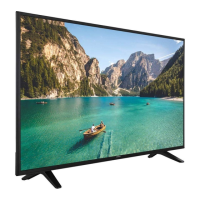
Details on energy consumption, screen size, and display resolution.
 General
| Screen shape | Flat |
|---|---|
| Response time | - ms |
| Display diagonal | 50 \ |
| Display brightness | 350 cd/m² |
| Display technology | LED |
| Native aspect ratio | 16:9 |
| LED backlighting type | Direct-LED |
| Contrast ratio (typical) | 5000:1 |
| Display diagonal (metric) | 126 cm |
| Supported graphics resolutions | 3840 x 2160 |
| Motion interpolation technology | BPI (Backlight Picture Index) 1200 |
| PC in (D-Sub) | Yes |
| Common interface (CI) | No |
| USB 2.0 ports quantity | USB 2.0 ports have a data transmission speed of 480 Mbps, and are backwards compatible with USB 1.1 ports. You can connect all kinds of peripheral devices to them. |
| S-Video inputs quantity | 0 |
| Ethernet LAN (RJ-45) ports | 1 |
| Mobile High-Definition Link (MHL) | - |
| Quantity per pack | 1 pc(s) |
| Annual energy consumption | 103 kWh |
| AC input voltage | 220 - 240 V |
| AC input frequency | 50 Hz |
| Power consumption (standby) | - W |
| Power consumption (typical) | 71 W |
| Wi-Fi standards | 802.11b, 802.11g, Wi-Fi 4 (802.11n) |
| Browser supported | Opera |
| Video formats supported | H.265 |
| High Dynamic Range (HDR) technology | High Dynamic Range 10 (HDR10) |
| RMS rated power | 20 W |
| Equalizer bands quantity | 5 |
| Package type | Box |
| Package weight | 9200 g |
| Tuner type | Digital |
| Number of tuners | 2 tuner(s) |
| Analog signal format system | Not supported |
| Digital signal format system | DVB-S2, DVB-T2 |
| Video apps | Amazon Prime Video, Netflix, YouTube |
| Hybrid Broadcast Broadband TV (HbbTV) version | 1.5 |
| Product color | Black |
| Cables included | AC |
 Weight and Dimensions
| Depth (with stand) | 249 mm |
|---|---|
| Height (with stand) | 715 mm |
| Depth (without stand) | 81 mm |
| Width (without stand) | 1130 mm |
| Height (without stand) | 656 mm |
| Weight (without stand) | 8900 g |

 To Next Page