3. Signal Cable Connection
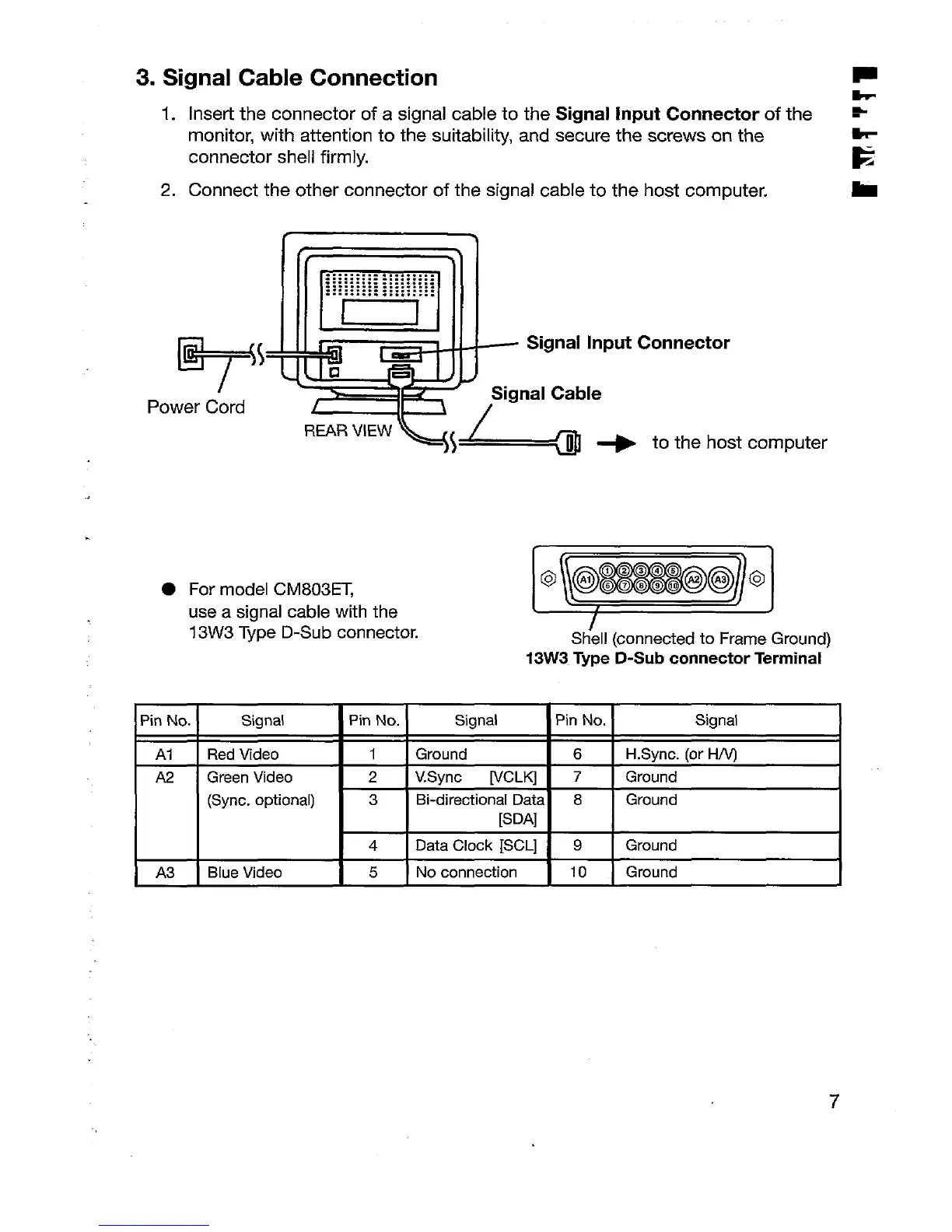
1. Insert the connector of a signal cable to the Signal input Connector of the *
monitor, with attention to the suitability, and secure the screws on the
connector shell firmly.
E
2. Connect the other connector of the signal cable to the host computer.
m
P
>
t
\’
Ed
..................
::::::::::::::::::
::::::::::::::::::
..................
v ~,. q ~-
5 Jgl ~
Signal Input
Power Cord
Signal Cable
/
Connector
‘WRV’EW%!L=+ tothehost
computer
For model CM803ET,
use a signal cable with the
13W3 Type D-Sub connector.
~
Shell (connected to Frame Ground)
13W3
Type D-Sub connector Terminal
Pin No.
Signal
Pin No.
Signal
Pin No. Signal
Al Red Video
1 Ground 6 H.Sync. (or H/V)
A2 Green Video
2 VSync ~CLKj 7 Ground
(Sync. optional) 3
Bi-directional Data 8 Ground
[SDA]
4
Data Clock [SCL] 9 Ground
A3
Blue Video 5
No connection 10 Ground
7






 To Next Page