–
18
–
EN
2C15
RL
DVD/VCR
OUT
VCR
IN
AUDIO
OUT
DVD
L
L
R
R
AUDO
VIDEO
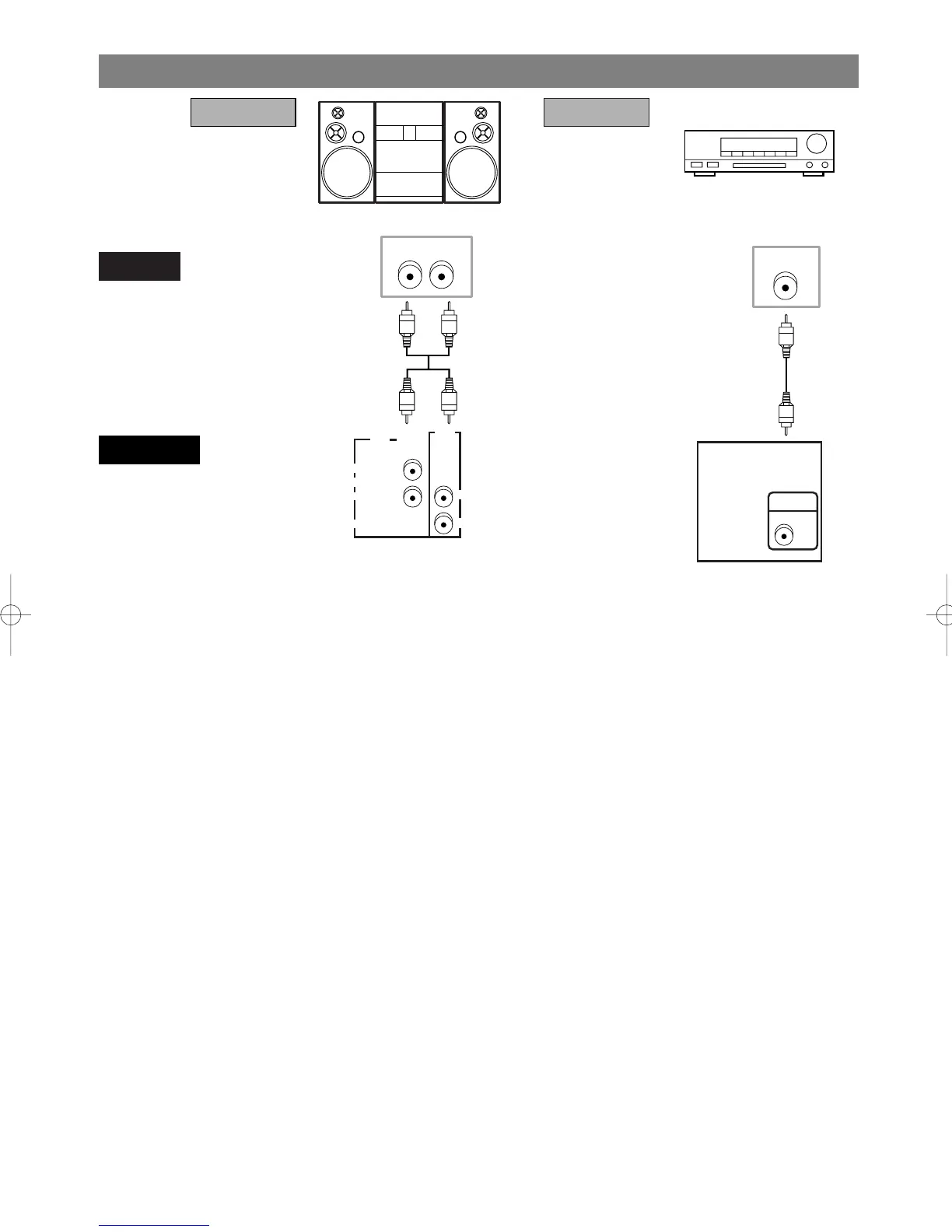
Stereo system
Dolby Digital decoder
or
DTS decoder
CONNECTION TO AN AUDIO SYSTEM
Notes
¡If output Dolby Digital audio, connect to a Dolby Digital decoder, and set Dolby Digital to on for audio out-
put in the setup mode. (See page 38)
¡
If output DTS audio, connect to a DTS decoder, and set DTS to ON for audio output in the setup mode. (See page 38)
¡Unless connected to a Dolby Digital decoder, or a DTS decoder, set Dolby Digital or DTS to off for audio out-
put in the setup mode. Playing a DVD using incorrect settings may generate noise distortion, and may also
damage the speakers. (See page 38)
¡The audio source on a disc in a 5.1 channel Dolby Digital surround format cannot be recorded as digital sound
by an MD or DAT deck.
¡
Set Dolby Digital and DTS to off for audio output in the setup mode for method 1 only. Playing a DVD using incor-
rect settings may generate noise distortion, and may also damage the speakers. (Refer to page 38 to set ON for Dolby
Digital and DTS)
COAXIAL
DVD
COMPONENT
VIDEO OUT
Y
C
R
COAXIAL
S-VIDEO
OUT
DIGITAL
AUDIO OUT
C
B
AUDIO
DVD/VCR
Method 1
Audio Input Jacks
Digital Audio
Input Jacks
Analog Audio Out Digital Audio Out
Method 2
• Method 1 DVD/VCR + Stereo system
• Method 2 DVD/VCR + Dolby Digital decoder or DTS decoder
H9210UD(EN)-2 02.4.15 10:18 AM Page 18


 To Next Page