Chapter 14 Operation Examples
14-16
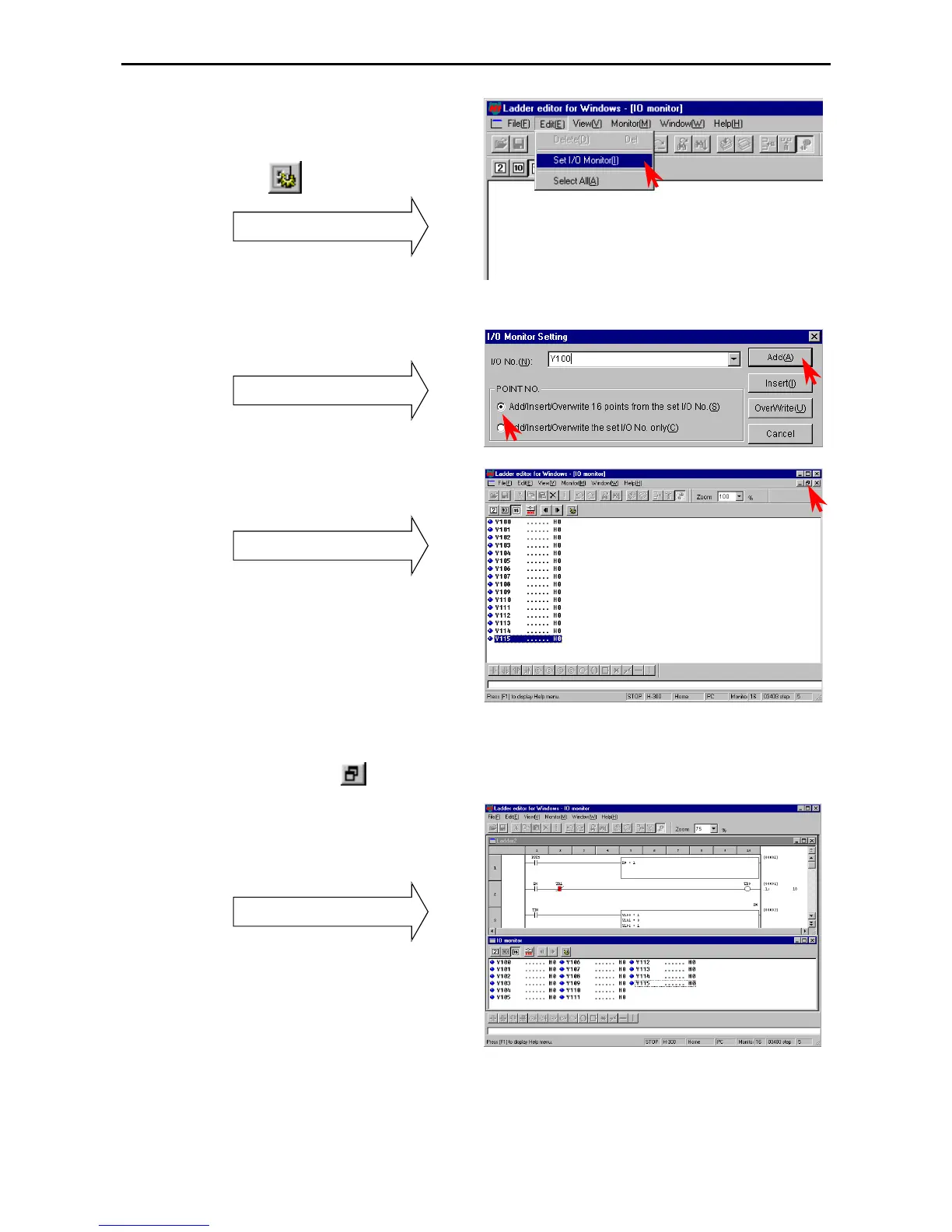
The I/O monitor can be specified in the following
two ways.
1] Click [Edit] → [I/O monitor setting] in the
Menu bar.
2] Click the
icon in the Symbol bar.
I/O Monitor dialogue box
• Enter the starting I/O No.
• Click the number of points to be monitored.
• Click on either the [Add], [Insert], or
[Overwrite] buttons.
I/O Monitor Setting dialogue box
Monitor and display 16 points from Y100.
I/O monitor
The I/O monitor can display up to 64 I/O points (up
to 64 including words/double-words).
Click the I/O No. being I/O monitored and click
[Edit] → [Delete] to delete it from the monitor.
The display size of the I/O Monitor dialogue box
can be changed by clicking
.
Both the circuit monitor in the Read/Edit screen
and the I/O Monitor can be displayed by making
their display sizes smaller to check the operation.
Display of circuit and I/O monitor



 To Next Page