4
4) Canceling “TEST RUN” Mode
1. When the unit is not operating, press the RESET switch.
2. When the unit is operating, press the RUN/STOP switch.
ATTENTION:
When “00” is indicated, the auto-address function may be performing.
Cancel the “TEST RUN” mode and set it again.
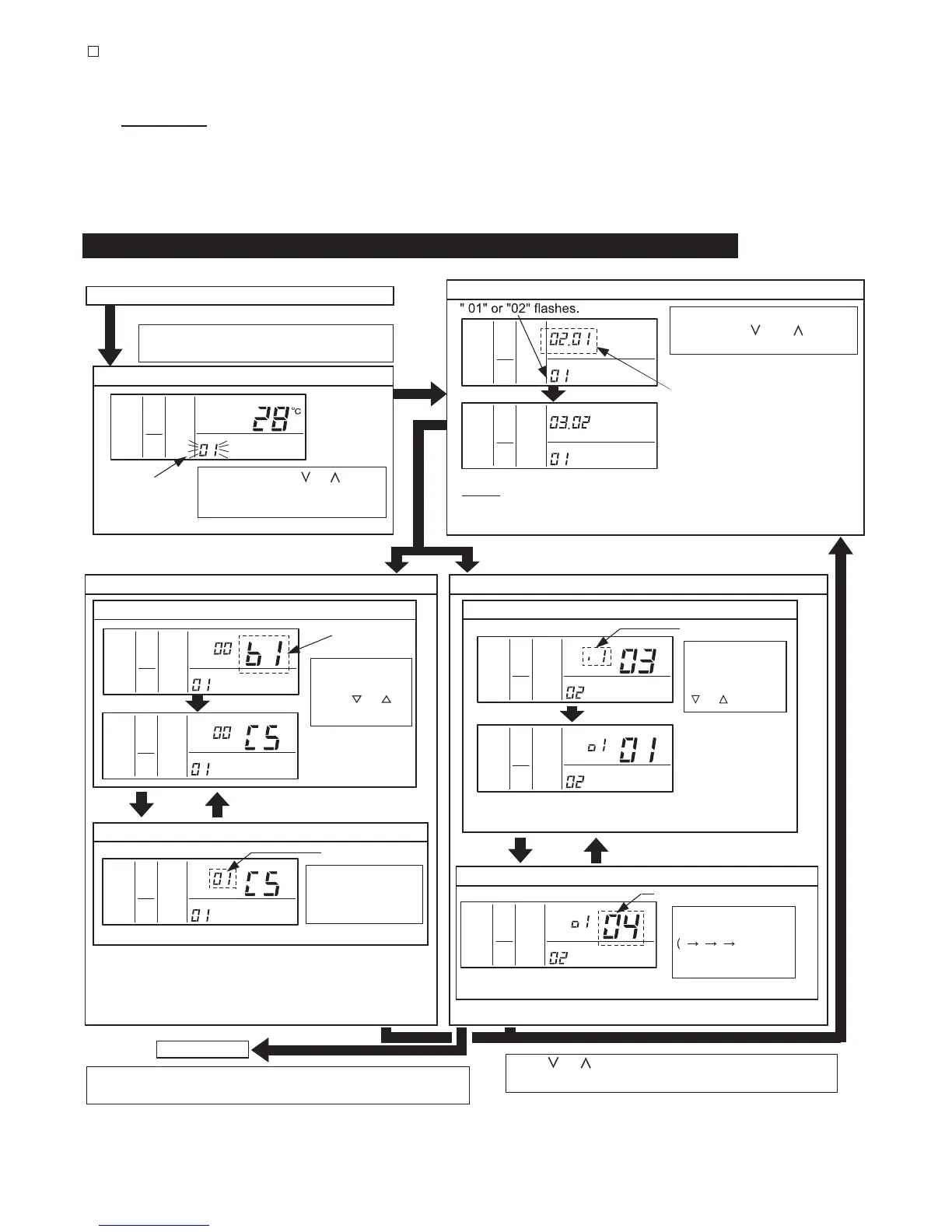
5. Optional Setting and Input / Output Setting of Indoor Unit
SERVICE
AC/
HIGH
COLO
SET TEMP.
COLO
HIGH
ADDS
RN
SERVICE
AC/
COLO
HIGH
AC/
SERVICE
ADDS RN
COLO
HIGH
AC/
SERVICE
COLO
HIGH
AC/
SERVICE
COLO
HIGH
AC/
SERVICE
COLO
HIGH
AC/
SERVICE
Normal Mode (When unit is not operating)
1. Change to the optional setting mode.
Press the "CHECK" switch and the "RESET"
switch simultaneously for more than 3 seconds.
Optional Setting Mode (Mode Number "01")
4. Selection of Optional Setting Items
Item Code of
Optional Setting
Select the item code
by pressing the
"TIME"
or
switch.
<Example>
When selecting C5
(Increasing Fan
Speed)
3. Selection of Indoor Unit for Optional Setting
Select the indoor unit to set by
pressing the " " or " " switch
and press the "CHECK" switch.
The address of the indoor unit (ADDS)
to set and the refrigerant cycle number
(RN) are indicated by 0 to 15. (The left
figure shows the No.1 cycle and No.2
indoor unit.)
<Example>
When selecting No.2 cycle and No.3 indoor
unit (The address is indicated by 0 to 15.)
NOTES: (1) In case that the both indications of the "ADDS." and "RN" show "AA",
the same setting is performed to all the indoor units.
(2) The address of indoor unit not connected is not indicated.
"SERVICE" is
indicated and the
mode number is
flashed.
Press the "TEMP." or switch
and set "01" or "02". Then press
the "CHECK" switch.
2. Selection of Optional Setting Mode
Input / Output Setting Mode (Mode Number "02")
4. Selection of Input / Output Number
Input / Output Number
Select the input /
output number by
pressing the "TIME"
or switch.
<Example>
When selecting o1
(Output 1)
In Case of Setting Other Items
In Case of Setting Other Items
COLO
HIGH
AC/
SERVICE
COLO
HIGH
AC/
SERVICE
5. Change of Setting Conditions
Setting Condition
The optional setting
condition is changed
by pressing
the "CHECK" switch.
<Example> When setting 01(Increasing Fan Speed 1)
5. Change of Setting Conditions
Contents of Input / Output Setting
<Example> When setting 04 (Output: Thermo-ON for Cooling)
The optional setting
condition is changed
...
) by
pressing the "CHECK"
switch.
Normal Mode
Press the "RESET" switch in the condition of 4 or 5 to cancel the
optional setting mode.
Press or switch in step 4 or 5 when selecting
settings for another unit.
* Refer to the contents of the setting codes for the Table A of
“Optional Setting Items”.
120
* Refer to Table B (Page 8) for contents of the input / output setting.
* Refer to the Table C for the contents of the input / output setting.



 To Next Page