9
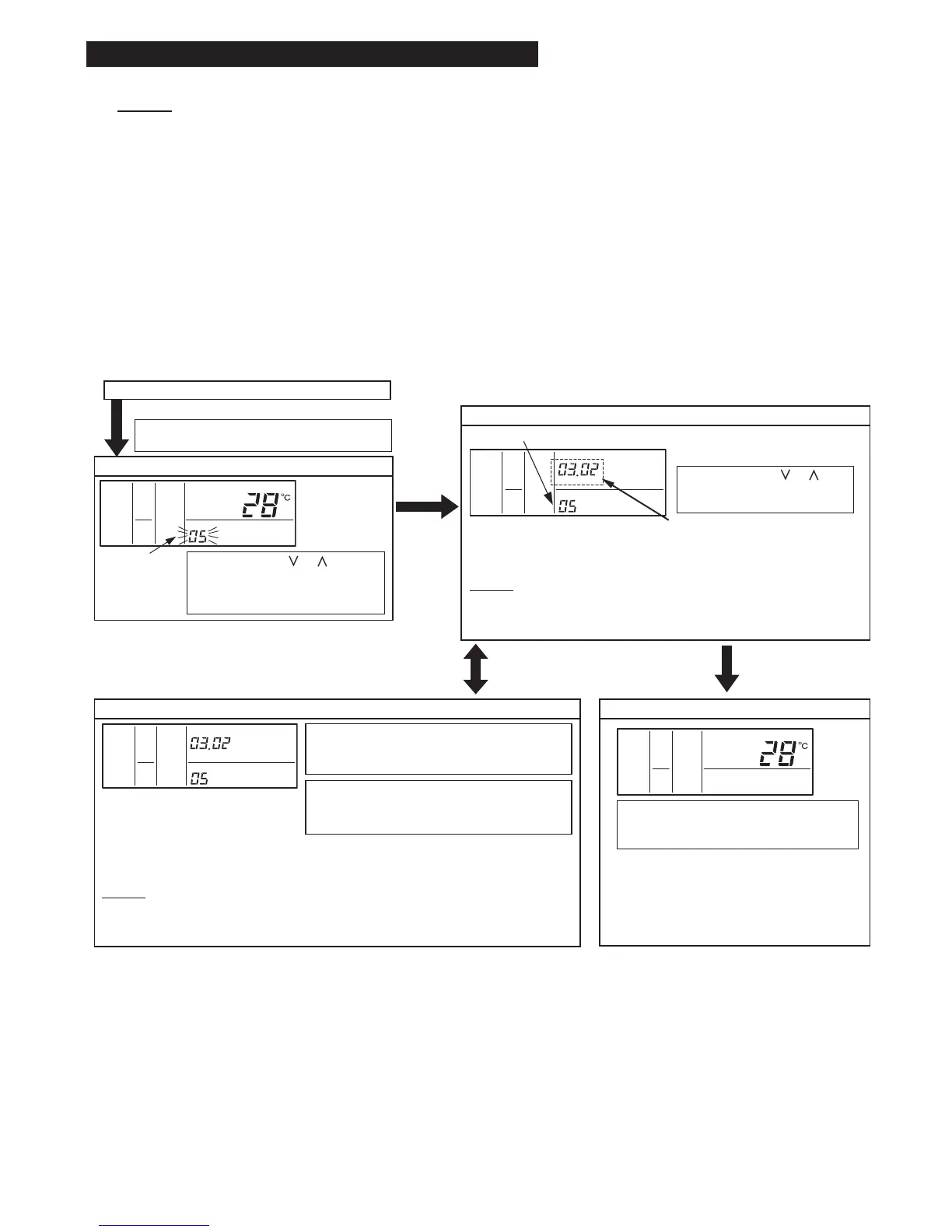
7. Changing Indoor Unit Address from Controller
Normal Mode (when unit is not operating)
COLO
HIGH
AC/
SERVICE
SET TEMP.
"05" Indicates.
Press the "TEMP."
or
switch and select the address of
the indoor unit.
Select the address of the indoor
unit to be operated.
COLO
HIGH
AC/
SERVICE
ADDS RN
The address and refrigerant cycle
number of the indoor unit to be set are
displayed (the diagram at left shows the
No. 2 cycle and the No. 3 indoor unit).
Press the "TEMP" or switch,
select "05" for the address check
mode, and then press the "CHECK"
switch.
1. Change to the optional setting mode.
Press the "CHECK" switch and the "RESET"
switch simultaneously for more than 3 seconds.
2. Selection of Optional Setting Mode
"SERVICE" is
indicated and the
mode number is
flashed.
"CHECK"
Switch
3. Selection of Indoor Unit
NOTES:
* Unconnected indoor unit address is not displayed.
* In case of control by using two controllers (Main and Sub),
the indoor unit addresses cannot be checked.
4. Run and Stop Indoor Unit.
COLO
HIGH
AC/
SERVICE
ADDS RN
5. Ending Address Checking
COLO
HIGH
AC/
SET TEMP.
"RUN/STOP" switch "RESET" switch
After selecting the indoor unit, press the "RUN/
STOP" switch to operate the indoor unit of the
displayed address.
Pressing the "RUN/STOP" switch during the
indoor unit operation, returns to the indoor unit
selection procedure of step (3).
Repeat steps (3) and (4) until the address number of the indoor unit for which the address
is to be changed is able to be checked. When selecting another indoor unit, first stop the
operation of the indoor unit currently being checked.
NOTES:
* All operations other than operation of the "RUN/STOP" switch are not available during
the address checking.
* Do not operate from the central station during the address checking.
Press the "RESET" switch during the indoor
unit operation OFF to return to the normal
mode.
Once the address of the indoor unit to be
changed has been checked, change the
address of the indoor unit by proceeding to
step (3) Address Change Mode.
The address (unit number) of the indoor unit can be changed by using the controller (PC-AR).
(1) Check the Indoor Unit for which the address to be changed.
Address of Indoor Unit to be Changed is not known (check) . . . Proceed to (2) Address Check Mode.
Address of Indoor Unit to be Changed is known . . . Proceed to (3) Address Change Mode.
Initialize address set with the automatic address function or initialize address that has been changed with the
address change mode. . . Proceed to (4) Address Initialization Mode.
(2) Address Check Mode
This function is for two or more the indoor units are connected to the controller.
The indoor unit address can be checked by the indoor unit individual operation with selecting the indoor address.
NOTES:
* In case of operating with two controllers (Main and Sub), the address of the indoor units cannot be changed or
checked.
* The address may not be able to be changed depending on the type of indoor unit.
* Do not operate the central controller when in the address check mode or address change mode.



 To Next Page