5
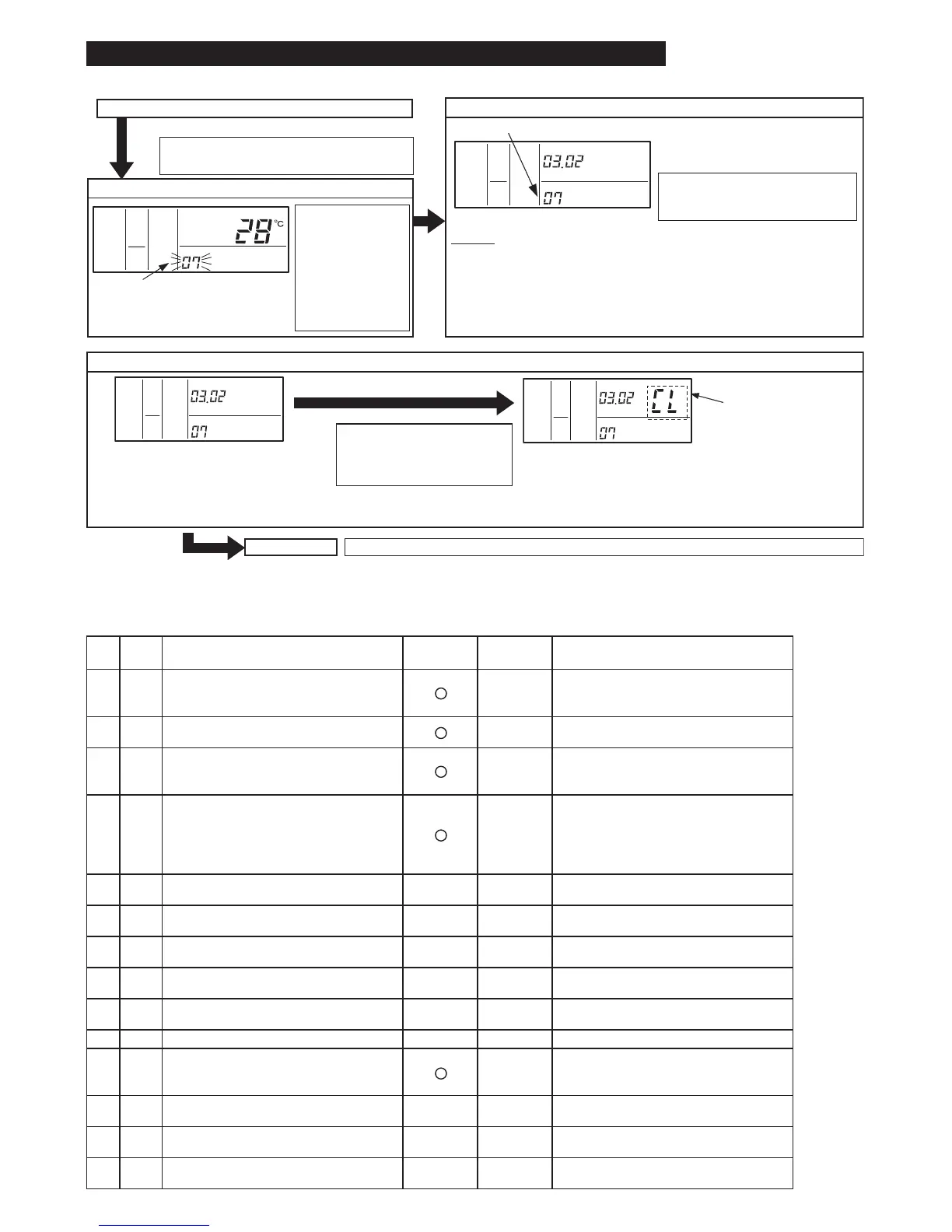
● Table A Optional Setting Items
6. Initialization of Optional Setting and Input / Output Setting
Normal mode (when unit is not operating)
COLO
HIGH
AC/
SERVICE
SET TEMP.
COLO
HIGH
AC/
SERVICE
ADDS RN
COLO
HIGH
AC/
SERVICE
ADDS RN
COLO
HIGH
AC/
SERVICE
ADDS RN
Press the "CHECK" switch and the "RESET"
switch simultaneously for more than 3 seconds.
1. Change to the optional setting mode.
2. Selection of Optional Setting Mode
Press the "TEMP."
"V" or "" switch,
select "07" for
the optional input
/ output setting
cancel mode, and
then press the
"CHECK" switch.
Select the address of the indoor unit
to be returned to the optional setting-
"07" flashes.
input/output factory settings.
Press the "TEMP." control or
switch and select the address of the
indoor unit.
NOTES:
* In case of control by using two controllers (Main and Sub),
settings shall be operated by the main controller.
* In case of selecting the address of the indoor unit not to initialize the
optional and input / output setting, "NO FUNCTION" is displayed.
* If selecting the indoor unit address "AA", the indoor units that do not
have these initialization function cannot be restore to the factory setting.
4. Optional Setting and Input/Output Setting Initialization
Press "CHECK" switch and the
initialization is performed.
It takes approximately 15 to 30
seconds.
When displayed "CL",
the optional and input
/ output settings are
initialized. (restore to
factory settings.)
In case of performing to initialize the other indoor units, repeat
the procedure from step 3.
In this case, the indoor unit address is completed to initialize,
the indication "CL" is displayed.
Normal Mode
V
V
V
"SERVICE" is indicated and the mode
number is flashed.
In case that initialization is not required, press the “RESET” switch in step 4.
Check to ensure that there are no problems
to restore the factory settings, and perform
to initialize.
No. Items Optional Function
Individual
Setting
Setting
Condition
Contents
1b1
Removal of Heating
Temperature Compensation
due to Uneven Heat Load
00
01
02
Standard (Set Temp. +4
o
C)
Removal (Set Temp.)
Set Temp. +2
o
C (*1)
2b2
Circulator Function at
Heating Thermo-OFF
00
01
Not Available
Available
3b3
Enforced 3 Minutes
Minimum Operation Time of
Compressor
00
01
Not Available
Available
4b4 Change of Filter Cleaning Time
00
01
02
03
04
Standard
100 hours
1,200 hours
2,500 hours
No Indication
5b5 Fixing of Operation Mode
00
01
Not Available
Available
6b6 Fixing of Setting Temperature
00
01
Not Available
Available
7b7
Fixing of Operation as
Exclusive Cooling Unit
00
01
Not Available
Available
8b8 Automatic COOL/HEAT Operation
00
01
Not Available
Available
9b9 Fixing of Fan Speed
00
01
Not Available
Available
10 bA Not Prepared "- -" Fixed Not Used
11 bb
Cooling Temperature Compensation
due to Uneven Heat Load
00
01
02
Standard (No Compensation)
Set Temp. -1
o
C
Set Temp. -2
o
C
12 bC Not Prepared-
00
01
Not Used
(Use as 00 conditions)
13 bd Not Prepared-
00
01
Not Used
(Use as 00 conditions)
14 bE Not Prepared-
00



 To Next Page