8
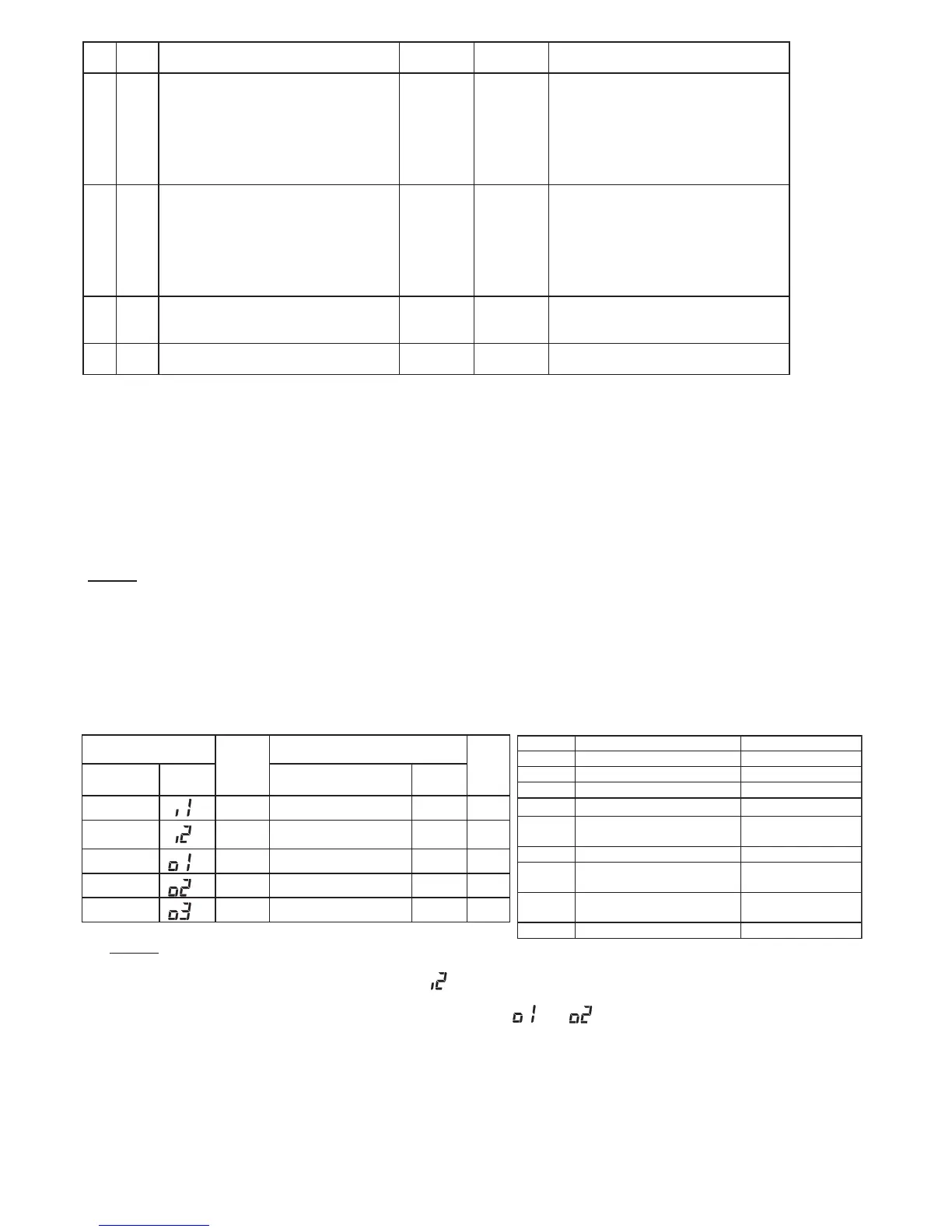
● Table B Input and Output Number Display and Connectors ● Table C Input and Output Settings and Display Codes
No. Items Optional Function
Condition
Contents
62 FC
Cooling Lower Limit for Setting
Temperature (*5)
00
01
02
09
10
Standard
Lower Limit +1
o
C
Lower Limit +2
o
C
Lower Limit +9
o
C
Lower Limit +10
o
C
63 Fd
Heating Upper Limit for Setting
Temperature (*6)
00
01
02
09
10
Standard
Upper Limit -1
o
C
Upper Limit -2
o
C
Upper Limit -9
o
C
Upper Limit -10
o
C
64
FE
Not Prepared
-
00
01
02
Not Used (Use as 00 condition)
65
FF
Lock Function for ON / OFF Timer
00
01
Not Available
Available (Factory-setting)
NOTES:
* After at least 3 minutes from the power ON, change the optional setting.
* When changing "CF" setting (change of louver swing range), restore the power supply or allow the louver to make one complete
swing fully in the auto swing mode to apply the optional setting.
* The optoinal settings are different according to the indoor and outdoor unit models. Check to ensure that the unit has the optional
setting or not.
* Record the setting conditions for each optional setting in the "Setting" column of the table.
(*1)
: The "02" setting may not be available according to the type of indoor unit.
(*2): In case of RPI models, 00: Increasing fan speed 1 (standard), 01: Increasing fan speed 2 (high static pressure)
,
02: Standard (low static pressure)
(*3): 00: Standard (7-step operation), 01: Draft Prevention (lower 2 steps cut of
f), 02: High ceiling (upper 2 steps cut off)
(*4): In case that the set temperature is changed and kept within the set time at "F4", the temperature is automatically change
d to "F5"
and "F6". (In case that the set temperature is out of range at "F5" and "F6", it is applied within upper and lower limit for the set
temperature.)
: Applicable to fan, cooling and dry operation modes.
: Applicable to heating operation mode.
(*7): Operation is stopped by pressing the "RUN/ST
OP" switch for 3 seconds.
X
X
X
..
..
..
..
Input and Output Number Display and Connectors
Input and Output Settings and Display Codes
Input Number Display
Port
Factory Setting
Setting
Input / Output Indication Setting Item Indication
Input1 CN3 1-2 Remote ON/OFF 1 (level)03
Input2 CN3 2-306
Output1 CN7 1-2 Operation01
Output2 CN7 1-3 Alarm02
Output3 CN8 1-2 Thermo-ON for Heating
Forbidding Remote Control
after Manual Stoppage
06
Indication Input Output
00 Not set Not set
01 Room Thermostat (for Cooling) Operation
02 Room Thermostat (for Heating) Alarm
03 Remote ON/OFF 1 (level) Cooling
04 Remote ON/OFF 2 (Operation)
Thermo-ON for
Cooling
05 Remote ON/OFF 2 (Stoppage) Heating
06
Forbidding Remote Control
after Manual Stoppage
Thermo-ON for
Heating
07
Remote Cooling / Heating
Change
Total Heat Exchanger
08 Elevating Grille Input
NOTES:
* After at least 3 minutes from the power ON, change the optional setting.
* The elevating grille input can be set to Input 2 only " " .
The elevating grille cannot be set to Input 1.
* The elevating grille output can be set to Output 1 or Output 2 only " " or " " .
The elevating grille output cannot be set to Output 3.
* Do not set the elevating grille for the total heat exchanger.
* Record the setting conditions for each input and output in the "Setting" column of the table.



 To Next Page