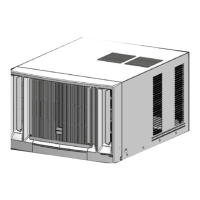
This document is an Installation & Operation Manual for Hitachi Window Type Air Conditioners, Inverter Cooling only Series, using R410A refrigerant. The manual covers models RAW-VJ07SCASK, RAW-VJ10SCASK, RAW-VJ13SCASK, RAW-VJ18SCASK, and RAW-VJ24SCASK.
Function Description
This manual provides comprehensive instructions for the installation, operation, and maintenance of Hitachi window-type inverter air conditioners designed for cooling-only operation. The primary function of these units is to cool indoor spaces efficiently. The inverter technology allows for variable compressor speed, which contributes to energy savings and more precise temperature control compared to traditional on/off systems. The units are designed to operate within specific outdoor and indoor temperature ranges to ensure optimal performance and prevent breakdowns.
Important Technical Specifications
- Refrigerant: R410A, an environmentally friendly refrigerant.
- Power Requirement: Rated Voltage: 220 V +/- 10%. The manual emphasizes that electric components can be damaged by excessively high voltage, and low voltage can cause violent compressor vibration, potentially damaging the refrigerant system and leading to component failure.
- Grounding: Proper grounding is mandatory to prevent electric shock. A special socket must be used, and the socket and wiring must conform to wiring regulations. The earthing method must be reliable, and the earth wire should not be connected to water pipes.
- Circuit Protection: For fixed circuits, an electricity leakage protection switch with sufficient power capacity and an air switch with adequate space are required. The circuit breaker/fuse rating should match the power cord.
- Circuit Breaker Capacity:
- 15 A for RAW-VJ07SCASK, RAW-VJ10SCASK, and RAW-VJ13SCASK models.
- 30 A for RAW-VJ18SCASK and RAW-VJ24SCASK models.
- Power Cord Conductors: Distinguished by color: BROWN for Live (L), BLUE for Neutral (N), and YELLOW/GREEN for Earth (E).
- Operating Conditions (COOL mode):
- Outdoor temperature: 18°C to 43°C (64°F to 109°F). Operating outside this range may lead to breakdowns.
- Indoor temperature: 17°C to 32°C (62°F to 90°F).
- Room humidity: Should be lower than 90%. Higher humidity may cause dew formation on the surface and water dripping, which is considered normal.
- Operating Conditions (DRY mode):
- Outdoor temperature: 18°C to 43°C (64°F to 109°F). Operating outside this range may lead to breakdowns.
- Drainage: The air conditioner is designed to splash condensate on the condenser coil for maximum cooling efficiency. An external drainage tray can be installed if the splashing sound is bothersome, though this may slightly reduce performance. RAW-VJ18SCASK and RAW-VJ24SCASK models are provided with two drain trays.
- Installation Space Requirements:
- Top View: Over 500 mm from fence and wall.
- Front View: Over 150 mm from ceiling.
- Side View: Over 150 mm from wall, Over 500 mm from another wall, Less than 220 mm from the bottom.
- Remote Control Batteries: Two AAA 1.5V dry batteries.
Usage Features
- Remote Control Operation: A general-use remote control is provided with buttons for On/Off, Mode (Auto, Cool, Dry, Fan Only), Temperature adjustment (+/-), Swing, Fan speed (Auto, Low, Mid, High), Sleep, Timer, and Light.
- Mode Selection:
- Auto Mode: The unit operates automatically based on default settings; set temperature cannot be adjusted.
- Cool Mode: Air conditioner operates in cooling mode. Fan speed can be adjusted.
- Dry Mode: The unit runs at low fan speed for dehumidifying. Fan speed cannot be adjusted in this mode.
- Fan Only Mode: The unit blows wind without cooling. Fan speed can be adjusted.
- Temperature Adjustment: Pressing "+" or "-" buttons adjusts the set temperature by 1°F(°C). Holding the button for 2 seconds allows for quick adjustment. The temperature setting range is 16°C to 30°C.
- Swing Function: Activates or deactivates the automatic air swing.
- Fan Speed: Selectable between Auto, Low, Mid, and High.
- Sleep Mode: Available in COOL mode, this function adjusts the temperature to maintain comfort during sleep.
- Timer Function: Allows setting an ON or OFF timer. The timer setting range is 0.5 to 24 hours, adjustable in 0.5-hour increments (0.5-10 hours) or 1-hour increments (10-24 hours).
- Light Button: Activates or deactivates the LED display on the control panel.
- Health Button: Not applicable for the listed models.
- WiFi Function: Not applicable for the listed models.
- Temperature Display Switchover: Under OFF status, pressing "-" and "Mode" buttons simultaneously switches the temperature display between °C and °F.
- Control Panel Operation: In case the wireless remote control is lost, the unit can be operated manually using buttons on the control panel for On/Off, Swing, Fan Speed, Time/Temp, and Mode.
- Filter Button (Control Panel): This button serves as a reminder to clean the air filter. The LED illuminates after 250 hours of operation. Pressing the button resets the light. Holding it for 3 seconds clears accumulated operation time before the LED illuminates.
Maintenance Features
- Air Filter Cleaning: The air filter behind the inlet grille should be checked and cleaned at least once every two weeks or as needed. Cleaning involves removing the front panel, arching the filter to remove it from its slot, washing it with warm soapy water (below 40°C), rinsing, and allowing it to dry thoroughly away from direct sunlight. Operating the unit without the air filter can lead to equipment failure due to dust/dirt accumulation.
- Cabinet Cleaning: The cabinet and front panel can be dusted with an oil-free cloth or wiped with a cloth dampened in a solution of warm water and mild liquid dishwashing detergent. Harsh cleaners, wax, or polish should not be used. Excessive water around controls should be avoided.
- Winter Storage: If storing the air conditioner for winter, it should be carefully removed according to installation instructions, covered with plastic, or placed in its original carton.
- Troubleshooting Guide: The manual includes a troubleshooting section to help users identify and resolve common issues such as the unit not operating, poor cooling efficiency, foggy air discharge, noisy operation, and condensate leakage, before contacting service.
- Professional Maintenance: Repairs and maintenance must be performed by qualified professionals to avoid electric shock, injury, or damage. Contacting the dealer or local service center is recommended for installation, relocation, or maintenance.
- Battery Replacement: Instructions are provided for replacing the remote control batteries, emphasizing correct polarity and using new batteries of the same model. Batteries should be removed if the remote control is not used for a long period.
- Safety Precautions: The manual highlights critical safety precautions, including proper grounding, not connecting to multi-purpose sockets, installing a switch, avoiding water spray on the unit or remote control, not inserting fingers or objects into air inlets/outlets, not stepping on the unit, not blocking airflow, disconnecting power before cleaning, and not attempting self-repair. It also warns against using the air conditioner for purposes other than cooling, such as drying clothes or preserving food.

 Need help?
 General

 To Next Page