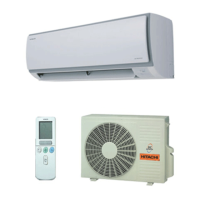
This document describes the Hitachi Split Type Air Conditioner, covering its indoor and outdoor units, model specifications, functions, and maintenance.
The air conditioner models covered are:
- Indoor Unit: RAS-25YHA3, RAS-35YHA4
- Outdoor Unit: RAC-25YHA3, RAC-35YHA4
These units use HFC R410A refrigerant.
Dimensions:
- RAS-25YHA3 / RAS-35YHA4 (Indoor Unit):
- Width: 780 mm
- Height: 280 mm
- Depth: 220 mm
- RAC-25YHA3 / RAC-35YHA4 (Outdoor Unit):
- Width: 750 mm
- Height: 548 mm
- Depth: 288 mm
Indoor Unit Components and Functions
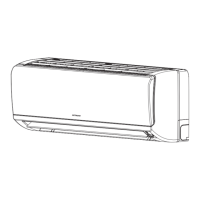
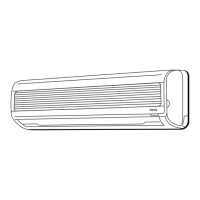
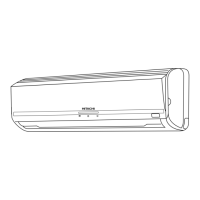
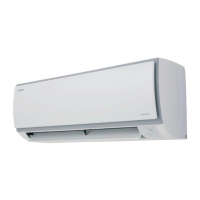
The indoor unit features:
- Air filter: Prevents dust from entering the unit. Cleaning is recommended when the FILTER lamp lights up (after approximately 200 hours of operation).
- Front panel: The main cover of the indoor unit.
- Indoor unit indicators: Lights showing operating conditions.
- FILTER LAMP (Green): Lights up after about 200 hours of operation, indicating filter cleaning is due. It turns off when the "AUTO SWING" button is pressed while the unit is stopped.
- OPERATION LAMP (Yellow): Lights during operation. Flashes during preheating (2-3 minutes after startup) and defrosting (5-10 minutes, about once an hour when frost forms on the outdoor unit).
- TIMER LAMP (Orange): Lights when the timer is active.
- Horizontal deflector / Vertical deflector (Air Outlet): Controls the direction of airflow. The horizontal deflector can be swung up and down automatically or set to a desired angle using the "AUTO SWING" button. Vertical deflectors are manually adjustable.
- Remote controller: Used to send operation signals to the indoor unit. It has a control range of about 7 meters.
Temporary Switch:
- Used to start and stop the unit if the remote controller is not working. It operates at the most recent settings. The unit will immediately go into automatic operation once power is switched on.
Air Purifying Filters (Accessories):
- These filters can be attached to the filter frame by gently compressing their sides.
- They can be used for about 1 year.
- Note that using air purifying filters may slightly weaken cooling capacity and slow down cooling speed.
Outdoor Unit Components and Functions
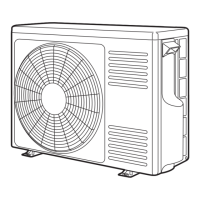
The outdoor unit includes:
- Air outlet: Discharges cool air during heating and warm air during cooling/dehumidifying.
- Drain hose: Drains dehumidified water from the indoor unit to the outdoor during cooling or dehumidifying.
- Piping and Wiring: Connects the indoor and outdoor units.
- Air inlets (Rear and left sides): Where air is drawn into the unit.
- Drain port (Bottom): For water drainage.
- Earth terminal (Lower section of the side): For grounding the unit.
Outdoor Unit Specifics:
- When the indoor unit is stopped, the outdoor fan may continue to turn for 10-60 seconds to cool electrical parts.
- During heating, condensate or water from defrosting will flow. Do not cover the drain port in chilly areas to prevent freezing.
- If the outdoor unit is ceiling-hung, install a bush and drain pipe on the drain port for water drainage.
Remote Controller Functions
The remote controller features:
- Signal emitting window/transmission sign: Points towards the indoor unit. The sign blinks when a signal is sent.
- Display: Shows selected room temperature, current time, timer status, function, and circulation intensity.
- START/STOP button: Starts and stops operation.
- AUTO SWING button: Controls the angle of the horizontal air deflector.
- FAN SPEED selector: Cycles through AUTO, HI, MED, LOW, and SILENT fan speeds.
- SLEEP button: Sets the sleep timer.
- TEMPERATURE buttons: Raises or lowers the temperature setting.
- TIME button: Sets and checks the time and date.
- RESET button: Used after battery replacement or irregular operation.
- FUNCTION selector: Cycles through AUTO, HEAT, DEHUMIDIFY, COOL, and FAN modes.
- TIMER control buttons:
- OFF-TIMER button: Selects turn-off time.
- ON-TIMER button: Selects turn-on time.
- RESERVE button: Time setting reservation.
- CANCEL button: Cancels time reservation.
Remote Controller Precautions:
- Do not place in direct sunlight or near a heater.
- Handle with care; avoid dropping or getting wet.
- After outdoor unit stops, it will not restart for about 3 minutes (protection mechanism).
- Pressing the FUNCTION selector during operation may stop the device for about 3 minutes for protection.
Usage Features
Auto Restart Control:
- In case of power failure, operation automatically restarts with previous mode and airflow direction when power resumes.
- Not available if Timer or Sleep Timer mode is set.
Automatic Operation:
- The unit automatically determines HEAT or COOL mode based on initial room temperature.
- The selected mode changes if room temperature varies.
- Monitoring operation range is ±3°C relative to the preset temperature.
- If the automatically selected mode is unsatisfactory, it can be manually changed.
Heating Operation:
- Recommended for outdoor temperatures under 21°C, and above -15°C for reliability.
- The unit may not work if it's too warm (over 21°C) to protect the device.
- Fan speed can be set to AUTO, HI, MED, LOW, or SILENT.
- AUTO: Fan speed adjusts automatically based on air temperature.
- HI: Economical for quick warming, but may feel chilly initially.
- MED: Quiet.
- LOW: More quiet.
- SILENT: Silent.
- Defrosting occurs about once an hour when frost forms on the outdoor unit (5-10 minutes). The operation lamp blinks during defrosting. Maximum defrosting time is 20 minutes.
Dehumidifying Operation:
- Use when room temperature is over 16°C. It will not work under 15°C.
- Dehumidifying takes place with a target temperature slightly lower than the room temperature setting (minimum 16°C).
- Operation stops if room temperature falls below target, restarts if it rises above.
- Preset room temperature may not be reached depending on room conditions.
Cooling Operation:
- Use when outdoor temperature is -10 to 42°C.
- If indoor humidity is very high (over 80%), dew may form on the air outlet grille.
- Fan speed can be set to AUTO, HI, MED, LOW, or SILENT.
- AUTO: Fan speed is HI initially, then varies to MED when preset temperature is reached.
- HI: Economical for quick cooling.
- MED: Quiet.
- LOW: More quiet.
- SILENT: Silent.
- Cooling function does not start if the temperature setting is higher than the current room temperature.
Fan Operation:
- Used as an air circulator or to dry the interior of the indoor unit.
- Fan speed can be set to HI, MED, LOW, or SILENT.
- FAN SPEED (AUTO) in cooling/heating:
- Heating: Fan speed changes automatically based on discharged air temperature. A light breeze blows when preset temperature is reached.
- Cooling: Operation starts in HI mode, then switches to LOW as preset temperature is approached.
Timer Settings:
- OFF-Timer: Sets a specific time for the unit to turn off.
- ON-Timer: Sets a specific time for the unit to turn on.
- ON/OFF-Timer: Sets both turn-off and turn-on times. The earlier preset time occurs first.
- Sleep Timer: Unit operates for a desired number of hours (1, 2, 3, or 7 hours) then turns off.
- If sleep timer is set when off-timer or on/off-timer is active, the sleep timer takes priority.
- During sleep timer operation, fan speed automatically sets to SILENT.
Adjusting Air Deflectors:
- Upward/Downward (Horizontal): Automatically set to a proper angle. Can be swung continuously or set to a desired angle using the "AUTO SWING" button.
- In "Cooling" operation, avoid continuous swinging for long periods to prevent dew formation.
- Left/Right (Vertical): Manually adjusted by holding the third blade from the left or right end of the air deflector.
Maintenance Features
General Precautions:
- Cleaning and maintenance must be performed by qualified service personnel.
- Always stop operation and switch off power supply before maintenance.
Air Filter Cleaning:
- Clean when the FILTER lamp lights up (approx. every 200 hours).
- Procedure:
- Open the front panel and remove the filter.
- Vacuum dust from the filter. If very dusty, wash with detergent, rinse thoroughly, and dry in the shade.
- Reinsert the filter with "FRONT" mark facing front, and close the front panel by pushing at the three arrow portions.
- Cautions:
- Do not wash with hot water (>40°C) to prevent shrinking.
- Shake off moisture completely and dry in the shade; do not expose to direct sun.
- Do not operate the unit without the filter.
Front Panel Cleaning:
- Remove the front panel and wash with clean water and a soft sponge, using neutral detergent if needed. Rinse thoroughly.
- If not removing the panel, wipe with a soft dry cloth.
- Wipe water thoroughly from indicators or signal receiver to prevent trouble.
- Removing/Attaching: Hold the front panel with both hands. To remove, push the right arm inward. To attach, move the shafts of the arms into the steps and insert into the holes.
- Cautions:
- Do not splash water directly on the unit.
- Never use hot water (>40°C), benzine, gasoline, acid, thinner, or a brush, as they can damage plastic surfaces and coating.
Maintenance at Beginning of Long Off Period:
- Run the unit in FAN mode at HI speed for about half a day on a fine day to dry the unit completely.
- Switch off the power plug or circuit breaker.
Safety Precautions
During Installation:
- Do not reconstruct the unit (risk of water leakage, fault, short circuit, fire).
- Installation must be done by a sales agent or qualified technician.
- Use an earth line; do not place near water/gas pipes, lightning conductors, or telephone earth lines (risk of electric shock).
- Use specified piping set for R410A (risk of broken pipes/faults).
- Install a circuit breaker.
- Do not install near flammable gas (risk of fire).
- Ensure smooth drain hose flow to prevent water drips.
- Use a single-phase 240V power source (risk of overheating/fire with other sources).
During Shifting or Maintenance:
- If abnormal situations (e.g., burning smell) occur, stop operation, remove plug, or turn off circuit breaker, and contact agent (risk of fault, short circuit, fire).
- Contact agent for maintenance; improper self-maintenance risks electric shock/fire.
- Contact agent for removal/reinstallation; improper self-removal/reinstallation risks electric shock/fire.
- Avoid extended direct airflow for health.
- Do not connect power cable with extension cable or plug too many appliances into one socket (risk of electric shock, heat, fire).
- Do not bundle, pull, put objects on, heat, process, or put between things the power cable (risk of electric shock, fire).
- Do not insert thin rods into blower/suction panel (risk of injury from high-speed fan).
During Operation:
- Do not use any conductor as fuse wire (fatal accident risk).
- During thunderstorms, disconnect plug or turn off circuit breaker.
- Do not place spray cans or combustibles within 1 meter of air outlets (risk of rupture).
- Operate product according to manufacturer specifications only.
- Do not operate with wet hands (fatal accident risk).
- When using burning equipment, ventilate the room regularly to avoid oxygen insufficiency.
- Do not direct cool air towards household heating apparatus.
- Ensure outdoor mounting frame is stable and firm (risk of collapse).
- Do not wash unit with water or place water containers on indoor unit (risk of electrical leakage/shock).
- Do not place plants or animals directly under airflow.
- Do not climb on outdoor unit or place objects on it.
- Avoid operating with open doors/windows, high humidity (>80%), and downward/auto-swinging deflector for long periods (risk of condensation/water drips).
- If room heat exceeds unit capacity, preset temperature may not be achieved.
- Indoor unit cleaning must be done by authorized personnel; commercial detergents can damage plastic parts or clog drain pipes (risk of water drips/electric shock).
- Do not touch air outlet, bottom surface, or aluminum fin of outdoor unit (risk of injury).
- Do not touch refrigerant pipe and connecting valve (risk of burns).
- Not intended for use by young children or infirm persons without supervision.
- Young children should be supervised to ensure they do not play with the appliance.
Capabilities:
- Heating: Utilizes a heat pump system. Heating capability decreases with lower ambient temperature. Inverter increases compressor RPM to maintain heating. If still insufficient, use other heating appliances. Designed to heat an entire room; preheating is recommended.
- Cooling/Dehumidifying: If room heat exceeds unit capacity (e.g., many people, other heating appliances), preset temperature may not be reached.
Various Functions:
- Settings indication on remote controller disappears after 10 seconds if no buttons are pressed.
- Pressing the button during operation activates a protective circuit, stopping the unit for approx. 3 minutes.
- During heating, the indoor unit's indicator lamp may flash with no air emitted for a while.
- For quiet operation or after heating, AUTO fan speed is recommended over HI.
- LOW and SILENT settings slightly lower cooling capacity.
- Fan speed in LOW and SILENT settings during heating varies with operating conditions.
Timer Programming/Sleep Timer Operation:
- Unit will not operate even if set time is reached unless it receives a signal from the remote controller. Confirm timer programming with a beep and TIMER lamp light.
- Sleep timer takes priority over ON/OFF timer.
- During sleep timer operation, fan speed sets to SILENT, regardless of preset speed.
Regular Inspection (Half-yearly or Yearly):
- Check earth line connection (risk of failure/electric shock if faulty).
- Check mounting frame for rust, tilt, or instability (risk of collapse/injury).
- Check power plug for secure insertion and heat (risk of electric shock/fire). Clean dust/dirt from plug.
After Sales Service and Warranty (Troubleshooting):
- Remote controller not transmitting (dim/blank display): Check if batteries need replacement or if polarity is correct.
- Unit does not operate: Check fuse, voltage (high/low), circuit breaker (ON), power plug insertion, and power cut.
- Unit does not cool/heat well: Check if air filter is blocked, set temperature is suitable, horizontal air deflectors are adjusted correctly, air inlets/outlets are blocked, and fan speed is not LOW/SILENT.
Normal Phenomena (Not Unit Failure):
- During heating, operation indicator blinks and air blow stops: Unit is preheating or defrosting.
- Hissing or fizzy sounds: Refrigerant flow noise or valve sound.
- Squeaking noise: Unit expansion/contraction due to temperature changes.
- Rustling noise: Indoor unit fan RPM changing.
- Clicking noise: Motorized valve switching on.
- Perking noise: Ventilation fan sucking air into drain hose and blowing out dehumidifying water.
- Changing operation noise: Due to power variations or room temperature changes.
- Mist emission: Air within the room is suddenly cooled.
- Steam emitted from outdoor unit: Water from defrosting evaporates.
- Odors: Smells from smoke, food, cosmetics, etc., attached to the unit are blown out.
- Outdoor unit continues to operate when indoor unit stops: Defrosting is underway.
- OPERATION lamp blinking: Preheating or defrosting, or protective circuit/preheat sensor operation when mode is switched.
- Does not reach temperature setting: Actual room temperature may deviate slightly from remote controller setting due to number of people or indoor/outdoor conditions.
When to Contact Sales Agent Immediately:
- Circuit breaker switches off or fuse blows frequently.
- Switch operation is not stable.
- Foreign matter or water enters the unit.
- Power cord gets excessively hot or insulation is torn/stripped.
- TIMER lamp on indoor unit display blinks (check blinking cycle before turning off circuit breaker).
Notes:
- Slight flowing noise of refrigerant and rubbing noise from fan casing are normal.
- Odors may be emitted from the unit due to smoke, food, cosmetics; clean air filter and evaporator regularly.
- Slight brightness fluctuation may occur when switching on, especially with dimmed room light (normal).
- Observe local Power Supply Companies' conditions.

 Need help?
 General


 To Next Page