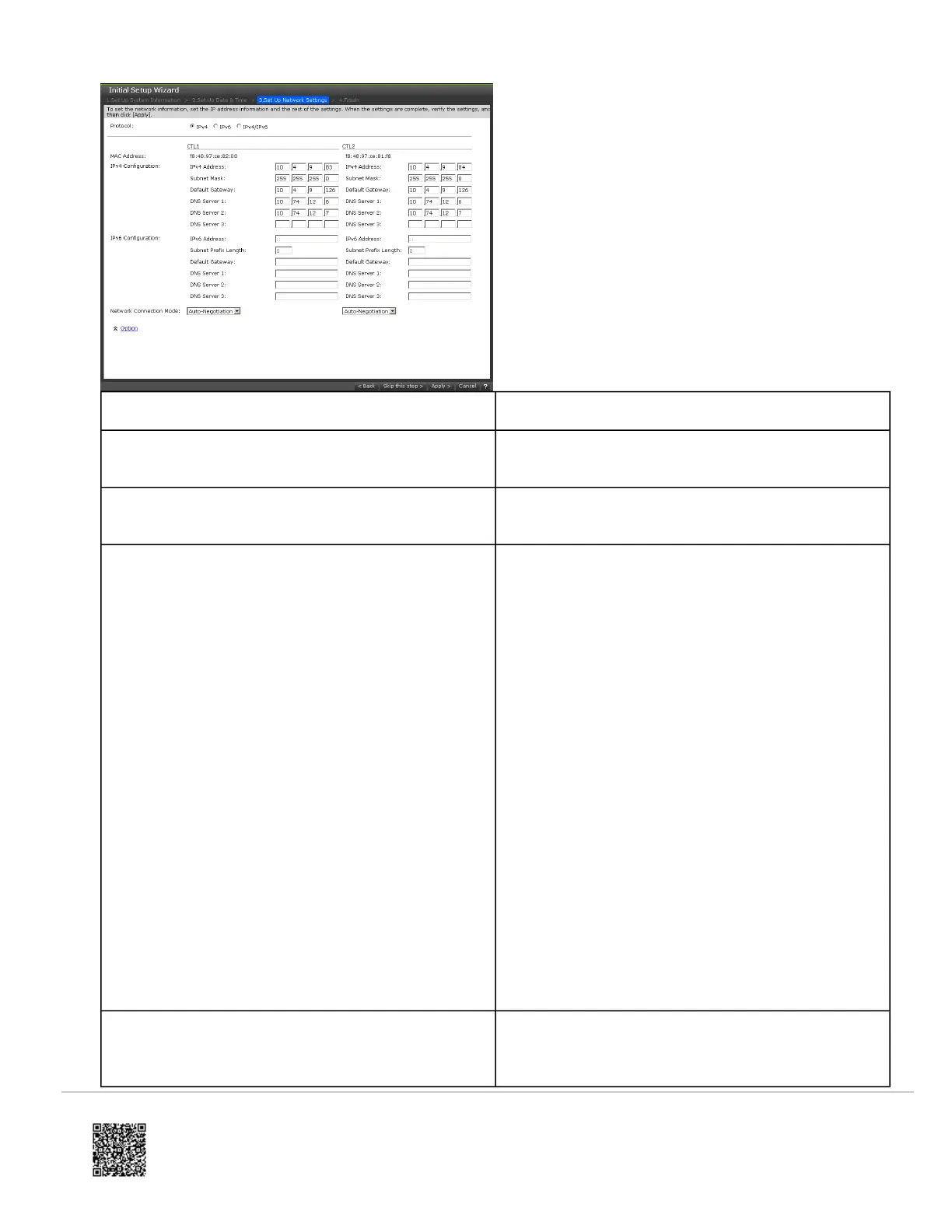
Setting Description
Protocol
IP addressing method to be used for configuring the
storage system.
MAC Address
Read-only field that shows the MAC address for
controllers 1 and 2.
IPv4 Configuration/ IPv6 Configuration
◦ IPv4 Address: IPv4 address of the production
network to which the storage system will be
connected (IPv4 only).
◦ IPv6 Address: IPv6 address of the production
network to which the storage system will be
connected (IPv6 only).
◦ Subnet Mask: IP address mask that identifies the
range of IP addresses in the subnet to which the
storage system will be connected.
◦ Subnet Prefix Length: Subnet prefix length of the
network to which the storage system will be
connected (IPv6 only).
◦ Default Gateway: IP address of the default
gateway to which the storage system will be
connected. The gateway is the IP address of the
router used to communicate outside the local
subnet.
◦ DNS Server 1-3: If your configuration uses DNS
to resolve IP addresses (for example, the IP
address for the NTP server used with the storage
system), enter up to three DNS IP addresses.
Network Connection Mode
Determines whether the storage system negotiates
the speed and duplex mode automatically with the
attached device. The default setting (Auto-
https://knowledge.hitachivantara.com/Documents/Storage/VSP_E_Series/93-04-0x/Installation/Installing_your_VSP_E590_an…
Updated: Thu, 06 Jan 2022 00:49:25 GMT
Powered by
11



 To Next Page