a year.
Use NTP Server
Determines whether the storage system time is
synchronized with an NTP server.
◦ Yes: Synchronize system time with an NTP
server. Enter the IP address or domain name of
the NTP server. To add more than three servers,
click the + Add NTP Server button. To
synchronize the system time to the NTP server
time now, check Synchronize immediately.
◦ No: Do not synchronize system time with an NTP
server. In Date & Time, enter the date and time
that the storage system will use.
Synchronizing Time
To synchronize the storage system time with the NTP
server at a specific time, enter the time when the two
will be synchronized.
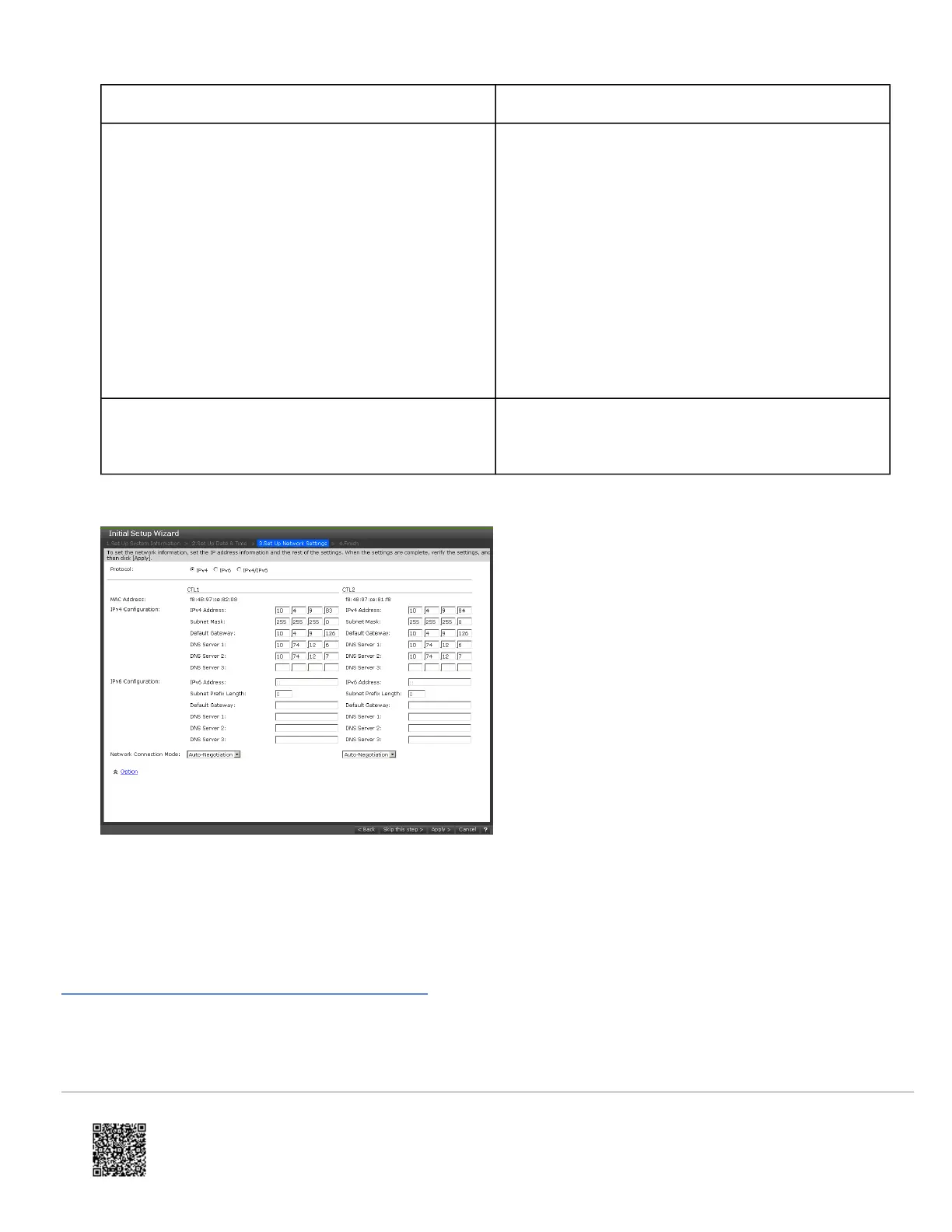
13. Confirm or change the network settings that you entered earlier in this procedure, and then click Apply.
14. When prompted that initial settings are complete, click Close.
Next steps
(Optional) Configure syslog and SNMP notifications.
Configure syslog and SNMP notifications
Before you begin
https://knowledge.hitachivantara.com/Documents/Storage/VSP_E_Series/93-04-0x/Installation/Installing_your_VSP_E590_an…
Updated: Thu, 06 Jan 2022 00:49:25 GMT
Powered by
14




 To Next Page