Battery
type
DEC
-
Batt type
Stop
Elapsed
time
INC
+
Charge
current
Battery
voltage
DEC
Start
Enter
-
INC
+
Charged
capacity
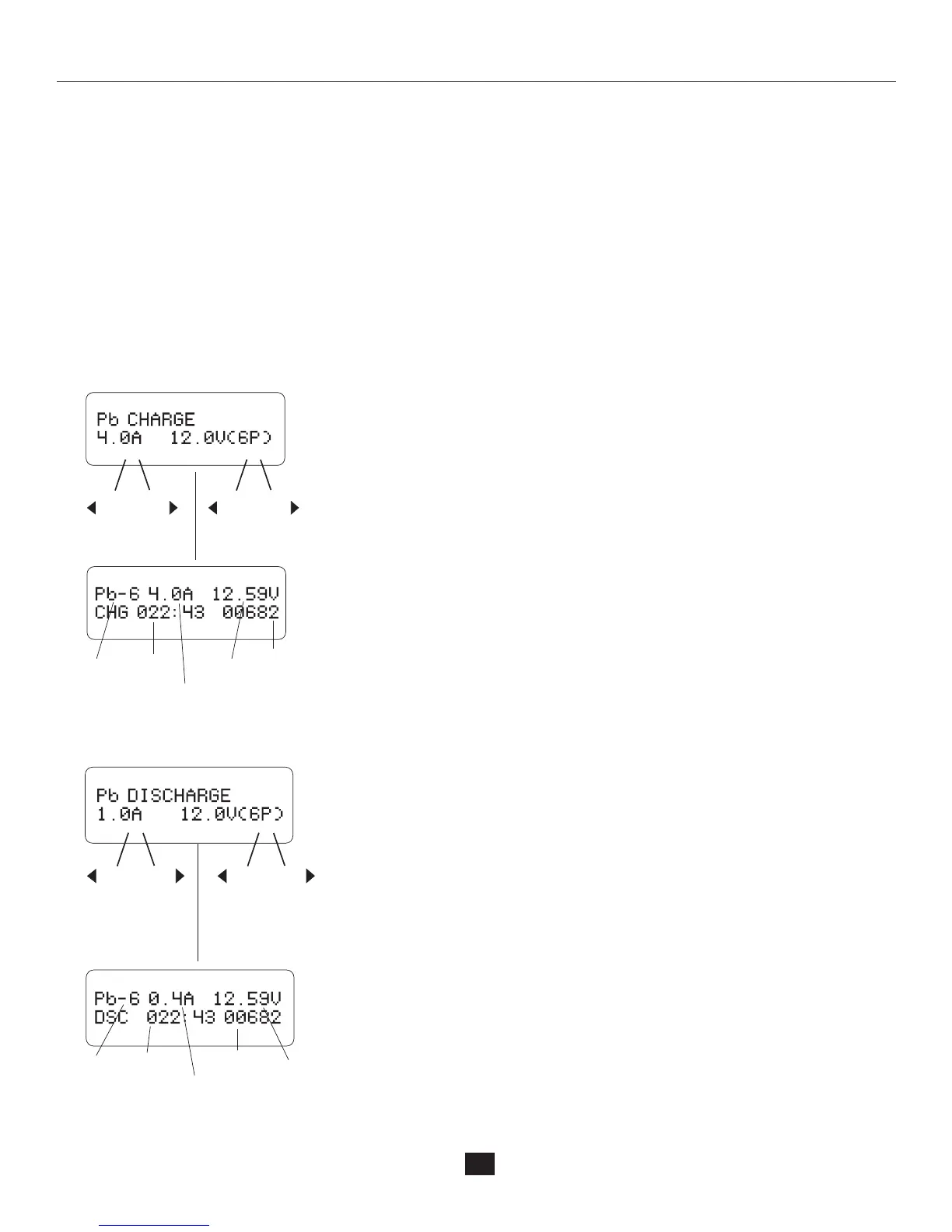
Set up the charge current on the left and the nominal
voltage on the right. The range of current is 0.1-10.0A.
The voltage should match the battery being charged.
Press the Start/Enter key for more than 3 seconds to
start charging.
This screen displays the real-time discharging status.
Press the Start/Enter key to alter the discharge current.
Press the Start/Enter key again to store the parameter
value you set. Press the Batt Type/Stop key to end the
program.
This program is only suitable for charging a Pb˄lead-acid˅battery with nominal
voltage from 2 ~ 24V. The Pb˄lead-acid˅battery is completely different from the
NiCd/NiMH batteries. These batteries deliver lower current in comparison to their
capacity. The same restriction applies to the charging process. Consequently,
the optimum charge current can only be 1/10 of the capacity. The Pb battery can
not be used for fast-charging.Always follow the instructions provided by the battery
manufacturer. Due to the chemistry characteristic of a Pb battery, the cut-off point
may be difficult to detect. We recommend using the CAPACITY CUT-OFF feature to
protect the battery. You can press the Start/Enter key to make it blink and alter the
value of the parameters using the INC or DEC key, then press the Start/Enter key
to store the value.
Charging Pb (lead-acid) battery in the charge mode
CHARGING PB (LEAD-ACID) BATTERY IN THE CHARGE MODE
DEC
-
Batt type
Stop
INC
+
DEC
Start
Enter
-
INC
+
Set up the discharge current on the left and the nominal
voltage on the right. The range of discharge current is
0.1-5.0A. The voltage should match the battery being
charged. Press the Start/Enter key for more than 3 seconds
to start charging.
This screen displays the real-time discharging status.
Press the Start/Enter key to alter the discharge current.
Press the Start/Enter key again to store the parameter value
you set. Press the Batt Type/Stop key to end the program.
Battery
type
Elapsed
time
Discharge
current
Battery
voltage
Discharged
capacity
Discharging of the Pb battery
22
'> 3 seconds'
'> 3 seconds'


 To Next Page