Version 1.0, 11/2017. Copyright 2012 Hitron Technologies
35
Version 1.0, 11/2017. Copyright 2017 Hitron Technologies
35
Hitron E31N2V1 User’s Guide
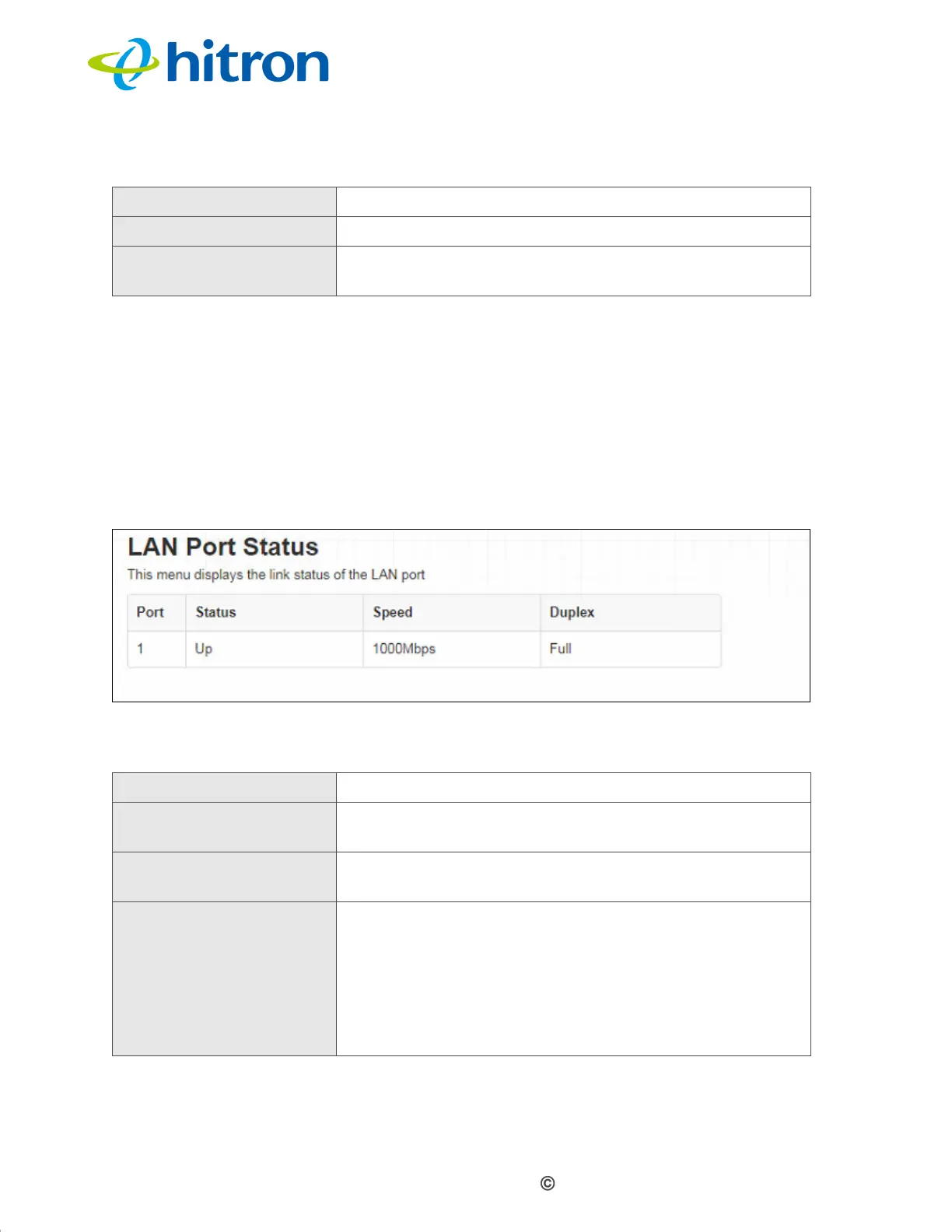
1.6 The Status: LAN Port Status Screen
Use this screen to see information about the data rate and flow of the E31N2V1’s
LAN port.
Click Status > LAN Port Status. The following screen displays.
Figure 5: The Status: Port Status Screen
The following table describes the labels in this screen.
Priority This displays the severity of the event.
Event This displays a description of the event.
Clear Click this to remove all DOCSIS event logs from the
system.
Table 7: The Status: Port Status Screen
Port This displays the physical LAN port number.
Status This displays whether or not there is a functioning
device connected to the port (Up) or not (Down).
Speed This displays the maximum achievable data speed in
megabits per second (Mbps).
Duplex
This displays Full when data can flow between the
E31N2V1 and the connected device in both
directions simultaneously.
This displays Half when data can flow between the
E31N2V1 and the connected device in only one
direction at a time.
Table 6: The Status: DOCSIS Event Screen (continued)


 To Next Page