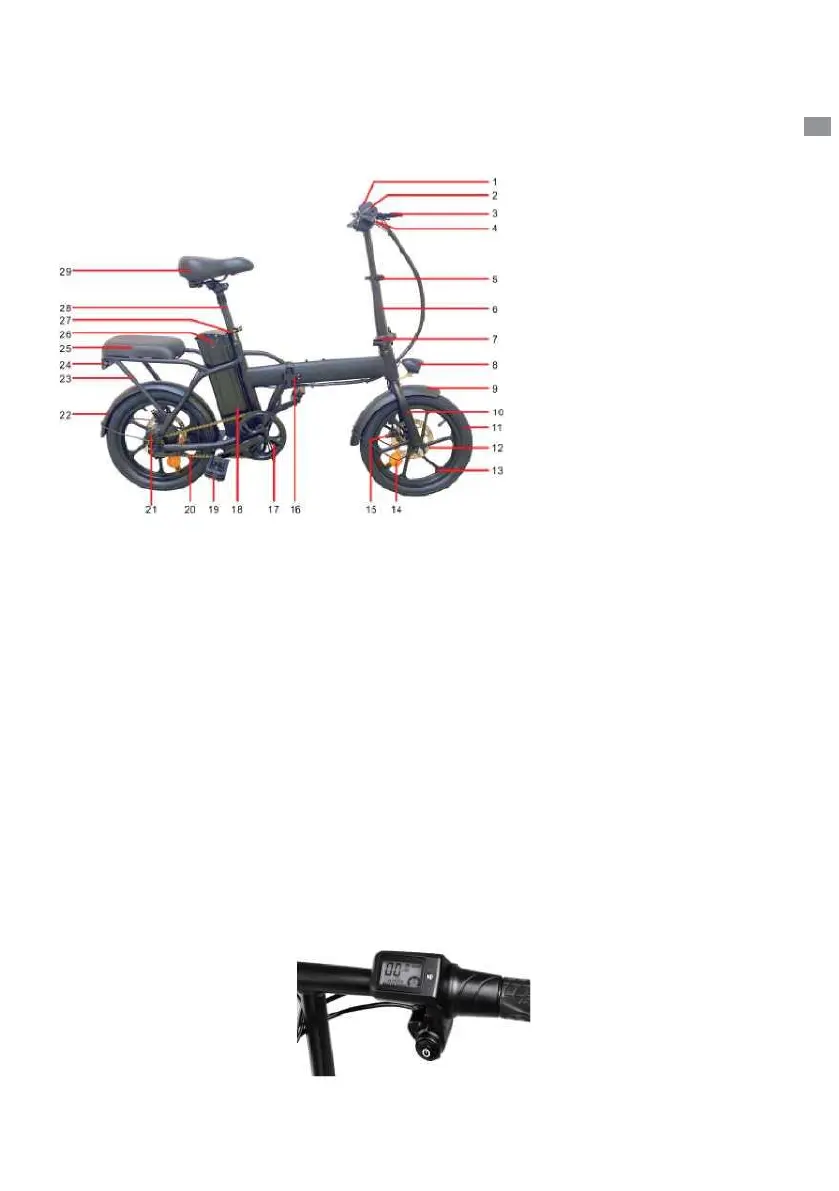
(Model:BK5) Product Function Diagram
1. Display
2. Handlebar
3. Brake lever
4. Front reflector
5. Vertical pipe adjustment
quick release
6. Stem
7. Stem folding quick release
8. Headlight
9. Front fender
10. Front fork
11. Tire
12. Disc brake pad
13. Wheel hub
14. Wheel reflector
15. Disc brake
16. Frame folding quick release
17.Sprocket
18. Battery
19. Folding pedal
20. Chain
21. Motor
22. Rear fender
23. Carrier
24. Rear reflector
25. Rearseat panel
26. Charging hole
27.Seat tube adjustmeng quick
release
28.Seat tube
29.Saddle
EN
Function Introduction:
1. Charging: Open the plastic cover of the charging hole on the left side of the frame and
connect the charger to start charging. When the battery is full and the charger indicator
turns from red to yellow-green, it means it is fully charged.
2. Turn on: Refer to Figure 2. Press the"(!>" key to turn on/offthe power.
3. Power display: The dashboard lights up after power on, and displays power. The power
is displayed in four grids, corresponding to high, medium, and low power.
4. Front light: Refer to Figure 2, Double-click the "M" button to turn on/offthe front light
5. Start mode: power-assisted riding, step on the sprocket ofthecar, and automatically start
electric power after a certain speed. Ifyou don
r
t need assistance, you can turn off the
power or turn off the battery.
Figure 2 (Right handlebar)
(2)



 To Next Page