14
TROUBLESHOOTING
PROBLEM
1. Lamp does not ig-
nite and red light on
main power switch
is off.
2. Lamp does not ig-
nite and red light on
main power switch
is on.
3. Unit blows fuses or
trips Main Power
Circuit Breaker.
POSSIBLE CAUSE
1. a. No line power.
b. Supply fuse or
breaker blown.
c. Unit main breaker
is tripped.
d. Main power
switch is defective.
e. Outlet is defec-
tive.
2. a. Vacuum is off.
b. Vacuum blanket
is not pulling down
tightly.
c. Vacuum switch is
out of adjustment.
d. Ignitor is bad.
e. Lamp is burned
out.
3. a. Check amperage
of supply breakers
or fuses.
b. Shorted
capacitor(s). Discol-
ored or infl ated.
c. Shorted ballast.
REMEDY
1. a. Check power
source.
b. Reset supply
breaker or replace
fuse.
c. Reset unit’s main
breaker.
d. Replace switch.
e. Replace outlet.
2. a. Turn vacuum on.
b. Determine source
of vacuum leak and
repair.
c. Adjust vacuum
switch.
d. Replace ignitor.
e. Replace lamp.
3. a. Replace supply
breakers or fuses
with minimum rating
of 20 amps.
b. Replace capaci-
tors.
c. Replace ballast.
3
INITIAL SETUP
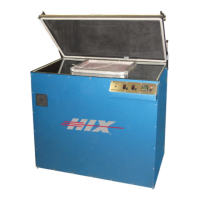
The “hot Restrike” feature, eliminates warming times between ex-
posure, saving electricity and extending bulb life. Due to this unique
Hot Strike feature, the Halux-1200D must be supplied electrical
power by a 120 volt, 20 amp dedicated circuit and constant voltage
between 115-125 volts.
The Hot Restrike System provides the advantage of a simple ex-
tremely reliable system with no moving parts, however some con-
sideration must be made to ensure consistent screen exposures.
From a “Cold” start (e.g. fi rst screen to be exposed for the day) the
lamp requires a 1 minute warm up cycle to bring the lamp to full
intensity. Also if more than 90 seconds elapses between screen
exposures, then the lamp should be cycled on for a minute to ensure
full intensity of the lamp for consistent screen exposures.
To warm up the lamp before starting your fi rst exposure, follow this
procedure.
1. Plug in your unit to the proper voltage power source (120V or
230V) as indicated on the serial number I.D. tag. NOTE: Ade-
quate voltage is required for proper operation. A minimum of
115V on a 120V circuit is required. The 230V version requires
a full 230 volts to operate properly. If voltage drops below
required level unit will not re-light. Simply wait 2 minutes to
cool and restart.
2. Close the blanket lid and latch the lid shut with the rubber latch-
hooks.
3. Turn the Main Power switch “ON”.
4. Turn the Vacuum switch “ON” and allow the blanket to pull down
tight to the glass.
5. Set the timer on at least 1 minute and press the “Start” button. To
change the time setting - see detailed instructions below.
6. The lamp will illuminate and quickly increase in intensity. When
the time set on the timer reaches “0” the lamp will extinguish.
Turn the vacuum switch off and release the blanket lid.
7. Within 90 seconds place the fi rst emulsion coated screen frame
into the unit, as detailed on the next page, and start an exposure.


 To Next Page
 Loading...