343-3512A (03/13)
14 of 27
Optimize
Step 1 - Install right-hand and left-hand brackets onto
panel.
Step 2 - Position and attach worksurface with wood
screws.
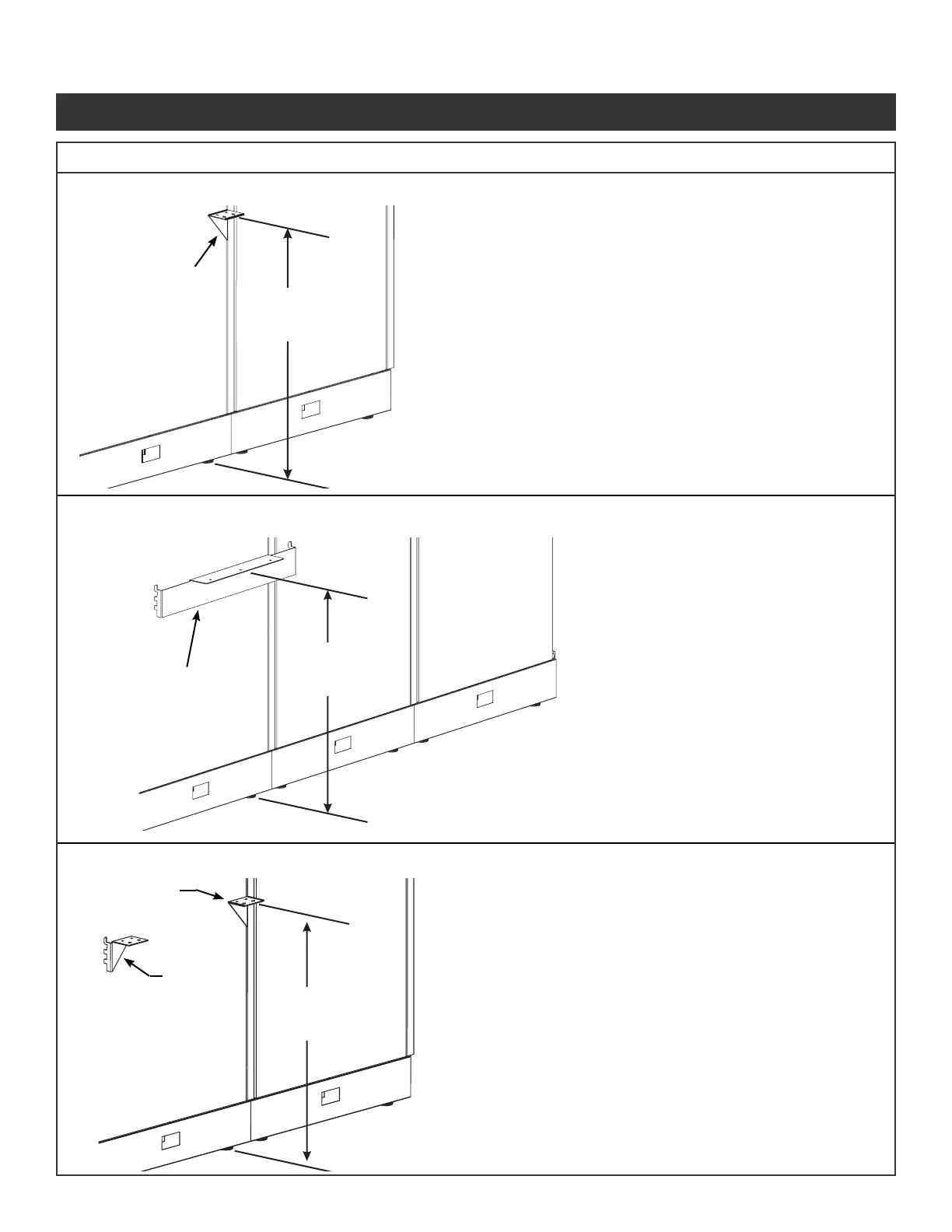
Illustration 3: Center Support Bracket
Illustration 4: Worksurface-to-Panel Support Bracket
Illustration 5: Worksurface Bracket Kit
Center support
bracket (insert
in left-hand
side of panel
connection)
Worksurface-
to-panel support
bracket
Right-hand
bracket
Left-hand
bracket
Install at 27¾"
for a 29½" high
worksurface
Install at 27¾"
for a 29½" high
worksurface
Install at 27¾"
for a 29½" high
worksurface
Step 1 - Install worksurface-to-panel
support bracket onto panel.
Step 2 - Position and attach
worksurface with wood
screws.
Note: Use center support bracket with worksurfaces longer
than 62¼".
Step 1 - Install center support bracket onto panel.
Step 2 - Position and attach worksurface with wood screws.
Worksurface Supports Installation
343-3512A (03/13)
14 of 27
Optimize
Step 1 - Install right-hand and left-hand brackets onto
panel.
Step 2 - Position and attach worksurface with wood
screws.
Illustration 3: Center Support Bracket
Illustration 4: Worksurface-to-Panel Support Bracket
Illustration 5: Worksurface Bracket Kit
Center support
bracket (insert
in left-hand
side of panel
connection)
Worksurface-
to-panel support
bracket
Right-hand
bracket
Left-hand
bracket
Install at 27¾"
for a 29½" high
worksurface
Install at 27¾"
for a 29½" high
worksurface
Install at 27¾"
for a 29½" high
worksurface
Step 1 - Install worksurface-to-panel
support bracket onto panel.
Step 2 - Position and attach
worksurface with wood
screws.
Note: Use center support bracket with worksurfaces longer
than 62¼".
Step 1 - Install center support bracket onto panel.
Step 2 - Position and attach worksurface with wood screws.
Worksurface Supports Installation
343-3512A (03/13)
14 of 27
Optimize
Step 1 - Install right-hand and left-hand brackets onto
panel.
Step 2 - Position and attach worksurface with wood
screws.
Illustration 3: Center Support Bracket
Illustration 4: Worksurface-to-Panel Support Bracket
Illustration 5: Worksurface Bracket Kit
Center support
bracket (insert
in left-hand
side of panel
connection)
Worksurface-
to-panel support
bracket
Right-hand
bracket
Left-hand
bracket
Install at 27¾"
for a 29½" high
worksurface
Install at 27¾"
for a 29½" high
worksurface
Install at 27¾"
for a 29½" high
worksurface
Step 1 - Install worksurface-to-panel
support bracket onto panel.
Step 2 - Position and attach
worksurface with wood
screws.
Note: Use center support bracket with worksurfaces longer
than 62¼".
Step 1 - Install center support bracket onto panel.
Step 2 - Position and attach worksurface with wood screws.
Worksurface Supports Installation
Illustration 12e. Center Support Bracket
Illustration 12f. Worksurface to Panel Support Bracket
Illustration 12g. Worksurface Bracket Kit
Illustration 12. Worksurface Supports Installation Continued
Panel System Installation Packet
343-3890A
(03/17)
Page 16 of 27



 To Next Page