SERVICE TRAINING CENTER
© HOBART GmbH, Service Training Center CNA Series (rev. 3.00) – Page 5
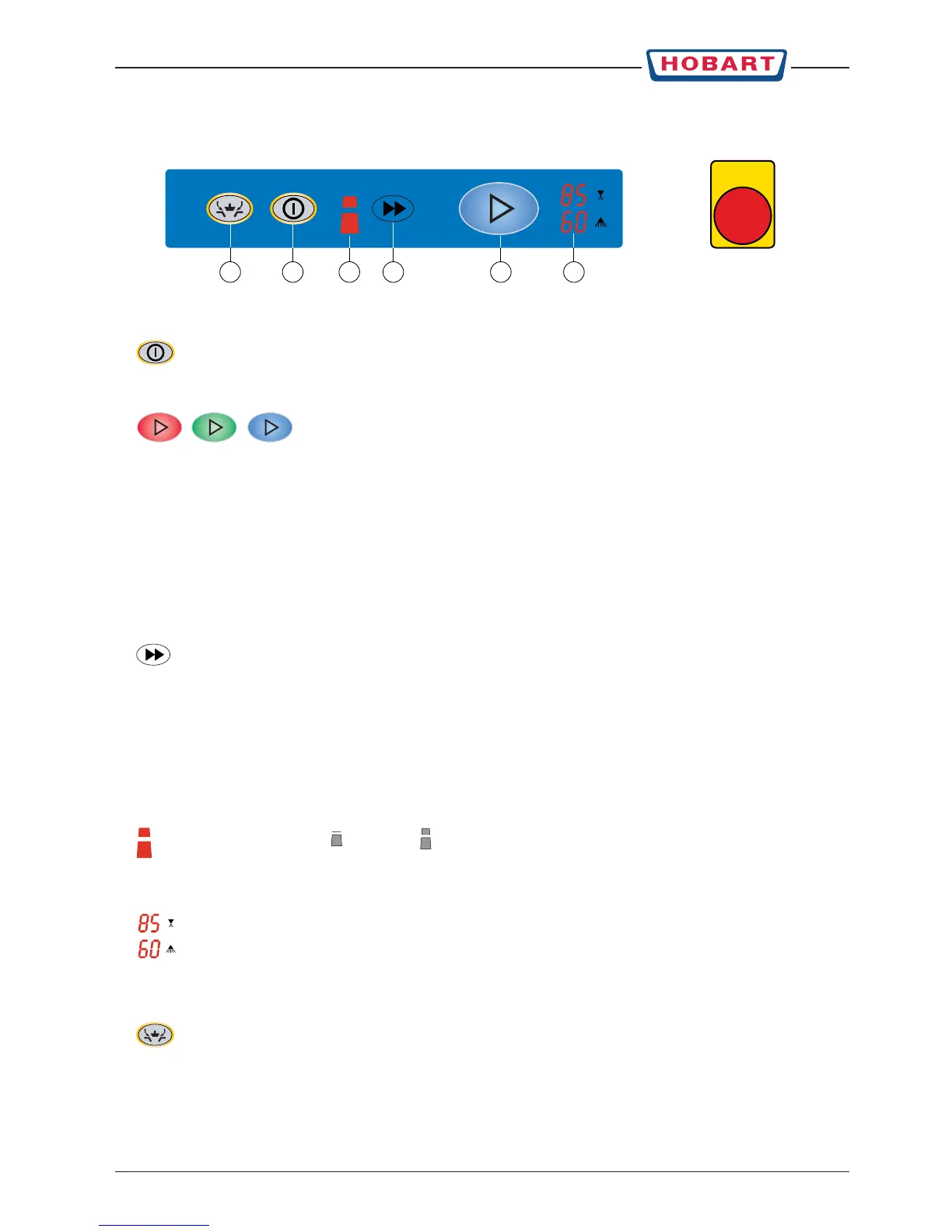
1. Machine ON / OFF Pushing this button switches the dishwasher on or off.
NOTE: After switch off, the machine is not voltage free! At the temperature
indicator Rinse appears a point.
2. Start / Stop button – Conveyor / Wash
Pushing this button starts the conveyor with the selected speed.
The button illuminates to indicate the mode of the machine:
RED =machine fills and starts heating
GREEN =machine is ready for operation
BLUE =washing on
When the button flashes:
RED = when switching on the machine: machine is filled but heating-up
fault: the temperature indicators display a code
GREEN =machine refills and heats up
BLUE = program started, but machine is not ready for operation
3. Conveyor speed button By pushing this button, it is possible to select between two pre-set conveyor
speeds. The selected speed will be indicated.
By pushing this button for approx. 4 seconds, temperatures will be indicated.
"Ch0" = rinse / "Ch1" = wash
"Ch2" = prewash (option – activated by S03 in configuration mode)
The temperatures will be displayed one after the other by repeated pushing the
Conveyor speed button.
The indicators go out 10 seconds after releasing the button.
4. Conveyor speed indicator Indicates the selected speed.
= slow = fast
When the conveyor speed indicator flashes, the table end switch is activated [1S6].
5. Temperature indicators Indicates the current temperature:
Temperature indicator Rinse (°C)
Temperature indicator Wash (°C)
With a machine malfunction, the temperature indicators display a code.
6. Drain button By pushing this button for approx. 2 seconds, only the prewash tank will be
drained.
The drain button illuminates and the Start / Stop button illuminates red.
After a pre-set time (C04) drain cycle stops and the machine will be refilled
automatically.
To drain the machine completely, push drain button for approx. 4 seconds.
The drain valves will be controlled via adjustable time delay [C05].
The Drain button illuminates and the Start / Stop button switches off.
CONTROLS
5 Emergency Stop
(option)
231 46



 To Next Page