Built-in devices
10-2
Adjusting knob / pushbutton
The adjusting knob / pushbutton
q
is used to select and
change specied values and parameters. The changes are sa-
ved by briey pressing the button. Selected menu items blink.
Turn to the right (+)
-
Goes through the menu list from left to right.
- Increases the values.
ı
ı
Ì ≠ªΩ
Turn to the left (-)
-
Goes through the menu list from right to left.
- Decreases the values.
Press the button briey
-
Saves a selected value.
- Selects a menu item; changes to the setting
mode.
Press (3 seconds)
-
Main function ON / OFF
Reset button
Press the reset button
r
to return to the previous menu and
reject the settings. This means that the previous values will
continue to apply.
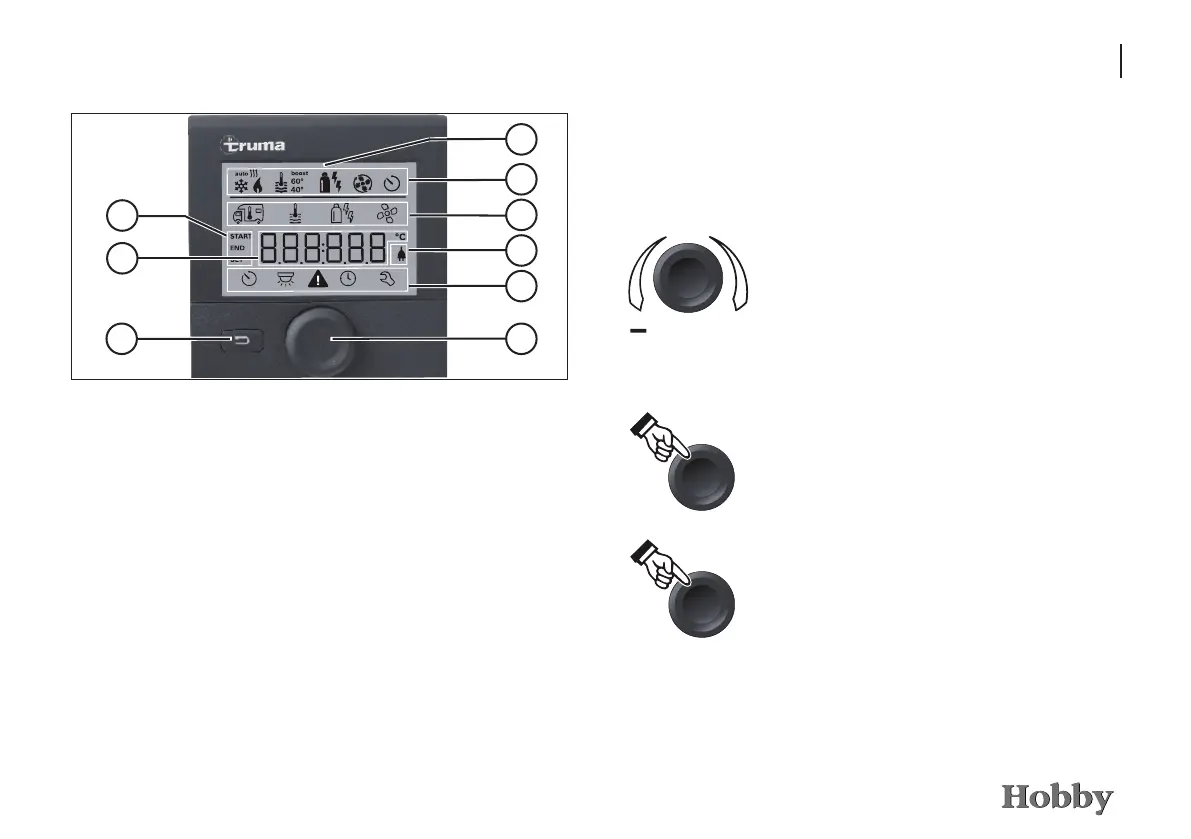
Operating and display controls
j
Display
k
Status line
l
Menu line (top)
m
Menu line (bottom)
n
Display: 230V mains voltage (charging current)
o
Display: timer
p
Settings / values
q
Adjusting knob / pushbutton
r
Reset button
6
1
7
9
2
3
8
The adjusting knob / pushbutton
q
is used to select the menus in
lines
l
and
m
and change the settings. The data is shown on
the display
j
; the background is illuminated. Use the reset button
r
to return to the previous menu.
5
4







 To Next Page