6 of 20 7 of 20
Renaming your BX2 in iGardener
®
® If you have multiple
iGardener
®
watering
devices added it may be
useful to rename your BX2 to
distinguish it from the others
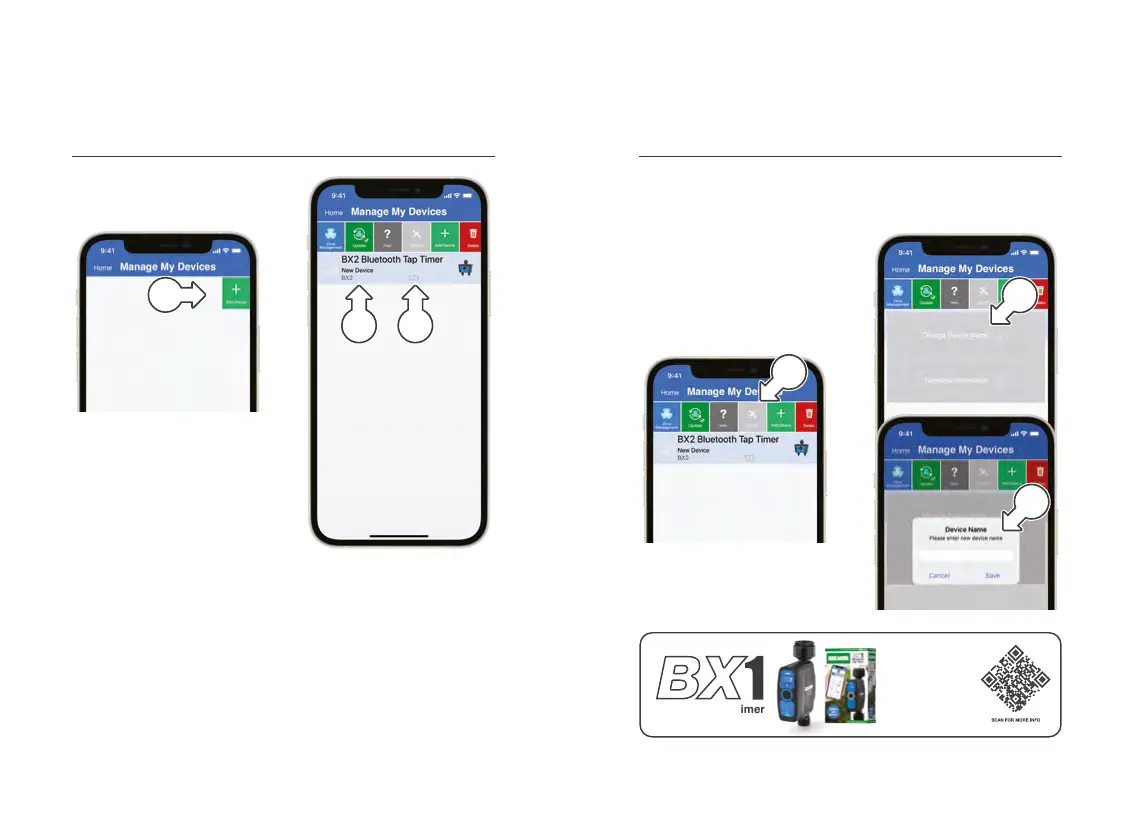
1. Ensure your BX2 is selected
in the device menu and
tap OPTIONS [a]
2. Tap CHANGE DEVICE
NAME [b] from the
pop up menu
3. Enter your new name and
confirm as required [c]
Connecting to iGardener
®
(continued)
5. Tap ADD DEVICE [c] to add
your BX2 to iGardener
®
® For security purposes, your
BX2 can only connect to
one smartphone at a time
6. When your BX2 is found
it will appear in your
iGardener
®
device list [d]
® Always ensure the latest
version of iGardener
®
is running to ensure
full functionality
7. Battery status [e] is
updated every minute when
within 20m Bluetooth
®
range–after battery
replacement, this can take
up to a minute to refresh
Setup Setup
c
d
a
b
c
e
Our single outlet
BX1 Bluetooth
®
Tap
Timer is the perfect
companion to your
garden. Water all
around your home
with iGardener
®
.
Bluetooth Tap Timer


 To Next Page