Scheduling
a
d
b
c
a
b
c
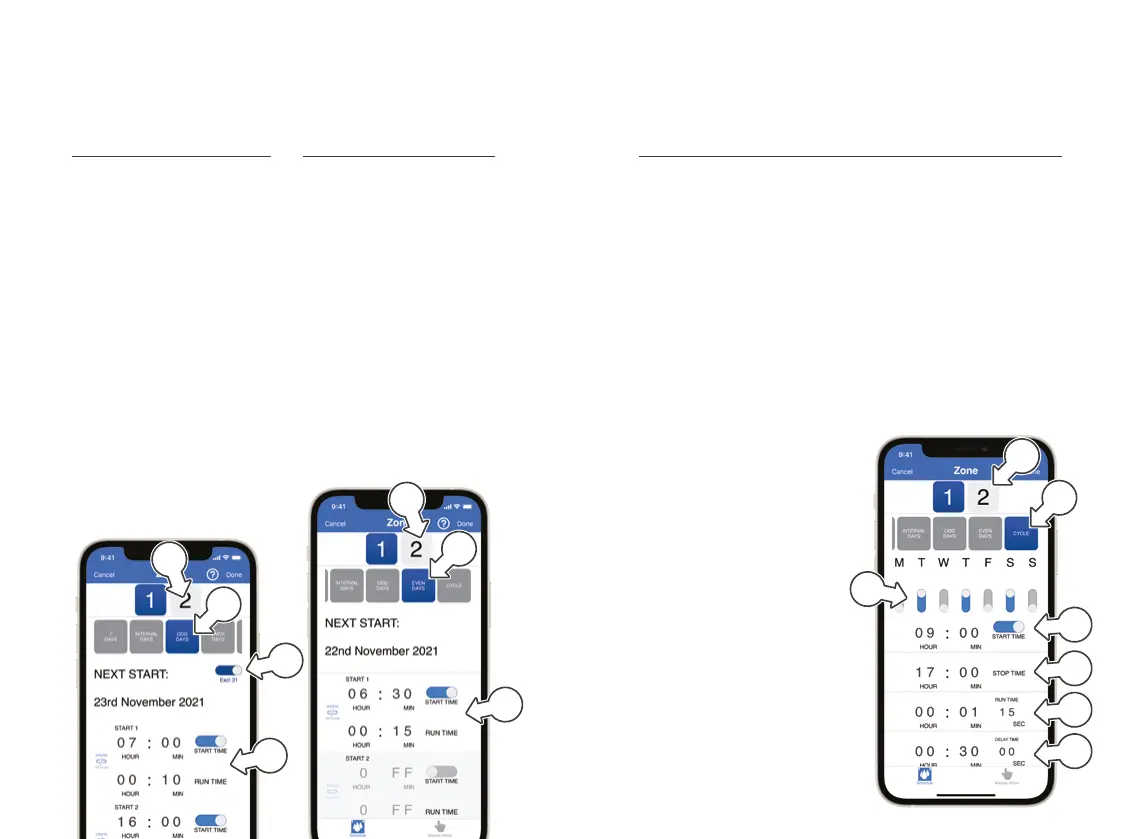
Even (calendar) Days Watering
1. On the ZONE page,
tap EVEN DAYS [a]
2. Set START and
RUNTIMES [b] in the same
way as 7 DAY WATERING
3. Toggle through to
ZONE2 [c] and
repeat steps 1-3
® This example shown will
water ZONE1 at 6:30am
for 15 minutes on every
even day beginning 22
November 2021
Odd (calendar) Days Watering
1. On the ZONE page,
tap ODD DAYS [a]
2. To skip watering on the 31st,
toggle EXCL31 [b] to ON
3. Set START and
RUNTIMES [c] in the same
way as 7 DAY WATERING
4. Toggle to ZONE2 [d]
and repeat steps 1-3
® This example will water
ZONE1 at 7am for
10minutes and 4pm for
15 minutes, on every
odd day beginning 23
November 2021, excluding
the 31st of any month
Cycle Watering
This feature allows you to run short burst intervals starting at 5
seconds, suitable to use with a misting system or greenhouse.
1. On the ZONE page,
tap CYCLE [a]
® You may need to swipe the
scheduling options across to
access the CYCLE button
2. Use the day switches to
toggle each day ON or
OFF as required [b]
3. Set a START TIME [c]
4. Set a STOP TIME [d]
5. Set a RUN TIME [e]
6. Set a DELAY TIME [f]
7. Toggle to ZONE2 [g]
and repeat steps 1-6
® Using this feature can drain
battery life when RUN
and DELAY TIMES are
set at a high frequency
® RUN and DELAY
TIMES must be set to
at least 5 seconds
® This example shown will
water ZONE1 on Tuesday,
Thursday and Saturday,
starting the cycle at 9am
and finishing at 5pm.
During this time, watering
will run for 1 minute 15
seconds at a time with a 30
minute delay in between
Scheduling
a
g
c
d
e
f
b


 To Next Page