8 of 20
Basic Functions
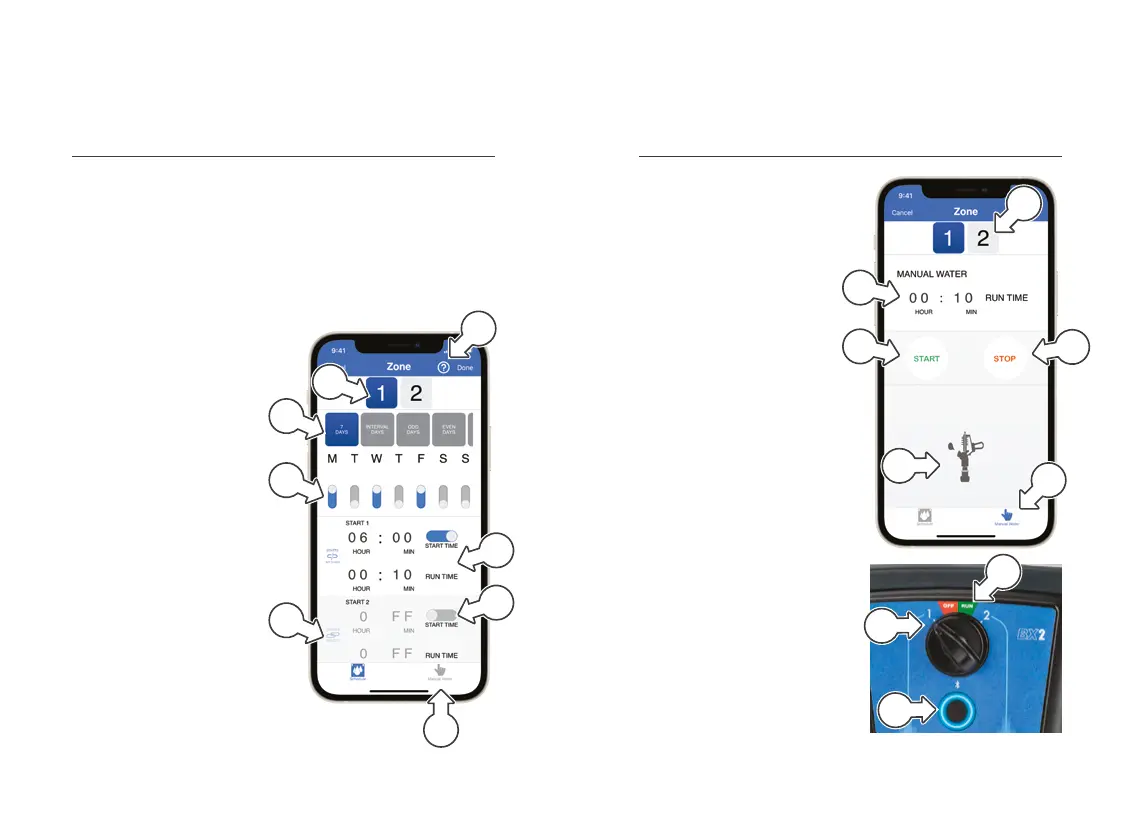
Zone Management
a. Support: Access
support by tapping
b. Zone options: Current
watering zone selected
shown in blue
c. Scheduling options:
Currently selected
shown in blue
d. Day selection: Use
switches to toggle each
day ON or OFF
e. Time selection: Schedule
up to 3× START TIMES
with individual RUN TIMES
f. Starts synced:
Shown when
SEQUENTIALWATERING
start times have been
synced across all zones
g. Manual operation
® This will not override
schedules
® If set to CYCLE, RUNTIME
will be the cycle duration
h. To disable watering, toggle
the START TIME switch
to OFF, and manually turn
back ON as required
a
e
h
g
b
c
d
f
Basic Functions
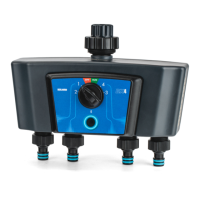
Manual Operation
1. On the ZONE page, tap
MANUAL WATER [a]
2. Select from ZONES1-2[b]
that you want to
manually water
3. Set the desired RUN TIME
using the time selector [c]
4. Tap START [d] to
start watering for the
set RUN TIME
5. Tap STOP [e] to finish
watering before the
RUNTIME has lapsed
® The sprinkler
animation[f] will run while
MANUALWATER is running
® To manually water without
using iGardener
®
, turn the
MAIN DIAL to the desired
ZONE [g] and press the
TAP TIMER button [h]
® Schedules will run if the
MAINDIAL is set to
RUN[i], ZONE 1 or ZONE 2
a
b
e
d
c
f
g
h
i


 To Next Page