10
PROGRAMMING
Step 2 – SET WATERING DAYS
This unit has individual day selection, EVEN/ODD/ ODD -31 Date selection in
areas where water restrictions require this feature, or interval watering from every
day to every 15th day.
INDIVIDUAL DAY SELECTION
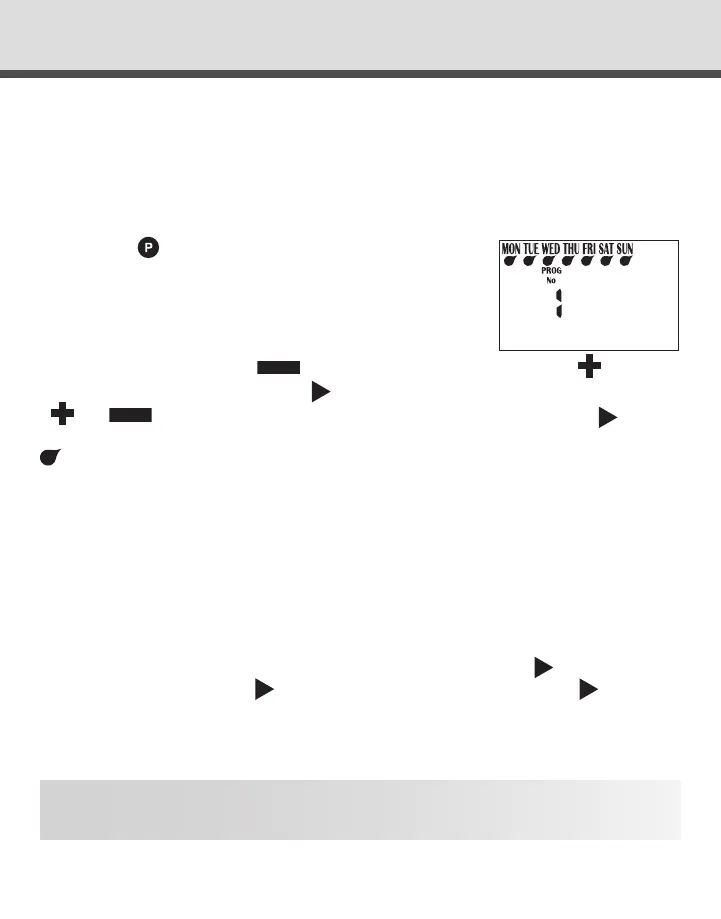
Turn the dial to “Set Watering days” and ensure that “Prog No 1” is showing. If not,
then use the
button to select “Prog No 1”.
“MON” will be ashing. The display will show:
To turn Monday off press
the
button.
To turn it back on press the
button.
To advance to the next day use the
button, the display will then ash Tue. Use
or
to turn days ON or OFF
and advance to the next day using .
Remember to set all 7 days ON or OFF. Active watering days will be shown by the
under the DAY.
ODD/EVEN DATE SELECTION (Optional)
In some regions users are only allowed to water their gardens on odd dates if their
house number is odd, or even dates when their house number is even.
This controller allows this to be done simply by setting the relevant selection of odd
or even and setting the current date into the controller. The controller will account for
leap years.
If you require the odd/even date option, simply keep pressing the
button until
“Even” is shown. Press the
button and “Odd” will be shown. Press again
and “Odd -31” wil be shown.
This feature may be required in areas where water restrictions are enforced, and not
allowing watering on two odd dates together.
NOTE: Remember to set the 365 day calendar when setting the clock, or this feature
will be out of sequence (refer page 8 “set calendar”).



 To Next Page